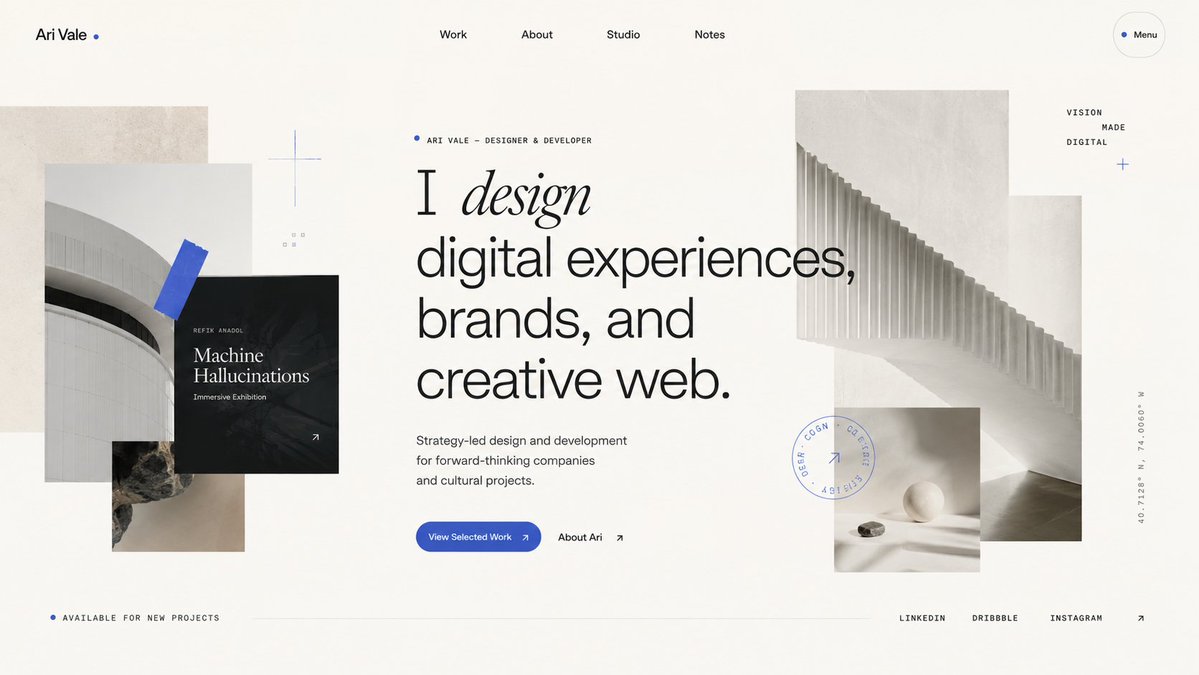
Minimalist Designer Portfolio Homepage
Generates a sophisticated editorial-style portfolio homepage hero for a designer or creative studio website.
Il s'agit d'un exemple de visuel pour la catégorie { GPT Image 2 Graphique et affiche . Utilisez le visuel ci-dessous pour générer des éléments visuels similaires et vérifiez les conditions d'utilisation (attribution Awesome GPT Image 2 Prompts et droits d'utilisation commerciale) avant toute réutilisation.
Besoin de l'ensemble complet des invites ? Utilisez le Graphique et affiche Consultez le centre thématique pour plus d'exemples connexes, ou ouvrez le GPT Image 2 catalogue rapide pour l'index complet des exemples, les structures réutilisables et l'attribution des sources.
Free 1K preview
Generate one preview image instantly, no sign-up required.
3428/4000
Prompt
invite prête à être copiée
Goal: Create a refined portfolio homepage hero design for {argument name="designer name" default="Ari Vale"}, a designer/developer, with an editorial Swiss-style layout and layered architectural collage.

Canvas: Wide desktop website screenshot, 16:9 aspect ratio, off-white warm paper background, lots of negative space, subtle grain texture, premium minimalist aesthetic.

Layout: Top navigation bar with 6 visible items: left wordmark “Ari Vale” followed by a small blue dot, centered navigation links “Work”, “About”, “Studio”, “Notes”, and a rounded outlined “Menu” pill on the far right with a blue dot. Main hero content sits slightly left of center with a small eyebrow label, oversized typography, short description, and two calls to action. Layer abstract monochrome architectural images around the text: a collage on the left and a larger stepped architectural image on the right, with a small still-life image below it. Bottom footer strip contains availability text on the left, a thin horizontal divider line through the center, and social links on the right.

Text content: Eyebrow above headline reads “ARI VALE — DESIGNER & DEVELOPER” with a small blue dot. Main headline reads exactly: “I design digital experiences, brands, and creative web.” Make the word “design” italic, elegant serif, while the rest of the headline is large modern sans serif. Supporting copy reads: “Strategy-led design and development for forward-thinking companies and cultural projects.” Primary button text: “View Selected Work” with a small arrow. Secondary text link: “About Ari” with an arrow. Left black project card reads “REFIX ANADOL”, “Machine Hallucinations”, and “Immersive Exhibition”, with a small arrow in the bottom-right corner. Small right-side stacked words read “VISION”, “MADE”, “DIGITAL”. Bottom-left text reads “AVAILABLE FOR NEW PROJECTS”. Bottom-right social links are exactly 3 items: “LINKEDIN”, “DRIBBBLE”, “INSTAGRAM”, followed by an arrow. Add a vertical coordinate label on the far right reading “40.7128° N, 74.0060° W”.

Visual details: Use a restrained palette of warm ivory, black, charcoal gray, pale concrete gray, and vivid cobalt blue accents. Typography should combine a clean grotesk sans serif with one high-contrast italic serif word. Use thin hairline rules, tiny uppercase labels with generous letter spacing, and precise alignment. Add exactly 5 blue accent elements: the wordmark dot, the eyebrow dot, the menu dot, a blue tape-like diagonal rectangle over the left architectural photo, and a small blue plus/cross near the right-side words. Add a faint circular stamp graphic near the lower-right collage with tiny unreadable uppercase text and a small arrow inside.

Image elements count: Include exactly 5 photographic/texture blocks: 1 tall beige concrete rectangle behind the left collage, 1 pale curved building photo on the left, 1 small rocky texture photo below it, 1 large pale architectural staircase/ribbed structure image on the right, and 1 small still-life image with a white sphere and stone beneath the right image. Also include exactly 1 black overlay project card on the left collage.

Constraints: Make it look like a high-end live website landing page, not a poster. Keep all text crisp and legible, avoid browser chrome, avoid extra navigation items, avoid extra images, avoid colorful gradients, avoid stock-photo people, and preserve spacious asymmetrical balance.
Variables d'invite
Espaces réservés aux arguments modifiables présents dans l'invite, avec leurs valeurs par défaut.
Variable
designer name
Défaut
Ari Vale
Best for
- - Graphique et affiche visual exploration
- - Image generation and reference-image edits
- - Reusable briefs that keep source attribution visible
Change these parts
- - Subject, product, character, or scene
- - Aspect ratio, camera, lighting, and background
- - Brand, text, color, and output constraints
Recommended model and settings
- - Model: gpt-image-2
- - Input mode: Texte vers image
- - Aspect ratio: source
- - Commercial status: review original source
How to use this prompt
- 1. Copy the prompt and preserve its structure for the first test.
- 2. Replace the subject, context, and publishing channel.
- 3. Change one camera, lighting, or style variable per iteration.
- 4. Inspect the output, source, text, and rights before reuse.
Limitations, source, and reuse cautions
- - Generated output is an editable draft, not factual, legal, or rights evidence.
- - Review the linked source, people, brands, logos, text, and third-party media before commercial use.
Importé de Awesome GPT Image 2 Prompts . L'attribution est requise. Le statut d'utilisation commerciale est allowed ; veuillez vérifier les droits d'auteur avant toute utilisation payante.
Plus de cas dans cette catégorie
Priorisé par catégorie, compatibilité du mode d'entrée, qualité et risque moindre.

Pink Hijab Mirror Selfie Portrait
Texte vers image

Fashion Studio Portrait with Blue Rim Lighting
Texte vers image

Spring Editorial Fashion Collage
Texte vers image

New Chinese-Style Editorial Portrait
Texte vers image

Transparent Earbuds on Stone Pedestal
Texte vers image

Surreal 3D Chess Match Artwork
Texte vers image
Réutilisation et notes de source
Utilisez cette invite en toute sécurité après avoir prévisualisé le dossier.
- 1.Copiez l'invite ou ouvrez-la directement dans Dovoo avec le bouton de génération.
- 2.Ajustez les variables, le format d'image et les images de référence en fonction de votre cas d'utilisation.
- 3.Avant toute publication ou utilisation payante, vérifiez les droits d'auteur, les exigences d'attribution et les risques liés à la marque ou à l'image.