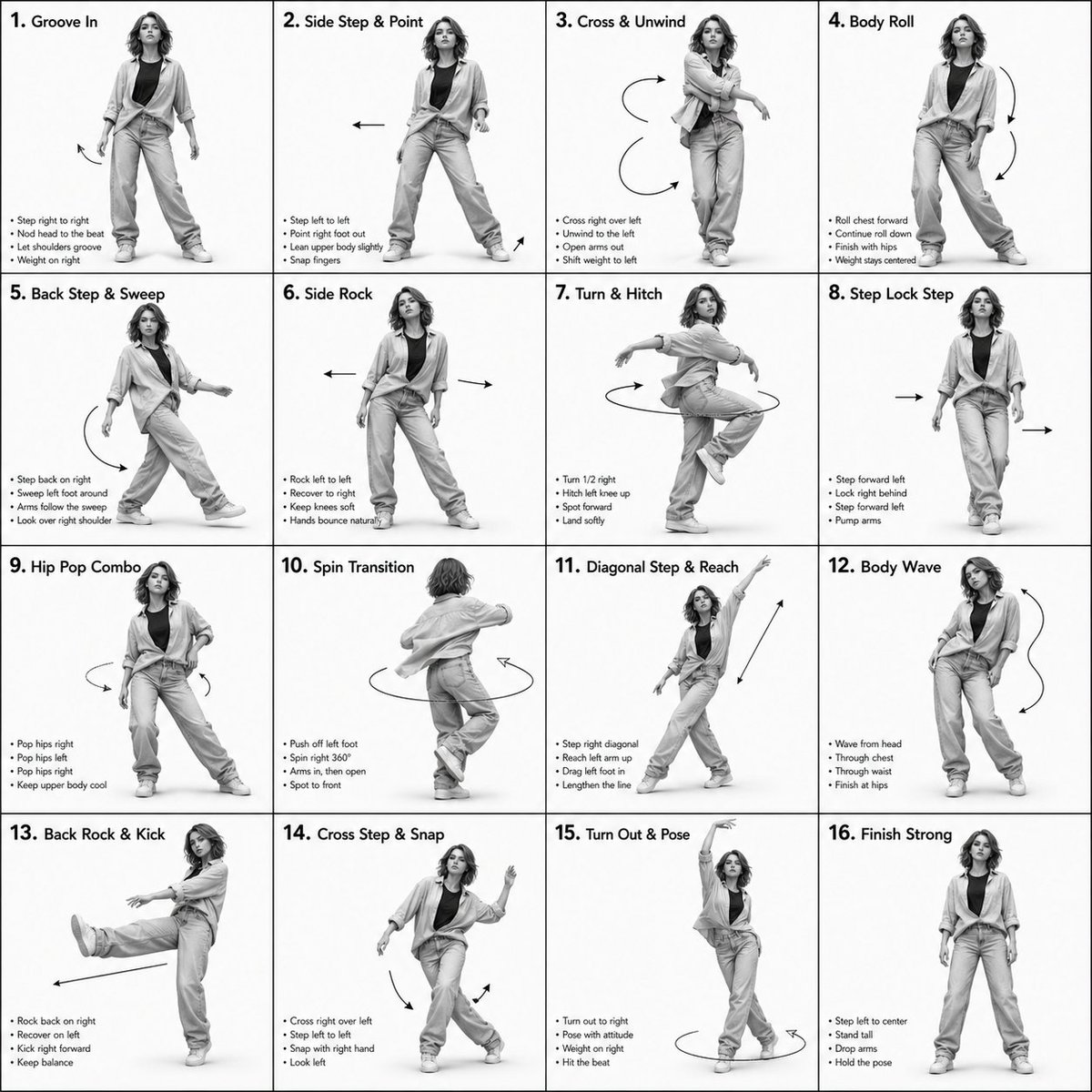
Guide des séquences de danse en rendu 3D
Exemple de guide chorégraphique professionnel illustrant les mouvements d'une danseuse dans une grille 4x4, mettant l'accent sur les détails techniques et les indicateurs de mouvement.
Il s'agit d'un exemple de visuel pour la catégorie { GPT Image 2 Autres sources d'inspiration . Utilisez le visuel ci-dessous pour générer des éléments visuels similaires et vérifiez les conditions d'utilisation (attribution Awesome GPT Image 2 Prompts et droits d'utilisation commerciale) avant toute réutilisation.
Besoin de l'ensemble complet des invites ? Utilisez le Autres sources d'inspiration Consultez le centre thématique pour plus d'exemples connexes, ou ouvrez le GPT Image 2 catalogue rapide pour l'index complet des exemples, les structures réutilisables et l'attribution des sources.
Free 1K preview
Generate one preview image instantly, no sign-up required.
1823/4000
Prompt
invite prête à être copiée
Dance Sequence Instruction Sheet
[VISUAL STYLE]
A composition featuring a highly detailed 3D-rendered female dancer. Designed like a professional choreography guide with a technical, diagram-inspired layout. Clean white background, soft studio lighting, and strong contrast to highlight body movement and posture.
[GRID LAYOUT]
Structured 4×4 panel grid (16 frames total), evenly spaced with thin black divider lines. Each panel is identical in size and clearly numbered from 1 to 16 to show a continuous dance progression.
[CHARACTER]
Use image1 as the base character. The same female dancer appears consistently across all panels with accurate likeness and proportions.
[WARDROBE]
The dancer wears a stylish, performance-ready outfit: same as in refrence image, bottom wears baggies trouser The look should feel modern and visually appealing while still practical for dance movement. Fabric should subtly respond to motion (slight flow and folds), even in grayscale.
[PANEL STRUCTURE – EACH FRAME]
Top-left: Step number + short dance move title (e.g., “Step 5 – Spin Transition”)
Center: Full-body pose capturing a precise moment in the choreography
Bottom-left: 3–4 lines of concise instruction describing the move
Overlay: Motion arrows and directional guides illustrating how the dancer transitions
[MOTION INDICATORS]
Incorporate curved arrows for fluid motion, straight arrows for directional steps, and circular indicators for spins or turns. Emphasize rhythm, weight shifts, and body isolation.
[RENDER QUALITY]
High-detail sculpted 3D style with smooth grayscale shading, subtle shadows, and clean linework. Maintain a polished, concept-art level finish with clarity in every pose.
[RESTRICTIONS]
No color, no background scenery, no extra characters, no visual clutter, only the dancer and instructional elements.
Best for
- - Autres sources d'inspiration visual exploration
- - Image generation and reference-image edits
- - Reusable briefs that keep source attribution visible
Change these parts
- - Subject, product, character, or scene
- - Aspect ratio, camera, lighting, and background
- - Brand, text, color, and output constraints
Recommended model and settings
- - Model: gpt-image-2
- - Input mode: Texte vers image
- - Aspect ratio: source
- - Commercial status: review original source
How to use this prompt
- 1. Copy the prompt and preserve its structure for the first test.
- 2. Replace the subject, context, and publishing channel.
- 3. Change one camera, lighting, or style variable per iteration.
- 4. Inspect the output, source, text, and rights before reuse.
Limitations, source, and reuse cautions
- - Generated output is an editable draft, not factual, legal, or rights evidence.
- - Review the linked source, people, brands, logos, text, and third-party media before commercial use.
Importé de Awesome GPT Image 2 Prompts . L'attribution est requise. Le statut d'utilisation commerciale est allowed ; veuillez vérifier les droits d'auteur avant toute utilisation payante.
Plus de cas dans cette catégorie
Priorisé par catégorie, compatibilité du mode d'entrée, qualité et risque moindre.

Android Quantum Lab Workstation
Texte vers image

Transparent Earbuds on Stone Pedestal
Texte vers image

Surreal 3D Chess Match Artwork
Texte vers image

Overhead Pepperoni Pizza Photo
Texte vers image

Fashion Studio Portrait with Blue Rim Lighting
Texte vers image

New Chinese-Style Editorial Portrait
Texte vers image
Réutilisation et notes de source
Utilisez cette invite en toute sécurité après avoir prévisualisé le dossier.
- 1.Copiez l'invite ou ouvrez-la directement dans Dovoo avec le bouton de génération.
- 2.Ajustez les variables, le format d'image et les images de référence en fonction de votre cas d'utilisation.
- 3.Avant toute publication ou utilisation payante, vérifiez les droits d'auteur, les exigences d'attribution et les risques liés à la marque ou à l'image.