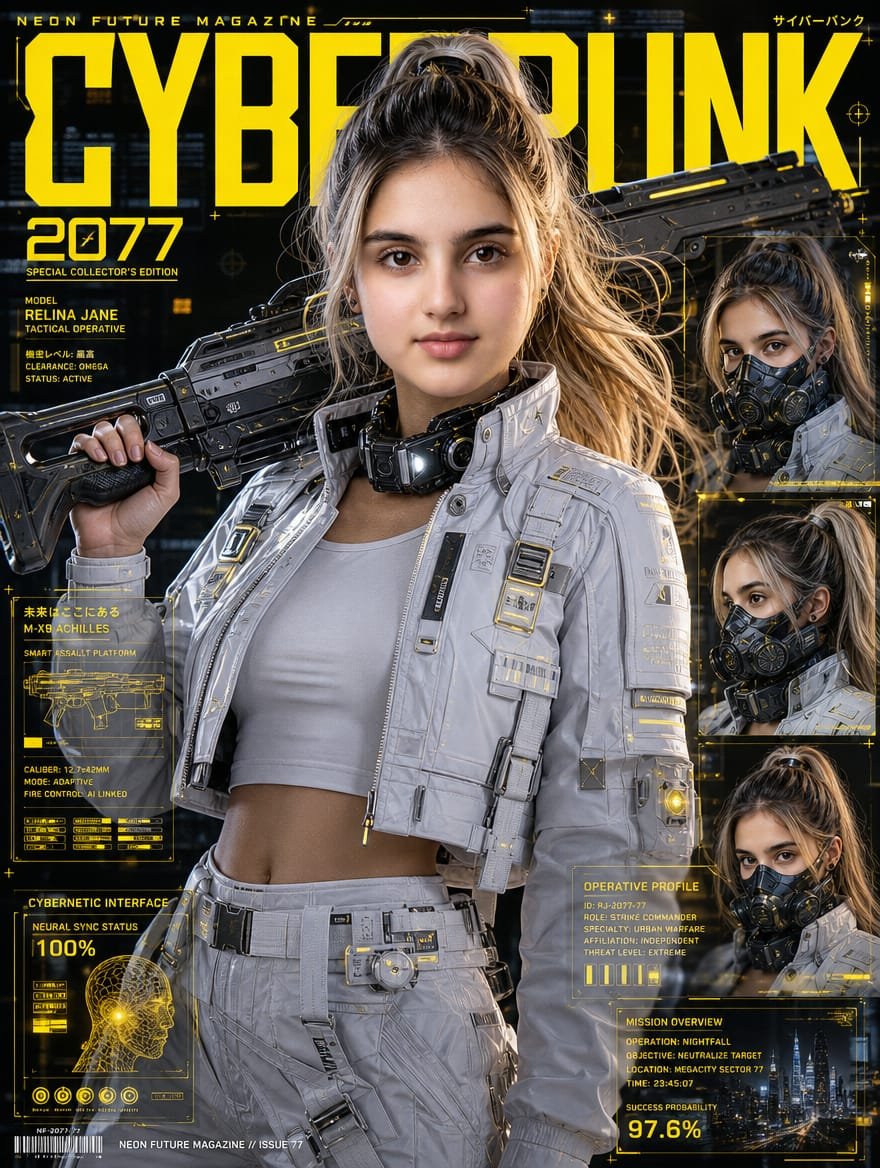
Cyberpunk Operative Magazine Cover
Generates a photorealistic futuristic magazine cover featuring a tactical female operative with cyberpunk HUD panels and luxury editorial styling.
Il s'agit d'un exemple de visuel pour la catégorie { GPT Image 2 Graphique et affiche . Utilisez le visuel ci-dessous pour générer des éléments visuels similaires et vérifiez les conditions d'utilisation (attribution Awesome GPT Image 2 Prompts et droits d'utilisation commerciale) avant toute réutilisation.
Besoin de l'ensemble complet des invites ? Utilisez le Graphique et affiche Consultez le centre thématique pour plus d'exemples connexes, ou ouvrez le GPT Image 2 catalogue rapide pour l'index complet des exemples, les structures réutilisables et l'attribution des sources.
Free 1K preview
Generate one preview image instantly, no sign-up required.
3306/4000
Prompt
invite prête à être copiée
Goal: Create an ultra-photorealistic cyberpunk fashion magazine cover featuring {argument name="character name" default="Relina Jane"}, an East Asian female tactical operative in a luxury sci-fi editorial style, blending Ghost in the Shell and Cyberpunk 2077 aesthetics.

Canvas: Vertical magazine cover, 3:4 aspect ratio, black futuristic city background with yellow holographic HUD graphics, high contrast cinematic lighting, 8K photorealism, glossy premium print finish.

Main subject: Centered waist-up female operative with {argument name="hair color and style" default="ash-blonde high ponytail"}, realistic skin, athletic build, wearing a white cropped tank top under a white futuristic tactical jacket and matching white tactical pants. Add detailed straps, zippers, buckles, armor plates, small yellow tech labels, illuminated accents, utility belt, and a bulky black cybernetic collar or neck device. She holds a large black futuristic sci-fi rifle across her shoulders with one hand gripping the stock. The rifle has angular industrial design, rails, vents, yellow accent lines, and realistic worn metal texture. Her face is covered by a flat rectangular skin-toned privacy block, matching the generated image.

Magazine masthead and typography: Huge bold condensed yellow title across the top reading {argument name="magazine title" default="CYBERPUNK"}, partially behind the character’s head and rifle. Small top text reads "NEON FUTURE MAGAZINE" on the left and Japanese-style cyberpunk text on the right. Large yellow issue text on the upper left reads {argument name="issue number" default="2077"}. Use sharp techno fonts, yellow grid lines, microtext, crosshair icons, tiny plus signs, and glowing interface details.

Layout and counted elements: Include exactly 1 main central portrait and exactly 3 smaller stacked portrait inset frames on the right side, each showing the same operative from slightly different angles with the same skin-toned rectangular face block. Include exactly 4 major yellow holographic information panels: 1 left-middle weapons blueprint panel labeled "M-X9 ACHILLES" with a rifle diagram and specs, 1 bottom-left cybernetic interface panel labeled "CYBERNETIC INTERFACE" with a head scan and "100%", 1 mid-lower-right operative profile panel labeled "OPERATIVE PROFILE", and 1 bottom-right mission overview panel showing a night city skyline and "SUCCESS PROBABILITY 97.6%".

Visible text details: On the left under the issue number, include "SPECIAL COLLECTOR'S EDITION", "MODEL", "RELINA JANE", "TACTICAL OPERATIVE", "CLEARANCE: OMEGA", and "STATUS: ACTIVE". In the right profile panel include compact technical lines such as ID, role, specialty, affiliation, and threat level. In the mission overview panel include operation, objective, location, time, and the large percentage "97.6%". Add a small barcode and footer text reading "NEON FUTURE MAGAZINE // ISSUE 77" along the bottom.

Visual style: Hyper-detailed editorial realism, cyberpunk yellow-on-black UI overlays, metallic whites and charcoal blacks, realistic fabric texture, glossy armor, dramatic rim lighting, shallow depth of field, futuristic city bokeh, premium collector’s edition cover design. Keep the composition dense but readable, with the bright yellow masthead dominating the top half.
Variables d'invite
Espaces réservés aux arguments modifiables présents dans l'invite, avec leurs valeurs par défaut.
Variable
character name
Défaut
Relina Jane
Variable
hair color and style
Défaut
ash-blonde high ponytail
Variable
magazine title
Défaut
CYBERPUNK
Variable
issue number
Défaut
2077
Best for
- - Graphique et affiche visual exploration
- - Image generation and reference-image edits
- - Reusable briefs that keep source attribution visible
Change these parts
- - Subject, product, character, or scene
- - Aspect ratio, camera, lighting, and background
- - Brand, text, color, and output constraints
Recommended model and settings
- - Model: gpt-image-2
- - Input mode: Texte vers image
- - Aspect ratio: source
- - Commercial status: review original source
How to use this prompt
- 1. Copy the prompt and preserve its structure for the first test.
- 2. Replace the subject, context, and publishing channel.
- 3. Change one camera, lighting, or style variable per iteration.
- 4. Inspect the output, source, text, and rights before reuse.
Limitations, source, and reuse cautions
- - Generated output is an editable draft, not factual, legal, or rights evidence.
- - Review the linked source, people, brands, logos, text, and third-party media before commercial use.
Importé de Awesome GPT Image 2 Prompts . L'attribution est requise. Le statut d'utilisation commerciale est allowed ; veuillez vérifier les droits d'auteur avant toute utilisation payante.
Plus de cas dans cette catégorie
Priorisé par catégorie, compatibilité du mode d'entrée, qualité et risque moindre.

Android Quantum Lab Workstation
Texte vers image

Fashion Studio Portrait with Blue Rim Lighting
Texte vers image

Spring Editorial Fashion Collage
Texte vers image

Wet Transparent Earbud Macro
Texte vers image

Pink Hijab Mirror Selfie Portrait
Texte vers image

Manga Desert Radio Telescope Road Trip
Texte vers image
Réutilisation et notes de source
Utilisez cette invite en toute sécurité après avoir prévisualisé le dossier.
- 1.Copiez l'invite ou ouvrez-la directement dans Dovoo avec le bouton de génération.
- 2.Ajustez les variables, le format d'image et les images de référence en fonction de votre cas d'utilisation.
- 3.Avant toute publication ou utilisation payante, vérifiez les droits d'auteur, les exigences d'attribution et les risques liés à la marque ou à l'image.