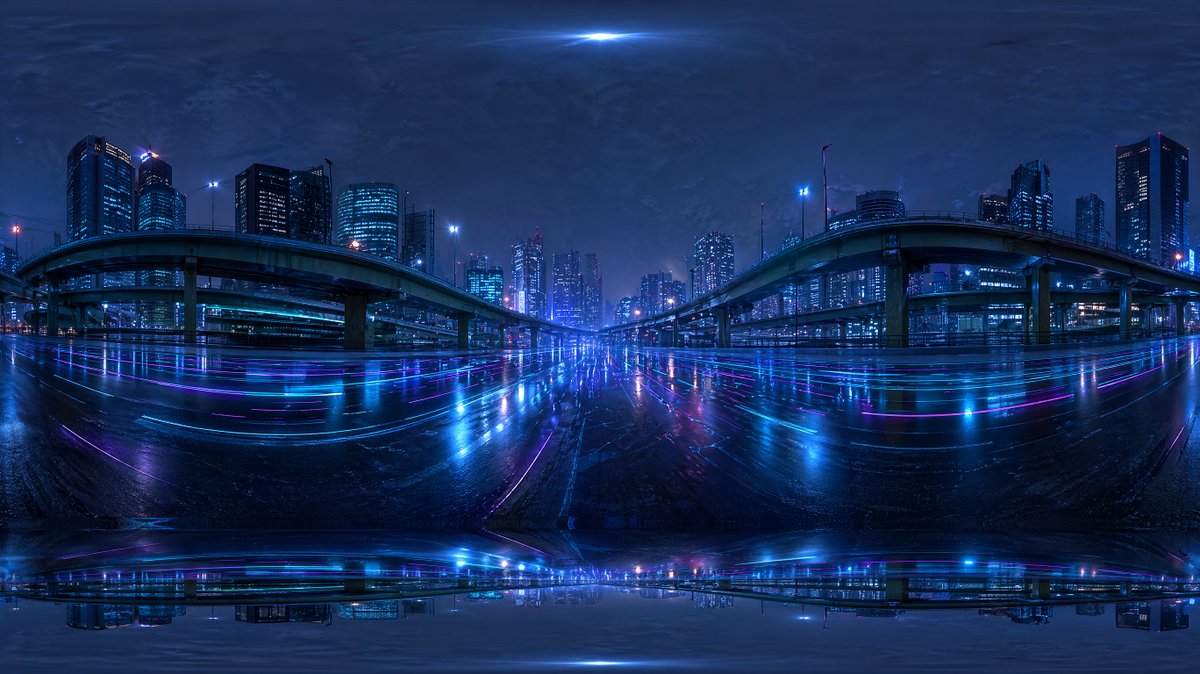
Autoroute urbaine cyberpunk HDRI
Un panorama urbain futuriste sous la pluie, conçu comme une carte d'environnement HDRI à 360 degrés pour le rendu 3D des arrière-plans et de l'éclairage.
Il s'agit d'un exemple de visuel pour la catégorie { GPT Image 2 Paysage et nature . Utilisez le visuel ci-dessous pour générer des éléments visuels similaires et vérifiez les conditions d'utilisation (attribution Awesome GPT Image 2 Prompts et droits d'utilisation commerciale) avant toute réutilisation.
Besoin de l'ensemble complet des invites ? Utilisez le Paysage et nature Consultez le centre thématique pour plus d'exemples connexes, ou ouvrez le GPT Image 2 catalogue rapide pour l'index complet des exemples, les structures réutilisables et l'attribution des sources.
Free 1K preview
Generate one preview image instantly, no sign-up required.
1557/4000
Prompt
invite prête à être copiée
Create a seamless-looking 360-degree equirectangular HDRI environment map of a futuristic urban expressway at night, viewed from the middle of a wide wet roadway beneath elevated highways in a dense modern city. Use a panoramic full-surround composition with strong fisheye-like equirectangular distortion at the top and bottom edges, designed for use as a Blender world background. The scene should feature 2 large curving elevated highway ramps, one on the left and one on the right, arching inward toward the center, with multiple supporting pillars and additional overpass layers receding into the distance. Surround the roadway with a skyline of illuminated high-rise office towers and apartment buildings, with cool blue and cyan windows and a few magenta and purple accent lights. Make the road surface glossy and rain-soaked, reflecting the city lights in long horizontal streaks of neon blue, violet, and pink. Add subtle light trails and luminous reflections across the pavement, creating a cyberpunk mood. The sky should be dark, cloudy, and atmospheric with a faint bright glow at the zenith and soft haze around distant buildings. Keep the overall palette dominated by deep indigo, electric blue, cyan, and purple. The image should feel cinematic, moody, ultra-detailed, photorealistic, high dynamic range, with realistic urban lighting and mirrored wet-surface reflections, suitable as an HDRI backdrop. Include slight panorama seam artifacts and stretched distortion near the poles so it feels like an AI-generated but usable environment map.
Best for
- - Paysage et nature visual exploration
- - Image generation and reference-image edits
- - Reusable briefs that keep source attribution visible
Change these parts
- - Subject, product, character, or scene
- - Aspect ratio, camera, lighting, and background
- - Brand, text, color, and output constraints
Recommended model and settings
- - Model: gpt-image-2
- - Input mode: Texte vers image
- - Aspect ratio: source
- - Commercial status: review original source
How to use this prompt
- 1. Copy the prompt and preserve its structure for the first test.
- 2. Replace the subject, context, and publishing channel.
- 3. Change one camera, lighting, or style variable per iteration.
- 4. Inspect the output, source, text, and rights before reuse.
Limitations, source, and reuse cautions
- - Generated output is an editable draft, not factual, legal, or rights evidence.
- - Review the linked source, people, brands, logos, text, and third-party media before commercial use.
Importé de Awesome GPT Image 2 Prompts . L'attribution est requise. Le statut d'utilisation commerciale est allowed ; veuillez vérifier les droits d'auteur avant toute utilisation payante.
Plus de cas dans cette catégorie
Priorisé par catégorie, compatibilité du mode d'entrée, qualité et risque moindre.

MotoGP POV Cornering Shot
Texte vers image

Cinematic Blue Backlit Portrait
Texte vers image

GPT Image 2 Real-Life Character Street Snap
Texte vers image

Luxury Travel Fashion Portrait Prompt
Texte vers image

Street Selfie with Cat in Matching Cap
Texte vers image

GPT Image 2 Prompt: Garden Dappled Light
Texte vers image
Réutilisation et notes de source
Utilisez cette invite en toute sécurité après avoir prévisualisé le dossier.
- 1.Copiez l'invite ou ouvrez-la directement dans Dovoo avec le bouton de génération.
- 2.Ajustez les variables, le format d'image et les images de référence en fonction de votre cas d'utilisation.
- 3.Avant toute publication ou utilisation payante, vérifiez les droits d'auteur, les exigences d'attribution et les risques liés à la marque ou à l'image.