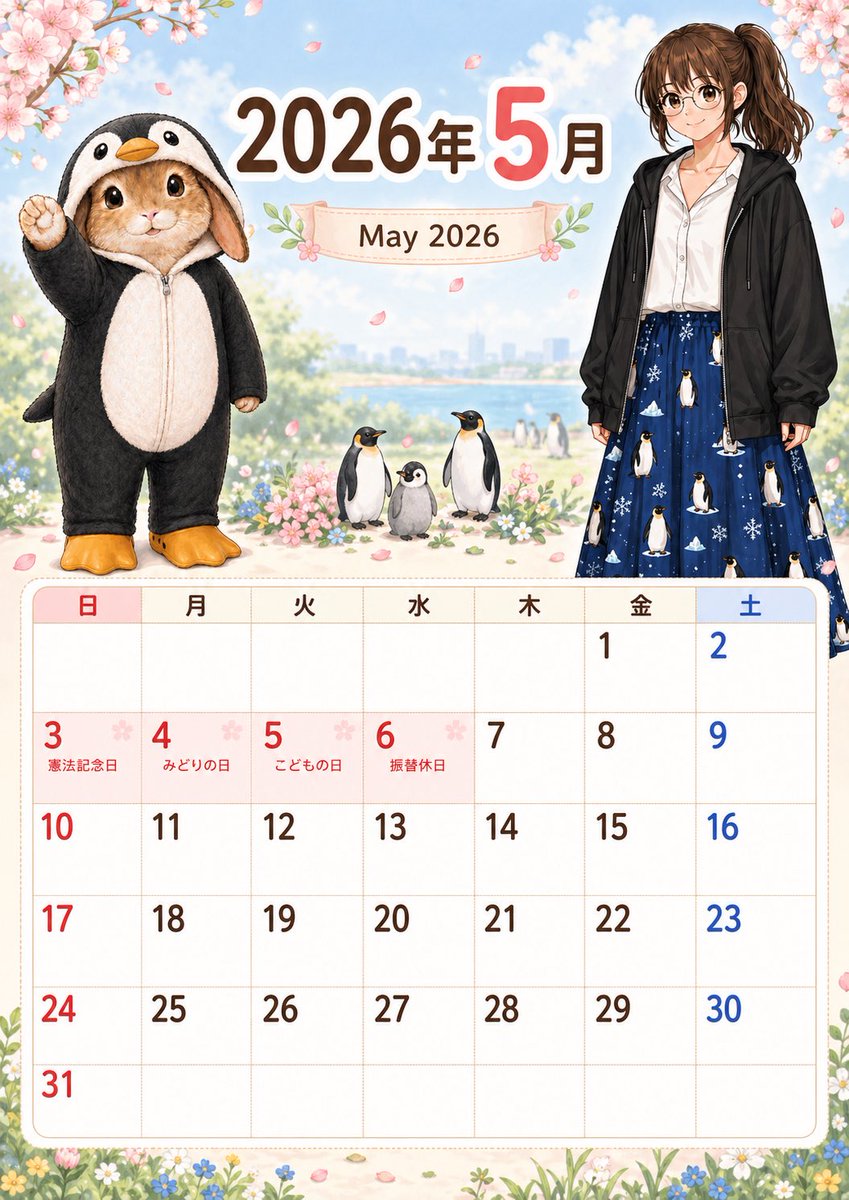
Calendrier de printemps mignon de mai 2026
Cela génère un calendrier mensuel illustré imprimable pour mai 2026 avec des étiquettes de jours fériés japonais, des cerisiers en fleurs printaniers, un lapin déguisé en pingouin et une jeune femme vêtue de façon décontractée.
Il s'agit d'un exemple de visuel pour la catégorie { GPT Image 2 Graphique et affiche . Utilisez le visuel ci-dessous pour générer des éléments visuels similaires et vérifiez les conditions d'utilisation (attribution Awesome GPT Image 2 Prompts et droits d'utilisation commerciale) avant toute réutilisation.
Free 1K preview
Generate one preview image instantly, no sign-up required.
Prompt
invite prête à être copiée
{
  "type": "illustrated monthly calendar poster",
  "orientation": "portrait",
  "year": "{argument name=\"year\" default=\"2026\"}",
  "month": {
    "numeric": "{argument name=\"month number\" default=\"5\"}",
    "english": "{argument name=\"month text\" default=\"May 2026\"}",
    "header_text": "May 2026"
  },
  "style": "soft cute Japanese calendar design, polished storybook illustration, pastel spring palette, clean printable layout",
  "scene": {
    "background": "bright blue sky with soft clouds, distant riverside or lakeside city skyline, light bokeh, cherry blossom branches framing the top left and top right corners, pink petals drifting through the air, flower meadow border along the bottom",
    "season": "late spring, cherry blossom theme"
  },
  "characters": {
    "count": 2,
    "left_character": "an adorable realistic bunny standing upright in a black-and-white penguin kigurumi with hood, orange beak on the hood, pale cream belly panel, orange penguin feet slippers, one paw raised in a cheerful pose, large glossy eyes, plush soft fur texture",
    "right_character": "a full-body young woman standing casually, face simplified or blank, medium brown hair in a high ponytail, white blouse, oversized black zip hoodie, long navy skirt printed with penguins and snowflakes"
  },
  "animals": {
    "count": 3,
    "items": [
      "one adult penguin standing front-facing",
      "one fluffy gray penguin chick in the center",
      "one adult penguin standing front-facing on the right"
    ]
  },
  "layout": {
    "sections": [
      {
        "title": "header",
        "position": "top",
        "count": 3,
        "labels": [
          "2026",
          "May",
          "May 2026"
        ]
      },
      {
        "title": "weekday row",
        "position": "above calendar grid",
        "count": 7,
        "labels": [
          "Sun",
          "moon",
          "Tue",
          "Water",
          "Wood",
          "Gold",
          "Sat"
        ]
      },
      {
        "title": "holiday labels",
        "position": "inside date cells",
        "count": 4,
        "labels": [
          "Constitution Memorial Day",
          "みどりの日",
          "こどもの日",
          "Substitute Holiday"
        ]
      }
    ],
    "calendar_grid": {
      "month": "May 2026",
      "rows": 6,
      "columns": 7,
      "week_starts_on": "Sunday",
      "sunday_color": "red",
      "saturday_color": "blue",
      "weekday_color": "dark brown",
      "visible_dates": [
        {
          "day": 1,
          "column": "Friday"
        },
        {
          "day": 2,
          "column": "Saturday"
        },
        {
          "day": 3,
          "column": "Sunday",
          "label": "Constitution Memorial Day"
        },
        {
          "day": 4,
          "column": "Monday",
          "label": "みどりの日"
        },
        {
          "day": 5,
          "column": "Tuesday",
          "label": "こどもの日"
        },
        {
          "day": 6,
          "column": "Wednesday",
          "label": "Substitute Holiday"
        },
        {
          "day": 7,
          "column": "Thursday"
        },
        {
          "day": 8,
          "column": "Friday"
        },
        {
          "day": 9,
          "column": "Saturday"
        },
        {
          "day": 10,
          "column": "Sunday"
        },
        {
          "day": 11,
          "column": "Monday"
        },
        {
          "day": 12,
          "column": "Tuesday"
        },
        {
          "day": 13,
          "column": "Wednesday"
        },
        {
          "day": 14,
          "column": "Thursday"
        },
        {
          "day": 15,
          "column": "Friday"
        },
        {
          "day": 16,
          "column": "Saturday"
        },
        {
          "day": 17,
          "column": "Sunday"
        },
        {
          "day": 18,
          "column": "Monday"
        },
        {
          "day": 19,
          "column": "Tuesday"
        },
        {
          "day": 20,
          "column": "Wednesday"
        },
        {
          "day": 21,
          "column": "Thursday"
        },
        {
          "day": 22,
          "column": "Friday"
        },
        {
          "day": 23,
          "column": "Saturday"
        },
        {
          "day": 24,
          "column": "Sunday"
        },
        {
          "day": 25,
          "column": "Monday"
        },
        {
          "day": 26,
          "column": "Tuesday"
        },
        {
          "day": 27,
          "column": "Wednesday"
        },
        {
          "day": 28,
          "column": "Thursday"
        },
        {
          "day": 29,
          "column": "Friday"
        },
        {
          "day": 30,
          "column": "Saturday"
        },
        {
          "day": 31,
          "column": "Sunday"
        }
      ]
    },
    "composition": "large decorative illustration in the upper half, spacious monthly calendar table in the lower half, rounded cream-colored calendar frame, delicate floral accents around the title banner and corners"
  },
  "typography": {
    "main_year": "bold rounded dark brown Japanese numerals",
    "main_month": "large pink numeral with white outline",
    "subtitle": "serif-style brown text on a pale ribbon banner",
    "weekday_headers": "simple rounded Japanese characters, Sunday in red and Saturday in blue"
  },
  "rendering": "high-resolution print-ready poster, crisp text, balanced margins, cute commercial stationery aesthetic"
}
Variables d'invite
Espaces réservés aux arguments modifiables présents dans l'invite, avec leurs valeurs par défaut.
Best for
- - Graphique et affiche visual exploration
- - Image generation and reference-image edits
- - Reusable briefs that keep source attribution visible
Change these parts
- - Subject, product, character, or scene
- - Aspect ratio, camera, lighting, and background
- - Brand, text, color, and output constraints
Recommended model and settings
- - Model: gpt-image-2
- - Input mode: Texte vers image
- - Aspect ratio: source
- - Commercial status: review original source
How to use this prompt
- 1. Copy the prompt and preserve its structure for the first test.
- 2. Replace the subject, context, and publishing channel.
- 3. Change one camera, lighting, or style variable per iteration.
- 4. Inspect the output, source, text, and rights before reuse.
Limitations, source, and reuse cautions
- - Generated output is an editable draft, not factual, legal, or rights evidence.
- - Review the linked source, people, brands, logos, text, and third-party media before commercial use.
Plus de cas dans cette catégorie
Priorisé par catégorie, compatibilité du mode d'entrée, qualité et risque moindre.






Réutilisation et notes de source
Utilisez cette invite en toute sécurité après avoir prévisualisé le dossier.
- 1.Copiez l'invite ou ouvrez-la directement dans Dovoo avec le bouton de génération.
- 2.Ajustez les variables, le format d'image et les images de référence en fonction de votre cas d'utilisation.
- 3.Avant toute publication ou utilisation payante, vérifiez les droits d'auteur, les exigences d'attribution et les risques liés à la marque ou à l'image.