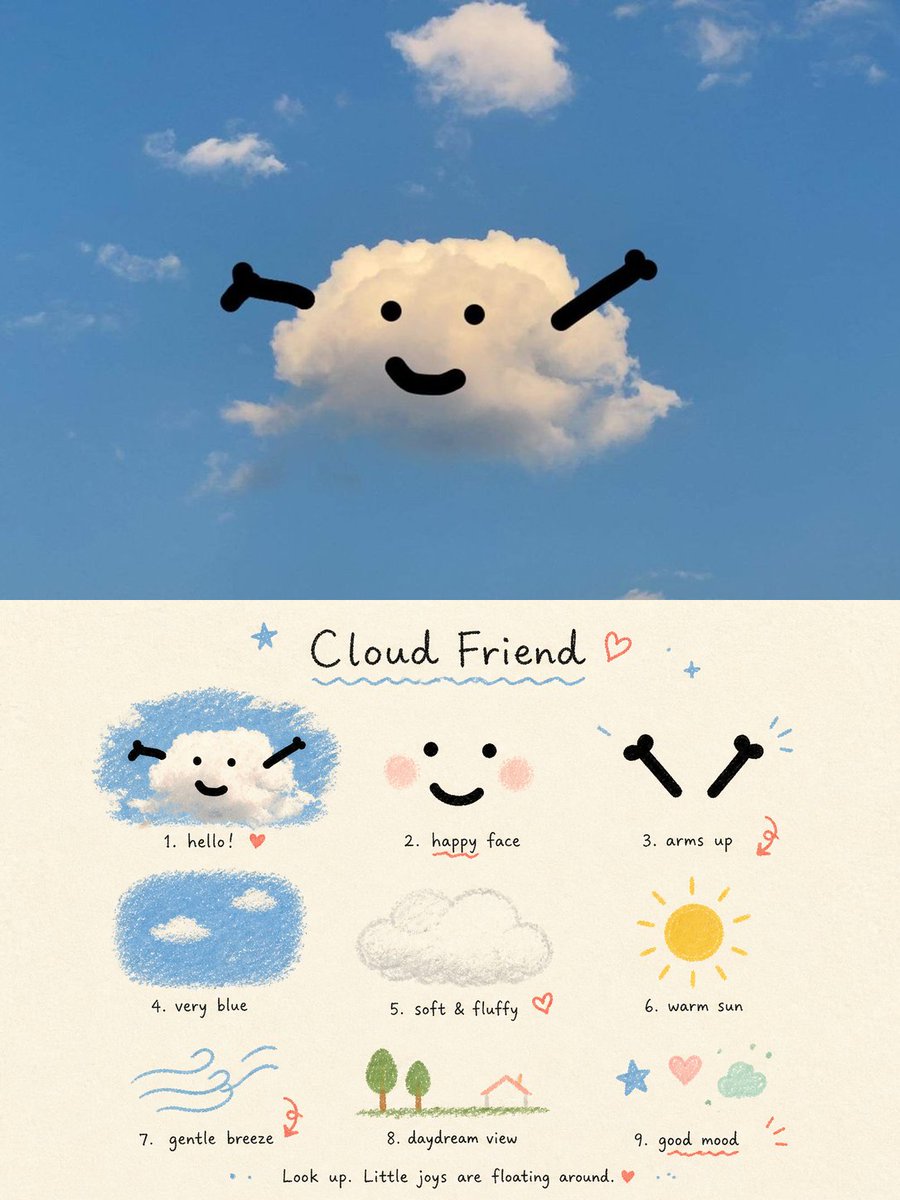
Cloud Friend Scrapbook Poster
A whimsical vertical poster featuring a smiling cloud in a blue sky above a nine-part hand-drawn cloud-themed mood board.
Il s'agit d'un exemple de visuel pour la catégorie { GPT Image 2 Graphique et affiche . Utilisez le visuel ci-dessous pour générer des éléments visuels similaires et vérifiez les conditions d'utilisation (attribution Awesome GPT Image 2 Prompts et droits d'utilisation commerciale) avant toute réutilisation.
Besoin de l'ensemble complet des invites ? Utilisez le Graphique et affiche Consultez le centre thématique pour plus d'exemples connexes, ou ouvrez le GPT Image 2 catalogue rapide pour l'index complet des exemples, les structures réutilisables et l'attribution des sources.
Free 1K preview
Generate one preview image instantly, no sign-up required.
2848/4000
Prompt
invite prête à être copiée
Goal: Create a whimsical two-part aesthetic poster about a cute cloud character, combining a real-sky photo scene on top with a hand-drawn scrapbook guide below.

Canvas: Vertical 3:4 poster. The top half is a realistic outdoor sky photograph; the bottom half is a cream paper illustration panel with a soft grainy texture.

Top scene: A bright blue daytime sky with a few small white clouds. In the center, one fluffy white cloud is turned into a friendly character using simple black graphic features: exactly 2 dot eyes, 1 curved smiling mouth, and 2 raised bone-like arms angled upward from the left and right sides. The mood is light, airy, relaxed, and childlike. Use natural sunlight and keep the sky spacious.

Bottom panel title: Handwritten title centered near the top: {argument name="title text" default="Cloud Friend"}. Add a small blue star to the left, a red heart to the right, tiny blue sparkles, and a wavy blue underline beneath the title.

Bottom layout: Arrange exactly 9 small illustrated vignettes in a loose 3-by-3 grid, each with a handwritten numbered caption underneath. The style should look like colored pencil, crayon, and ink on warm off-white paper.

Nine vignettes and captions:
1. “hello!” — a small smiling cloud character inside a rough blue scribble patch, with two black arms and a tiny red heart.
2. “happy face” — a simple face made of 2 black dot eyes, 1 black smile, and 2 soft pink blush circles.
3. “arms up” — two separate black bone-like arms raised like a cheering gesture, with small blue motion marks and a red doodle accent.
4. “very blue” — a rounded rectangle of textured blue crayon sky containing exactly 2 small white clouds.
5. “soft & fluffy” — a pale gray pencil sketch of one fluffy cloud outline, with a small red heart.
6. “warm sun” — a yellow-orange circular sun with short radiating rays.
7. “gentle breeze” — light blue flowing wind lines with a small swirl and red doodle accent.
8. “daydream view” — a tiny simple landscape with exactly 2 green trees, a green ground line, and a small red-roof house outline.
9. “good mood” — a cheerful doodle cluster containing 1 blue star, 1 pink heart, 1 mint green cloud, small dots, and red accent lines.

Footer text: Centered along the bottom in small handwritten lettering: {argument name="footer quote" default="Look up. Little joys are floating around."} followed by a small red heart and blue dots.

Visual style: Mix realistic photography in the top half with naive hand-drawn journaling in the bottom half. Use soft blue, cream, black, pastel pink, yellow, mint, and red accents. Keep all text handwritten, imperfect, casual, and charming.

Constraints: Preserve the exact two-panel composition, the exact count of 9 numbered vignettes, and the friendly minimalist cloud face. Avoid extra characters, logos, watermarks, or dense text.
Variables d'invite
Espaces réservés aux arguments modifiables présents dans l'invite, avec leurs valeurs par défaut.
Variable
title text
Défaut
Cloud Friend
Variable
footer quote
Défaut
Look up. Little joys are floating around.
Best for
- - Graphique et affiche visual exploration
- - Image generation and reference-image edits
- - Reusable briefs that keep source attribution visible
Change these parts
- - Subject, product, character, or scene
- - Aspect ratio, camera, lighting, and background
- - Brand, text, color, and output constraints
Recommended model and settings
- - Model: gpt-image-2
- - Input mode: Texte vers image
- - Aspect ratio: source
- - Commercial status: review original source
How to use this prompt
- 1. Copy the prompt and preserve its structure for the first test.
- 2. Replace the subject, context, and publishing channel.
- 3. Change one camera, lighting, or style variable per iteration.
- 4. Inspect the output, source, text, and rights before reuse.
Limitations, source, and reuse cautions
- - Generated output is an editable draft, not factual, legal, or rights evidence.
- - Review the linked source, people, brands, logos, text, and third-party media before commercial use.
Importé de Awesome GPT Image 2 Prompts . L'attribution est requise. Le statut d'utilisation commerciale est allowed ; veuillez vérifier les droits d'auteur avant toute utilisation payante.
Plus de cas dans cette catégorie
Priorisé par catégorie, compatibilité du mode d'entrée, qualité et risque moindre.

Tuxedo Cat Photo and Line Art Diptych
Texte vers image

Autumn Cozy Casual Outfit Prompt
Texte vers image

Cute Focus Desk Flat Lay and Kawaii Illustration
Texte vers image

Street Selfie with Cat in Matching Cap
Texte vers image

Morning Bed Stretching Legs Prompt
Texte vers image

GPT Image 2 Prompt: Garden Dappled Light
Texte vers image
Réutilisation et notes de source
Utilisez cette invite en toute sécurité après avoir prévisualisé le dossier.
- 1.Copiez l'invite ou ouvrez-la directement dans Dovoo avec le bouton de génération.
- 2.Ajustez les variables, le format d'image et les images de référence en fonction de votre cas d'utilisation.
- 3.Avant toute publication ou utilisation payante, vérifiez les droits d'auteur, les exigences d'attribution et les risques liés à la marque ou à l'image.