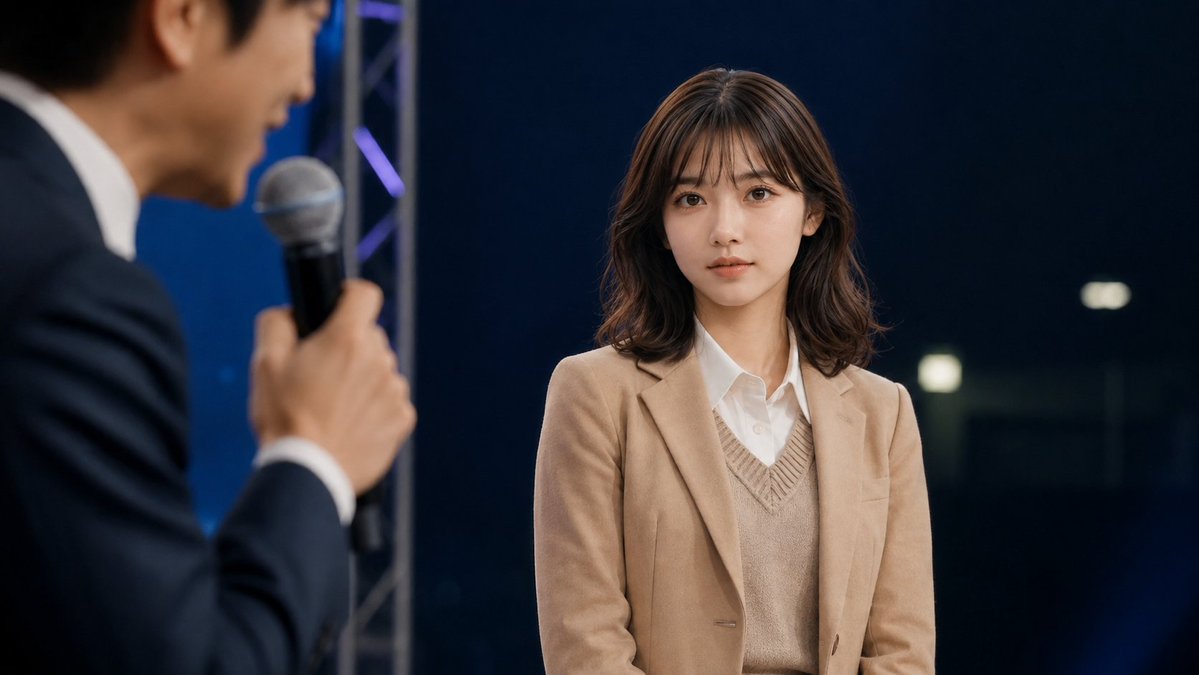
Cinematic Studio Interview Scene
A photorealistic widescreen talk-show still featuring a sharply focused young woman and a blurred male host speaking with a microphone.
Il s'agit d'un exemple de visuel pour la catégorie { GPT Image 2 Portrait et personnage . Utilisez le visuel ci-dessous pour générer des éléments visuels similaires et vérifiez les conditions d'utilisation (attribution Awesome GPT Image 2 Prompts et droits d'utilisation commerciale) avant toute réutilisation.
Besoin de l'ensemble complet des invites ? Utilisez le Portrait et personnage Consultez le centre thématique pour plus d'exemples connexes, ou ouvrez le GPT Image 2 catalogue rapide pour l'index complet des exemples, les structures réutilisables et l'attribution des sources.
Free 1K preview
Generate one preview image instantly, no sign-up required.
1411/4000
Prompt
invite prête à être copiée
Create a cinematic photorealistic still from a live talk show or interview on a dark studio stage. The main subject is a young East Asian woman, about early 20s, seated or standing center-right, facing slightly left but looking toward the camera with a calm, neutral, attentive expression. She has {argument name="hair color" default="dark brown"} shoulder-length softly wavy hair with wispy bangs, natural makeup, clear skin, and large expressive eyes. She wears a {argument name="jacket color" default="camel beige"} blazer over a beige V-neck knit vest and a crisp white button-up shirt. In the extreme left foreground, include exactly 1 blurred male host in profile, an East Asian man in a dark navy suit and white shirt, holding exactly 1 handheld microphone close to his mouth while speaking; keep him intentionally out of focus with shallow depth of field. The woman should be sharply focused while the host, microphone, and foreground are blurred. Background: a deep navy-black studio backdrop with subtle blue lighting, a vertical silver stage truss behind the host, faint purple-blue accent lights, and a few soft rectangular bokeh lights on the right. Composition: widescreen 16:9, medium shot, woman occupying the right half of frame, host cropped on the left, realistic event lighting, soft key light on the woman’s face, professional broadcast photography, no visible text, no logos, no watermark.Variables d'invite
Espaces réservés aux arguments modifiables présents dans l'invite, avec leurs valeurs par défaut.
Variable
hair color
Défaut
dark brown
Variable
jacket color
Défaut
camel beige
Best for
- - Portrait et personnage visual exploration
- - Image generation and reference-image edits
- - Reusable briefs that keep source attribution visible
Change these parts
- - Subject, product, character, or scene
- - Aspect ratio, camera, lighting, and background
- - Brand, text, color, and output constraints
Recommended model and settings
- - Model: gpt-image-2
- - Input mode: Texte vers image
- - Aspect ratio: source
- - Commercial status: review original source
How to use this prompt
- 1. Copy the prompt and preserve its structure for the first test.
- 2. Replace the subject, context, and publishing channel.
- 3. Change one camera, lighting, or style variable per iteration.
- 4. Inspect the output, source, text, and rights before reuse.
Limitations, source, and reuse cautions
- - Generated output is an editable draft, not factual, legal, or rights evidence.
- - Review the linked source, people, brands, logos, text, and third-party media before commercial use.
Importé de Awesome GPT Image 2 Prompts . L'attribution est requise. Le statut d'utilisation commerciale est allowed ; veuillez vérifier les droits d'auteur avant toute utilisation payante.
Plus de cas dans cette catégorie
Priorisé par catégorie, compatibilité du mode d'entrée, qualité et risque moindre.

Cinematic Blue Backlit Portrait
Texte vers image

Studio Portrait of Woman with Sunglasses
Texte vers image

Morning Bed Stretching Legs Prompt
Texte vers image

GPT Image 2 Prompt: Garden Dappled Light
Texte vers image

Playful Morning Selfie Portrait
Texte vers image

GPT Image 2 Real-Life Character Street Snap
Texte vers image
Réutilisation et notes de source
Utilisez cette invite en toute sécurité après avoir prévisualisé le dossier.
- 1.Copiez l'invite ou ouvrez-la directement dans Dovoo avec le bouton de génération.
- 2.Ajustez les variables, le format d'image et les images de référence en fonction de votre cas d'utilisation.
- 3.Avant toute publication ou utilisation payante, vérifiez les droits d'auteur, les exigences d'attribution et les risques liés à la marque ou à l'image.