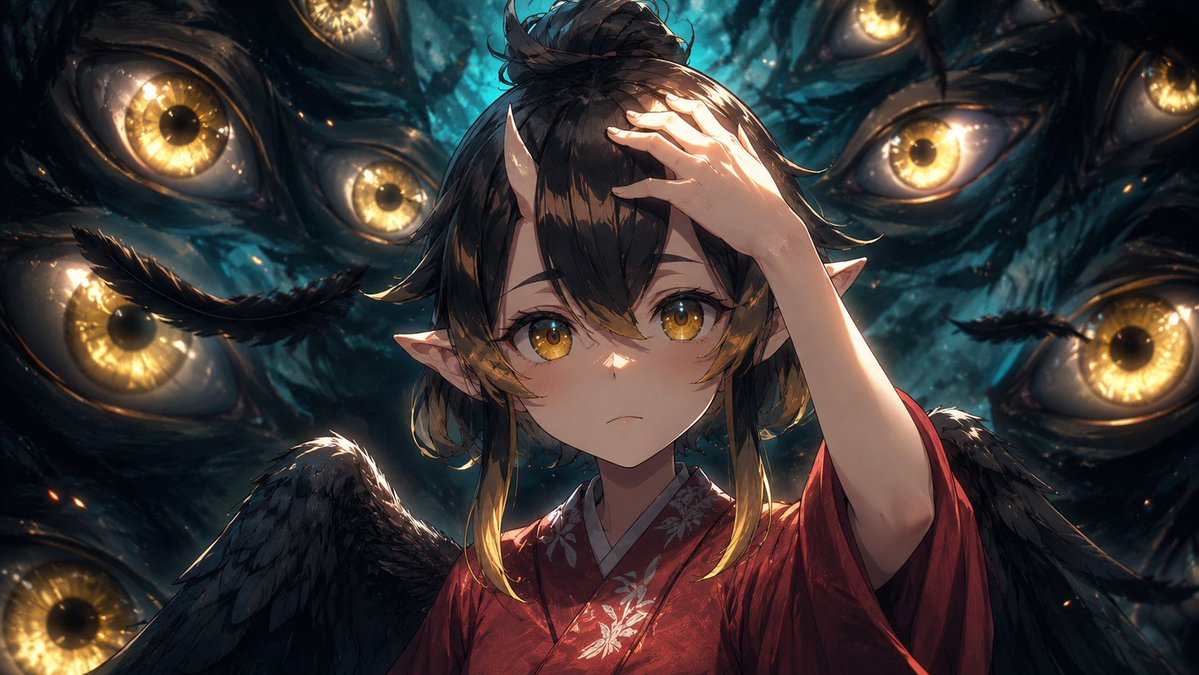
Amélioration des images d'anime cinématographiques
Transforme une scène d'anime de référence en une image fixe de production cinématographique plus soignée, tout en préservant la pose, le cadrage et le visage masqué d'origine.
Il s'agit d'un exemple de visuel pour la catégorie { GPT Image 2 Anime et jeux . Utilisez le visuel ci-dessous pour générer des éléments visuels similaires et vérifiez les conditions d'utilisation (attribution Awesome GPT Image 2 Prompts et droits d'utilisation commerciale) avant toute réutilisation.
Free 1K preview
Generate one preview image instantly, no sign-up required.
Free text preview doesn’t preserve reference-image consistency.
Prompt
invite prête à être copiée
Using the provided reference image as the base frame, brush it up into a high-end cinematic anime key visual while preserving the original composition, character pose, outfit, wings, pointed ears, hand placement, and the central rectangular privacy mask over the face. Keep the same dark supernatural scene with exactly 8 visible surrounding golden eyes, but greatly increase the drawing density, shadow detail, rim lighting, depth, texture, and contrast. Make the background eyes sharper and more luminous, with wet organic texture, teal-black darkness, glowing amber irises, subtle sparks, and layered depth of field. Refine the hair strands, feathers, kimono fabric, floral embroidery, skin shading, and highlights so the frame feels like a polished production still rather than a rough anime cut. Maintain the same widescreen crop and overall framing. Style target: {argument name="visual style" default="premium cinematic anime illustration"}. Enhancement strength: {argument name="enhancement strength" default="strong brush-up with more detail, shadows, and depth"}. Lighting mood: {argument name="lighting mood" default="dramatic teal-and-gold supernatural lighting"}. Privacy mask: {argument name="privacy mask" default="keep the opaque rectangular block covering the face"}.Variables d'invite
Espaces réservés aux arguments modifiables présents dans l'invite, avec leurs valeurs par défaut.
Best for
- - Anime et jeux visual exploration
- - Image generation and reference-image edits
- - Reusable briefs that keep source attribution visible
Change these parts
- - Subject, product, character, or scene
- - Aspect ratio, camera, lighting, and background
- - Brand, text, color, and output constraints
Recommended model and settings
- - Model: gpt-image-2
- - Input mode: Image vers image
- - Aspect ratio: source
- - Commercial status: review original source
How to use this prompt
- 1. Copy the prompt and preserve its structure for the first test.
- 2. Replace the subject, context, and publishing channel.
- 3. Change one camera, lighting, or style variable per iteration.
- 4. Inspect the output, source, text, and rights before reuse.
Limitations, source, and reuse cautions
- - Generated output is an editable draft, not factual, legal, or rights evidence.
- - Review the linked source, people, brands, logos, text, and third-party media before commercial use.
Plus de cas dans cette catégorie
Priorisé par catégorie, compatibilité du mode d'entrée, qualité et risque moindre.






Réutilisation et notes de source
Utilisez cette invite en toute sécurité après avoir prévisualisé le dossier.
- 1.Copiez l'invite ou ouvrez-la directement dans Dovoo avec le bouton de génération.
- 2.Ajustez les variables, le format d'image et les images de référence en fonction de votre cas d'utilisation.
- 3.Avant toute publication ou utilisation payante, vérifiez les droits d'auteur, les exigences d'attribution et les risques liés à la marque ou à l'image.