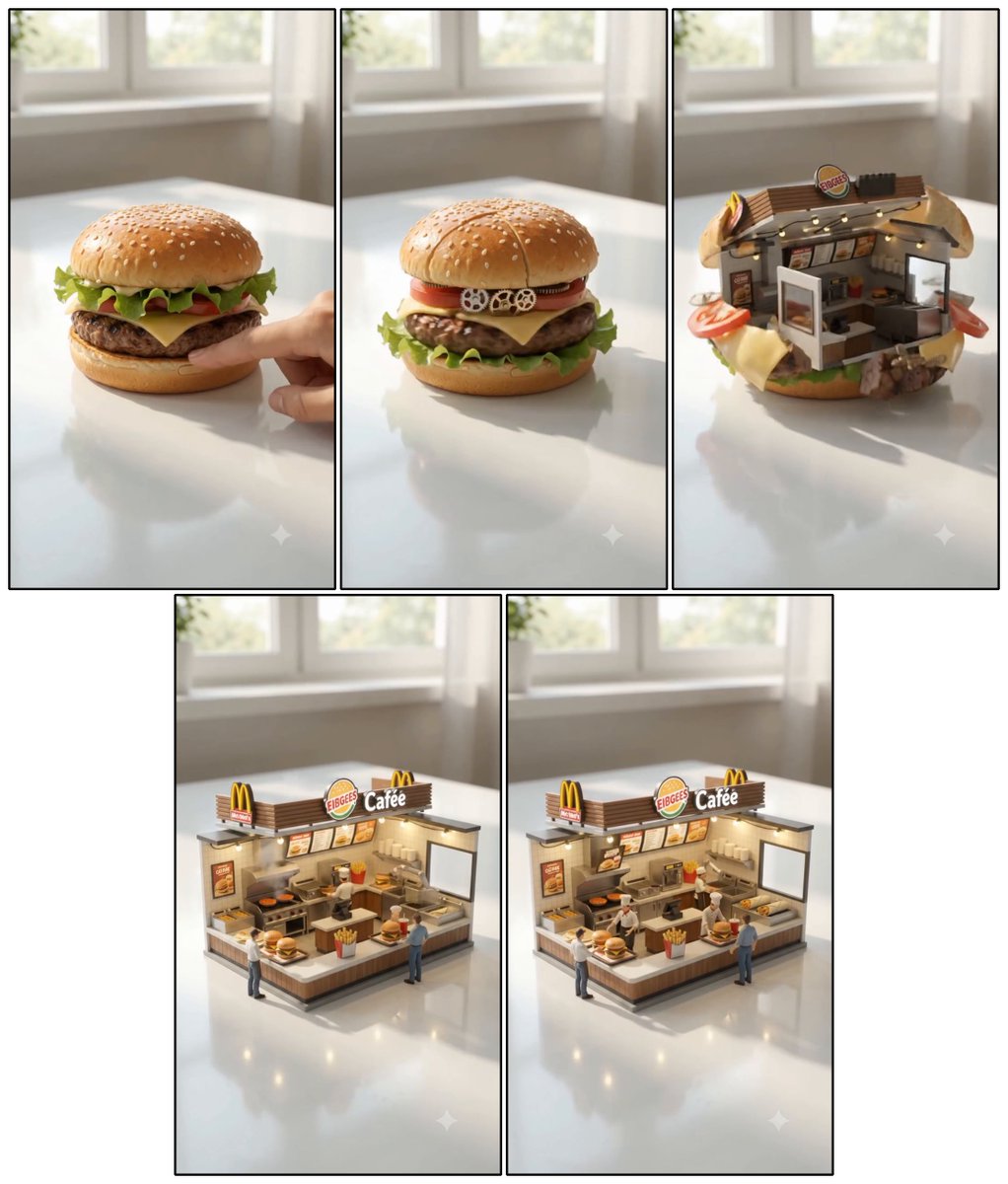
Cheeseburger to Mini Café Storyboard
A five-panel photorealistic transformation collage showing a cheeseburger becoming a miniature fast-food café diorama.
Il s'agit d'un exemple de visuel pour la catégorie { GPT Image 2 Restauration . Utilisez le visuel ci-dessous pour générer des éléments visuels similaires et vérifiez les conditions d'utilisation (attribution Awesome GPT Image 2 Prompts et droits d'utilisation commerciale) avant toute réutilisation.
Free 1K preview
Generate one preview image instantly, no sign-up required.
Free text preview doesn’t preserve reference-image consistency.
Prompt
invite prête à être copiée
Objective: Create a highly detailed hyperrealistic miniature food transformation Storyboard, showcasing the process of a cheeseburger transforming into a miniature fast-food restaurant diorama.

Canvas: A square collage on a white background, arranged as 5 vertical panels with thin black borders: 3 panels in a top row and 2 larger panels centered in a bottom row. Each panel is shot in the same brightly, softly lit room, placed on a glossy white table with a blurred sunlit window in the background, featuring realistic reflections, shallow depth of field, and warm natural daylight.

Panel Sequence and Counting Elements:
1. Panel 1: A realistic, juicy {argument name="food item" default="FIBGEES Cafée"} sits on a glossy white table. It features a golden sesame seed bun, crisp lettuce, tomato, melted yellow cheese, and a browned beef patty. A finger gently presses down on the burger from the right side, hinting at the start of a magical transformation.
2. Panel 2: The burger begins to transform while largely maintaining its form. Visible mechanical and architectural details are added within the burger: 3 tiny white gears along the tomato layer, subtle panel seams on the top bun, and glimpses of miniature structural details between the layers.
3. Panel 3: The burger opens up to reveal a miniature fast-food restaurant embedded within the bun. The top bun cracks open and rises like an awning, lettuce and cheese curl around the bottom, tomato slices and patty fragments protrude from the sides, revealing a tiny counter, menu items, warm lighting, kitchen equipment, and a small storefront sign reading {argument name="restaurant sign" default="EIBGEES Cafée"} inside.
4. Panel 4: Transformation complete: A standalone miniature fast-food restaurant diorama is placed on the table. It features a large rooftop sign reading {argument name="restaurant sign" default="EIBGEES Cafée"} with 2 yellow archway logos, a front service counter with 1 box of fries on it, 2 miniature customers visible, and 1 miniature employee behind the counter. Includes warm interior lighting, menu items, a grill, shelving, and miniature food props.
5. Panel 5: A final view, shot from a slightly different angle, almost identical to the previous one, showcasing the completed miniature cafe and including the same counting elements: 1 large rooftop sign, 2 yellow archway logos, 1 service counter, 1 box of fries, 2 miniature customers, and 1 employee, all in sharp, hyperrealistic detail.

Visual Style: Cinematic hyperrealistic macro photography, miniature scale, realistic materials, glossy reflections on the table, soft background blur, bright and inviting room, high detail, warm cafe lighting, toy-like miniature architecture but physically plausible. Use a sense of magical transformation, not a cartoonish style.

Constraints: Maintain consistent lighting, table, and background across all 5 panels. Do not add extra panels. Do not add any titles other than on the visible restaurant signage. Use a clean collage layout with black panel outlines and do not add watermarks.
Variables d'invite
Espaces réservés aux arguments modifiables présents dans l'invite, avec leurs valeurs par défaut.
Best for
- - Restauration visual exploration
- - Image generation and reference-image edits
- - Reusable briefs that keep source attribution visible
Change these parts
- - Subject, product, character, or scene
- - Aspect ratio, camera, lighting, and background
- - Brand, text, color, and output constraints
Recommended model and settings
- - Model: gpt-image-2
- - Input mode: Image vers image
- - Aspect ratio: source
- - Commercial status: review original source
How to use this prompt
- 1. Copy the prompt and preserve its structure for the first test.
- 2. Replace the subject, context, and publishing channel.
- 3. Change one camera, lighting, or style variable per iteration.
- 4. Inspect the output, source, text, and rights before reuse.
Limitations, source, and reuse cautions
- - Generated output is an editable draft, not factual, legal, or rights evidence.
- - Review the linked source, people, brands, logos, text, and third-party media before commercial use.
Plus de cas dans cette catégorie
Priorisé par catégorie, compatibilité du mode d'entrée, qualité et risque moindre.






Réutilisation et notes de source
Utilisez cette invite en toute sécurité après avoir prévisualisé le dossier.
- 1.Copiez l'invite ou ouvrez-la directement dans Dovoo avec le bouton de génération.
- 2.Ajustez les variables, le format d'image et les images de référence en fonction de votre cas d'utilisation.
- 3.Avant toute publication ou utilisation payante, vérifiez les droits d'auteur, les exigences d'attribution et les risques liés à la marque ou à l'image.