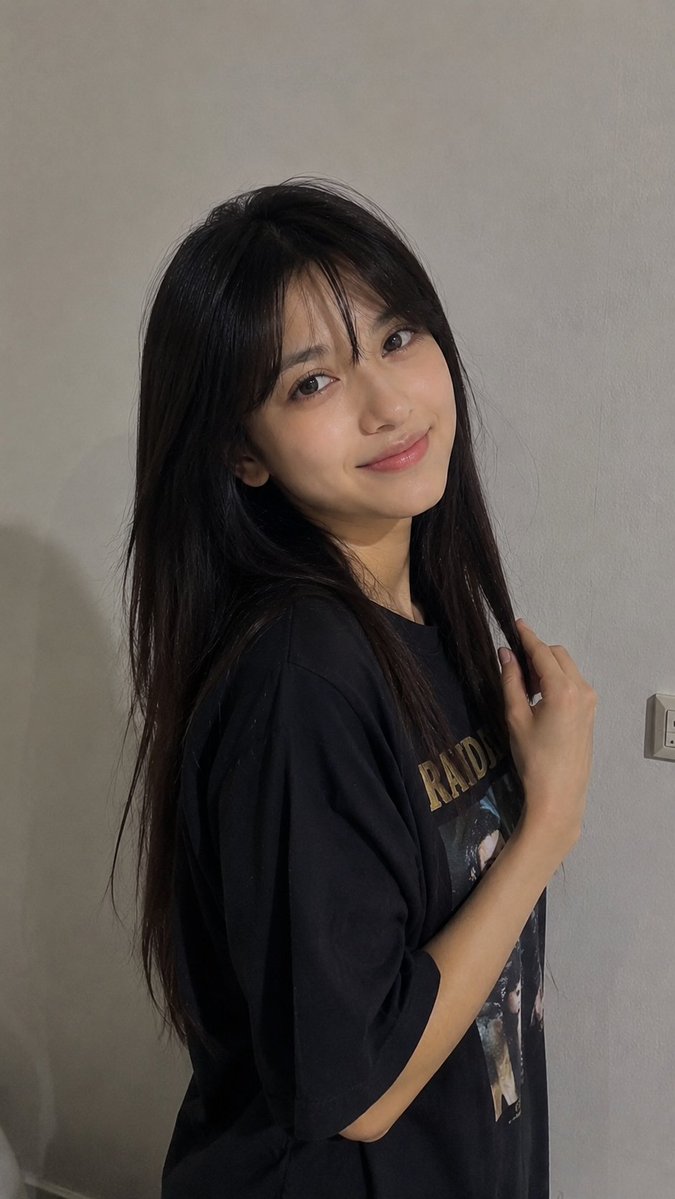
Casual Indoor Smartphone Portrait
A prompt for generating an ultra-realistic, casual indoor photo of a young woman against a simple gray wall, capturing a candid social media aesthetic.
Il s'agit d'un exemple de visuel pour la catégorie { GPT Image 2 Portrait et personnage . Utilisez le visuel ci-dessous pour générer des éléments visuels similaires et vérifiez les conditions d'utilisation (attribution Awesome GPT Image 2 Prompts et droits d'utilisation commerciale) avant toute réutilisation.
Besoin de l'ensemble complet des invites ? Utilisez le Portrait et personnage Consultez le centre thématique pour plus d'exemples connexes, ou ouvrez le GPT Image 2 catalogue rapide pour l'index complet des exemples, les structures réutilisables et l'attribution des sources.
Free 1K preview
Generate one preview image instantly, no sign-up required.
1581/4000
Prompt
invite prête à être copiée
Ultra-realistic casual smartphone photo of a young woman standing indoors against a simple light gray wall. She has {argument name="hair style" default="long, straight dark brown to black hair parted naturally in the middle"}, falling loosely over her shoulders and down her back. She has a soft natural face, minimal makeup, relaxed eyes, and a warm subtle closed-mouth smile.
She is wearing a {argument name="clothing" default="loose oversized black graphic T-shirt"}. Her body is turned slightly sideways toward the camera, with her head gently tilted toward the camera. One hand is raised naturally near her hair, lightly touching a strand beside her shoulder. She looks directly at the camera with a relaxed, playful, slightly shy expression.
Simple home interior, plain pale gray wall in the background, a small electrical outlet visible on the right side. Natural indoor ambient lighting, slightly dim and soft, realistic shadows, ordinary everyday environment.
Camera style: vertical smartphone video frame, handheld casual recording, slightly low-resolution social-media video quality, mild natural motion softness, subtle smartphone lens distortion, realistic skin texture, unfiltered appearance, candid moment, no professional photography, photorealistic, authentic human proportions.

Negative prompt: overly beautiful model look, heavy makeup, perfect studio lighting, plastic skin, beauty filter, CGI, anime, cartoon, exaggerated eyes, distorted face, extra fingers, malformed hands, unrealistic body, excessive sharpness, oversaturated colors, watermark, text, logo.
Variables d'invite
Espaces réservés aux arguments modifiables présents dans l'invite, avec leurs valeurs par défaut.
Variable
hair style
Défaut
long, straight dark brown to black hair parted naturally in the middle
Variable
clothing
Défaut
loose oversized black graphic T-shirt
Best for
- - Portrait et personnage visual exploration
- - Image generation and reference-image edits
- - Reusable briefs that keep source attribution visible
Change these parts
- - Subject, product, character, or scene
- - Aspect ratio, camera, lighting, and background
- - Brand, text, color, and output constraints
Recommended model and settings
- - Model: gpt-image-2
- - Input mode: Texte vers image
- - Aspect ratio: source
- - Commercial status: review original source
How to use this prompt
- 1. Copy the prompt and preserve its structure for the first test.
- 2. Replace the subject, context, and publishing channel.
- 3. Change one camera, lighting, or style variable per iteration.
- 4. Inspect the output, source, text, and rights before reuse.
Limitations, source, and reuse cautions
- - Generated output is an editable draft, not factual, legal, or rights evidence.
- - Review the linked source, people, brands, logos, text, and third-party media before commercial use.
Importé de Awesome GPT Image 2 Prompts . L'attribution est requise. Le statut d'utilisation commerciale est allowed ; veuillez vérifier les droits d'auteur avant toute utilisation payante.
Plus de cas dans cette catégorie
Priorisé par catégorie, compatibilité du mode d'entrée, qualité et risque moindre.






Réutilisation et notes de source
Utilisez cette invite en toute sécurité après avoir prévisualisé le dossier.
- 1.Copiez l'invite ou ouvrez-la directement dans Dovoo avec le bouton de génération.
- 2.Ajustez les variables, le format d'image et les images de référence en fonction de votre cas d'utilisation.
- 3.Avant toute publication ou utilisation payante, vérifiez les droits d'auteur, les exigences d'attribution et les risques liés à la marque ou à l'image.