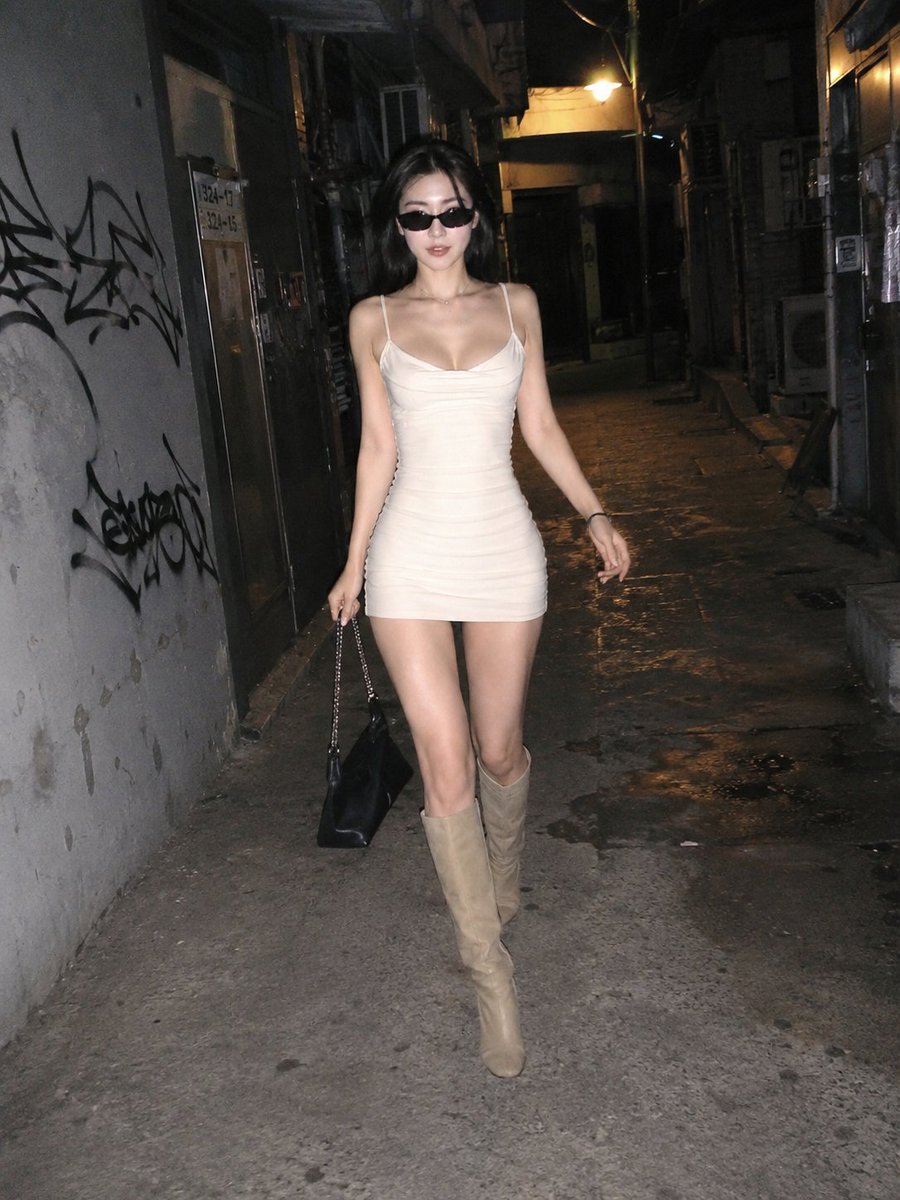
Photographie de rue nocturne spontanée au flash
Un exercice structuré pour créer des photos de rue spontanées, de type smartphone, de sujets marchant dans des ruelles urbaines la nuit avec un flash direct et intense.
Il s'agit d'un exemple de visuel pour la catégorie { GPT Image 2 Portrait et personnage . Utilisez le visuel ci-dessous pour générer des éléments visuels similaires et vérifiez les conditions d'utilisation (attribution Awesome GPT Image 2 Prompts et droits d'utilisation commerciale) avant toute réutilisation.
Free 1K preview
Generate one preview image instantly, no sign-up required.
Prompt
invite prête à être copiée
{
  "objective": "Create a candid-style street photograph taken with a smartphone, featuring an extremely beautiful, slender {argument name="ethnicity" default="extremely beautiful slender Korean woman"} woman confidently walking through a narrow city alley at night.",
  "aspect_ratio": "3:4",
  "composition": {
    "style": "Single snapshot",
    "camera_type": "Smartphone",
    "angle": "Slightly low angle, subject walking towards the camera in the center",
    "framing": "Full body shot, natural and imperfect composition",
    "aesthetic": "Raw, unedited, street photography"
  },
  "character": {
    "ethnicity": "Korean",
    "appearance": "Extremely beautiful, slender figure, soft facial features",
    "hair": "Medium-short length dark hair, slightly messy, natural dynamic feel",
    "expression": "Confident, slightly playful, relaxed",
    "pose": "Mid-stride, natural gait, arms swinging gently"
  },
  "wardrobe_and_accessories": {
    "outfit": "{argument name="outfit" default="narrow urban alley at night"}",
    "shoes": "Over-the-knee boots",
    "accessories": [
      "Fashionable sunglasses",
      "Handbag casually held",
      "Delicate jewelry"
    ]
  },
  "environment": {
    "setting": "{argument name="setting" default="low-neck fitted mini dress (light color, slightly tight)"}",
    "details": [
      "Dilapidated walls with graffiti",
      "Metal doors and vents",
      "Dim, warm-toned lights overhead",
      "Deep shadows and contrast",
      "Slightly damp or textured ground"
    ]
  },
  "lighting": {
    "type": "Strong smartphone direct flash",
    "effect": "Intense highlights on the subject, faded dark areas in the background, high contrast",
    "realism": "Slight overexposure of skin highlights typical of smartphone flash"
  },
  "style": {
    "rendering": "Photorealistic",
    "texture": "Visible grain, noise, slight blur in dynamic areas",
    "imperfections": [
      "Flash glare",
      "Slight overexposure",
      "Uneven lighting",
      "Slight motion blur"
    ],
    "color_grading": "Natural tones with a slight warm hue"
  },
  "negative_prompt": [
    "Studio lighting",
    "Perfect composition",
    "Overly smooth skin",
    "High-end fashion photoshoot",
    "Cinematic",
    "Overly retouched",
    "Symmetrical perfection"
  ]
}
Variables d'invite
Espaces réservés aux arguments modifiables présents dans l'invite, avec leurs valeurs par défaut.
Best for
- - Portrait et personnage visual exploration
- - Image generation and reference-image edits
- - Reusable briefs that keep source attribution visible
Change these parts
- - Subject, product, character, or scene
- - Aspect ratio, camera, lighting, and background
- - Brand, text, color, and output constraints
Recommended model and settings
- - Model: gpt-image-2
- - Input mode: Texte vers image
- - Aspect ratio: source
- - Commercial status: review original source
How to use this prompt
- 1. Copy the prompt and preserve its structure for the first test.
- 2. Replace the subject, context, and publishing channel.
- 3. Change one camera, lighting, or style variable per iteration.
- 4. Inspect the output, source, text, and rights before reuse.
Limitations, source, and reuse cautions
- - Generated output is an editable draft, not factual, legal, or rights evidence.
- - Review the linked source, people, brands, logos, text, and third-party media before commercial use.
Related prompt packs
Plus de cas dans cette catégorie
Priorisé par catégorie, compatibilité du mode d'entrée, qualité et risque moindre.






Réutilisation et notes de source
Utilisez cette invite en toute sécurité après avoir prévisualisé le dossier.
- 1.Copiez l'invite ou ouvrez-la directement dans Dovoo avec le bouton de génération.
- 2.Ajustez les variables, le format d'image et les images de référence en fonction de votre cas d'utilisation.
- 3.Avant toute publication ou utilisation payante, vérifiez les droits d'auteur, les exigences d'attribution et les risques liés à la marque ou à l'image.