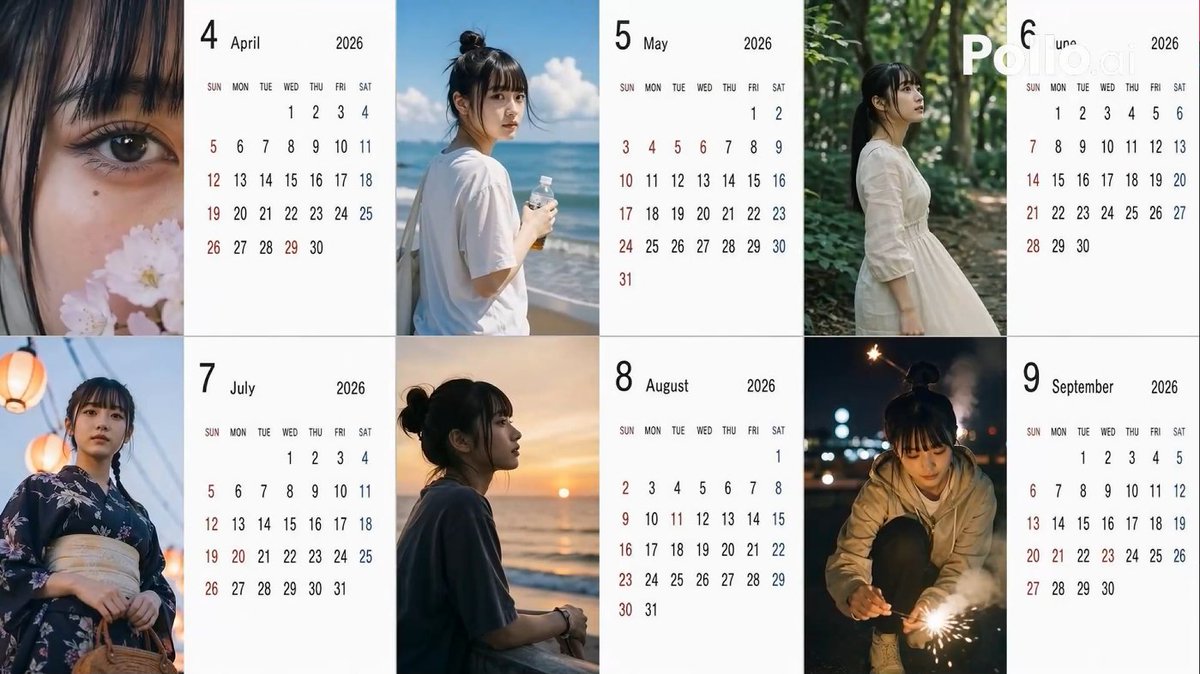
Candid 2026 Japanese Calendar Prompt
Un exercice très structuré pour générer un calendrier japonais de 6 mois pour 2026, utilisant des variables aléatoires pour les angles, les coiffures et les poses afin de créer une esthétique « prise sur le vif avec un smartphone ».
Il s'agit d'un exemple de visuel pour la catégorie { GPT Image 2 Produit et commercial . Utilisez le visuel ci-dessous pour générer des éléments visuels similaires et vérifiez les conditions d'utilisation (attribution Awesome GPT Image 2 Prompts et droits d'utilisation commerciale) avant toute réutilisation.
Free 1K preview
Generate one preview image instantly, no sign-up required.
Free text preview doesn’t preserve reference-image consistency.
Prompt
invite prête à être copiée
[Theme] A Japanese calendar for {argument name="year" default="2026"} from {argument name="period" default="April to September"} ({argument name="number of months" default="6"} months), using the person in the reference image as the model.
[Calendar] The background of the calendar portion should be white for readability.
[Image] Everyday photos taken by amateurs with an iPhone, themed after the seasons of each month.

[Location] Leave to AI according to the season.
[Distance] Randomly select one for each month: extreme_close, close, bust, mid, far, candid.
[Angle] Randomly select one for each month: eye, low, high, side, back.
[Exposure/Tone] Randomly select one for each month: overexp, natural, warm, cool, dark.
[Hairstyle] Randomly select one for each month: ponytail, bun, down, half_up, messy, wet, short, bob, braid, twin.
[Clothing] Leave to AI according to the season.
[Noise] Randomly select one for each month: low, mid, high, film.
[Blur/Focus] Randomly select one for each month: sharp, slight, motion, soft.
[Pose] Randomly select one for each month: natural_stand, sitting, walking, phone, wall_lean, crouch, look_back.
[Holding] Randomly select one for each month: none, smartphone, bottle, coffee, umbrella, bag, towel, script.
[Time of day] Randomly select one for each month: early_morning, morning, noon, afternoon, evening, night, late_night.
Variables d'invite
Espaces réservés aux arguments modifiables présents dans l'invite, avec leurs valeurs par défaut.
Best for
- - Produit et commercial visual exploration
- - Image generation and reference-image edits
- - Reusable briefs that keep source attribution visible
Change these parts
- - Subject, product, character, or scene
- - Aspect ratio, camera, lighting, and background
- - Brand, text, color, and output constraints
Recommended model and settings
- - Model: gpt-image-2
- - Input mode: Image vers image
- - Aspect ratio: source
- - Commercial status: review original source
How to use this prompt
- 1. Copy the prompt and preserve its structure for the first test.
- 2. Replace the subject, context, and publishing channel.
- 3. Change one camera, lighting, or style variable per iteration.
- 4. Inspect the output, source, text, and rights before reuse.
Limitations, source, and reuse cautions
- - Generated output is an editable draft, not factual, legal, or rights evidence.
- - Review the linked source, people, brands, logos, text, and third-party media before commercial use.
Plus de cas dans cette catégorie
Priorisé par catégorie, compatibilité du mode d'entrée, qualité et risque moindre.






Réutilisation et notes de source
Utilisez cette invite en toute sécurité après avoir prévisualisé le dossier.
- 1.Copiez l'invite ou ouvrez-la directement dans Dovoo avec le bouton de génération.
- 2.Ajustez les variables, le format d'image et les images de référence en fonction de votre cas d'utilisation.
- 3.Avant toute publication ou utilisation payante, vérifiez les droits d'auteur, les exigences d'attribution et les risques liés à la marque ou à l'image.