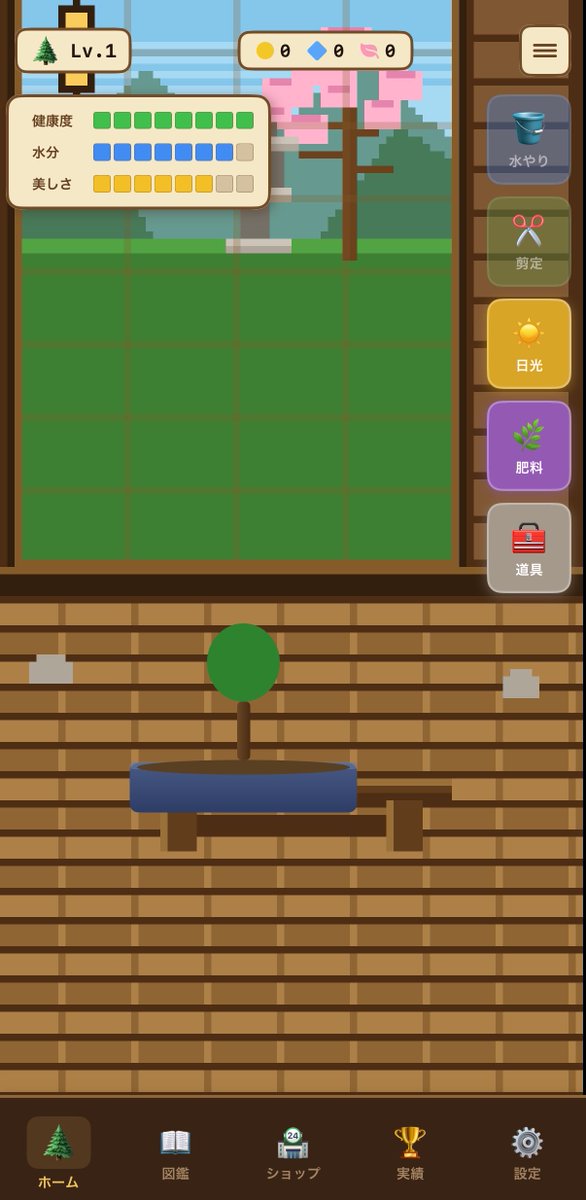
Maquette d'interface utilisateur du jeu mobile Bonsai
Un concept d'interface de jeu mobile au format portrait soigné pour un jeu de simulation de culture de bonsaï, utile pour le prototypage d'écrans d'applications et de mises en page d'interface utilisateur de jeux occasionnels.
Il s'agit d'un exemple de visuel pour la catégorie { GPT Image 2 Illustration et art . Utilisez le visuel ci-dessous pour générer des éléments visuels similaires et vérifiez les conditions d'utilisation (attribution Awesome GPT Image 2 Prompts et droits d'utilisation commerciale) avant toute réutilisation.
Besoin de l'ensemble complet des invites ? Utilisez le Illustration et art Consultez le centre thématique pour plus d'exemples connexes, ou ouvrez le GPT Image 2 catalogue rapide pour l'index complet des exemples, les structures réutilisables et l'attribution des sources.
Free 1K preview
Generate one preview image instantly, no sign-up required.
2662/4000
Prompt
invite prête à être copiée
{"type":"mobile game UI mockup","genre":"bonsai growing game","platform":"smartphone portrait screen","style":"cute casual Japanese game interface, flat 2D vector art, warm wooden UI, soft rounded panels, slightly toy-like app icons, clean mobile-friendly layout","screen":{"background":"traditional Japanese interior with horizontal wooden slat wall in warm brown tones","main subject":"a small bonsai tree with a round green canopy and short brown trunk, planted in a shallow oval blue pot on a simple wooden stand","layout":{"sections":[{"title":"top left level badge","position":"top left","count":2,"labels":["tree icon","Lv.1"]},{"title":"top center currencies","position":"top center","count":3,"labels":["yellow coin 0","blue gem 0","pink token 0"]},{"title":"status panel","position":"upper left over garden area","count":3,"labels":["健康度","水分","美しさ"]},{"title":"right vertical action menu","position":"right side","count":5,"labels":["水やり","剪定","日光","肥料","道具"]},{"title":"bottom navigation bar","position":"bottom full width","count":5,"labels":["ホーム","図鑑","ショップ","実績","設定"]}],"centerpiece":"large grow-area window in the upper half with a green square grid field and a pixel-art outdoor background showing a tree with pink blossoms, greenery, and a pale blue sky behind glass","top right button":"rounded square menu button with three horizontal lines"},"details":{"status meters":{"健康度":"10 green square segments, all filled","水分":"10 segments total, 8 blue filled and 2 beige empty","美しさ":"10 segments total, 8 yellow filled and 2 beige empty"},"right menu buttons":[{"label":"水やり","icon":"blue bucket","state":"dimmed inactive"},{"label":"剪定","icon":"red scissors","state":"dimmed inactive"},{"label":"日光","icon":"yellow sun","state":"highlighted active"},{"label":"肥料","icon":"green sprout","state":"purple button, active-looking"},{"label":"道具","icon":"red toolbox","state":"neutral gray"}],"bottom nav icons":[{"label":"ホーム","icon":"evergreen tree","state":"selected"},{"label":"図鑑","icon":"open book","state":"unselected"},{"label":"ショップ","icon":"shop building with small 24 badge","state":"unselected"},{"label":"実績","icon":"gold trophy","state":"unselected"},{"label":"設定","icon":"gray gear","state":"unselected"}]},"composition":"screenshot-style full app screen, centered symmetrical layout, bonsai in lower middle, game field in upper middle, sidebar controls on the right, navigation along the bottom","color palette":"brown wood, cream panels, green grass and bonsai foliage, blue pot and water icon, yellow sunlight button, purple fertilizer button, soft pastel accents","quality":"polished UI concept art for a casual simulation game"}Best for
- - Illustration et art visual exploration
- - Image generation and reference-image edits
- - Reusable briefs that keep source attribution visible
Change these parts
- - Subject, product, character, or scene
- - Aspect ratio, camera, lighting, and background
- - Brand, text, color, and output constraints
Recommended model and settings
- - Model: gpt-image-2
- - Input mode: Texte vers image
- - Aspect ratio: source
- - Commercial status: review original source
How to use this prompt
- 1. Copy the prompt and preserve its structure for the first test.
- 2. Replace the subject, context, and publishing channel.
- 3. Change one camera, lighting, or style variable per iteration.
- 4. Inspect the output, source, text, and rights before reuse.
Limitations, source, and reuse cautions
- - Generated output is an editable draft, not factual, legal, or rights evidence.
- - Review the linked source, people, brands, logos, text, and third-party media before commercial use.
Importé de Awesome GPT Image 2 Prompts . L'attribution est requise. Le statut d'utilisation commerciale est allowed ; veuillez vérifier les droits d'auteur avant toute utilisation payante.
Plus de cas dans cette catégorie
Priorisé par catégorie, compatibilité du mode d'entrée, qualité et risque moindre.

Grumpy Rhino Storybook Illustration
Texte vers image

Surreal 3D Chess Match Artwork
Texte vers image

Martial Arts Legend Character Bible Sheet
Texte vers image

Manga Desert Radio Telescope Road Trip
Texte vers image

Female Clown Cyborg Portrait
Texte vers image

Imperial Research Bunker on Volcanic Planet
Texte vers image
Réutilisation et notes de source
Utilisez cette invite en toute sécurité après avoir prévisualisé le dossier.
- 1.Copiez l'invite ou ouvrez-la directement dans Dovoo avec le bouton de génération.
- 2.Ajustez les variables, le format d'image et les images de référence en fonction de votre cas d'utilisation.
- 3.Avant toute publication ou utilisation payante, vérifiez les droits d'auteur, les exigences d'attribution et les risques liés à la marque ou à l'image.