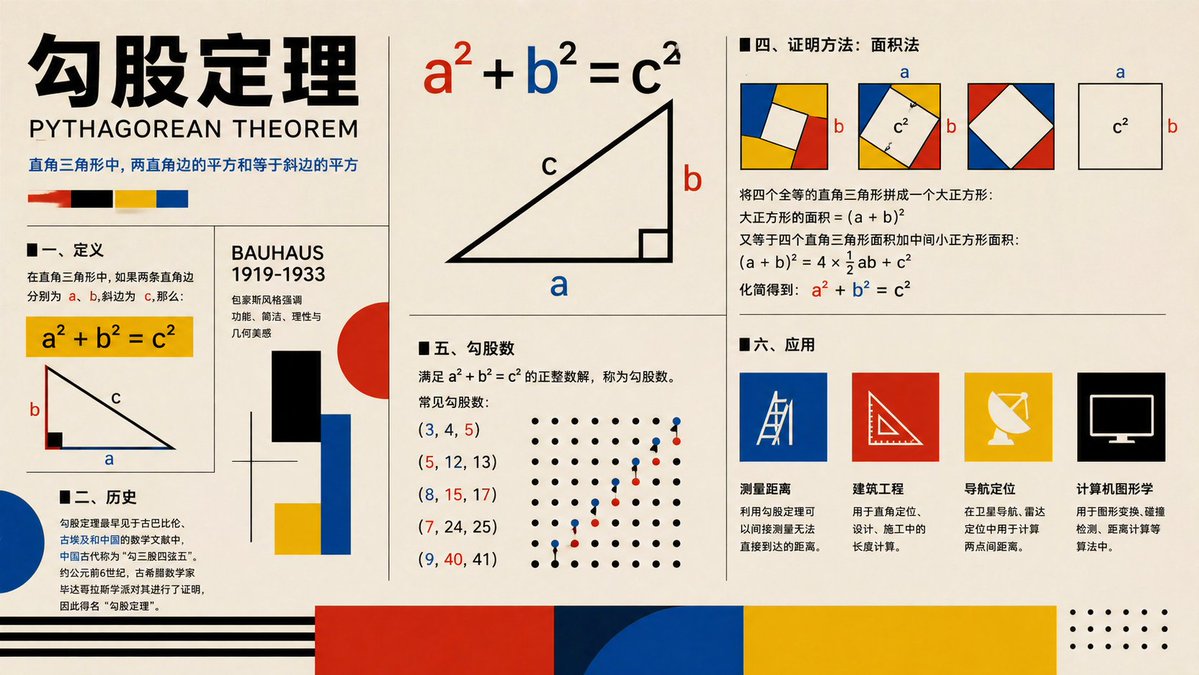
Affiche du Bauhaus sur le théorème de Pythagore
Une affiche infographique éducative de style Bauhaus expliquant le théorème de Pythagore avec des diagrammes, une démonstration, un historique, des triplets et des applications, adaptée aux supports visuels en classe ou au contenu éducatif social.
Il s'agit d'un exemple de visuel pour la catégorie { GPT Image 2 Graphique et affiche . Utilisez le visuel ci-dessous pour générer des éléments visuels similaires et vérifiez les conditions d'utilisation (attribution Awesome GPT Image 2 Prompts et droits d'utilisation commerciale) avant toute réutilisation.
Free 1K preview
Generate one preview image instantly, no sign-up required.
Prompt
invite prête à être copiée
{
  "type": "educational infographic poster",
  "topic": "{argument name=\"topic\" default=\"Pythagorean theorem\"}",
  "subtitle": "PYTHAGOREAN THEOREM",
  "style": "Bauhaus-inspired mathematical explainer poster, clean editorial grid, cream paper background, bold black typography, primary color palette of red, blue, yellow, black, geometric accents, vector shapes, high-contrast print design",
  "canvas": {
    "orientation": "landscape",
    "aspect_ratio": "16:9"
  },
  "layout": {
    "grid": "multi-panel poster with thin black dividers",
    "sections": [
      {
        "title": "header",
        "position": "top-left spanning two rows",
        "count": 4,
        "labels": [
          "large Chinese title",
          "English subtitle",
          "one-line Chinese theorem summary",
          "4 color swatches"
        ]
      },
      {
        "title": "I. Definition",
        "position": "left-center",
        "count": 3,
        "labels": [
          "section heading",
          "yellow formula box a² + b² = c²",
          "right-triangle diagram labeled a b c"
        ]
      },
      {
        "title": "II. History",
        "position": "bottom-left",
        "count": 3,
        "labels": [
          "section heading",
          "Chinese history paragraph",
          "large blue semicircle accent"
        ]
      },
      {
        "title": "BAUHAUS 1919-1933",
        "position": "center-left vertical panel",
        "count": 6,
        "labels": [
          "panel title",
          "3 short Chinese descriptive lines",
          "black rectangle",
          "red circle with blue and yellow blocks"
        ]
      },
      {
        "title": "main theorem diagram",
        "position": "top-center",
        "count": 3,
        "labels": [
          "large formula a² + b² = c² with a in red b in blue c in black",
          "large right triangle",
          "labels a b c on triangle"
        ]
      },
      {
        "title": "IV. Proof method: Area method",
        "position": "top-right",
        "count": 4,
        "labels": [
          "section heading",
          "3 square dissection diagrams with colored corner triangles and central white square",
          "1 separate c² square diagram with a and b side labels",
          "Chinese proof text with final formula a² + b² = c² highlighted in red and blue"
        ]
      },
      {
        "title": "V. Pythagorean triples",
        "position": "center-bottom",
        "count": 7,
        "labels": [
          "section heading",
          "definition text",
          "(3, 4, 5)",
          "(5, 12, 13)",
          "(8, 15, 17)",
          "(7, 24, 25)",
          "(9, 40, 41)"
        ]
      },
      {
        "title": "dot lattice illustration",
        "position": "right side of Pythagorean triples section",
        "count": 2,
        "labels": [
          "black dot grid",
          "ascending red and blue point pattern"
        ]
      },
      {
        "title": "6. Applications",
        "position": "bottom-right",
        "count": 5,
        "labels": [
          "section heading",
          "Distance measurement",
          "Civil engineering",
          "Navigation and positioning",
          "Computer graphics"
        ]
      },
      {
        "title": "application icons",
        "position": "bottom-right row",
        "count": 4,
        "labels": [
          "blue square with measuring tool line icon",
          "red square with triangle ruler icon",
          "yellow square with satellite dish icon",
          "black square with computer monitor icon"
        ]
      },
      {
        "title": "footer decorations",
        "position": "bottom edge",
        "count": 4,
        "labels": [
          "black horizontal stripes on left",
          "large red block",
          "large blue semicircle overlapping dark blue block",
          "large yellow block with dotted corner motif on far right"
        ]
      }
    ]
  },
  "typography": {
    "title_style": "extra bold oversized Chinese characters in black",
    "subtitle_style": "uppercase sans serif",
    "body_style": "clean sans serif Chinese text, neatly aligned columns"
  },
  "colors": {
    "background": "warm cream",
    "primary": [
      "black",
      "red",
      "blue",
      "yellow"
    ],
    "formula_emphasis": {
      "a": "red",
      "b": "blue",
      "c": "black"
    }
  },
  "rendering": "flat vector infographic, crisp lines, print-poster aesthetic, balanced negative space, museum graphic design feel"
}
Variables d'invite
Espaces réservés aux arguments modifiables présents dans l'invite, avec leurs valeurs par défaut.
Best for
- - Graphique et affiche visual exploration
- - Image generation and reference-image edits
- - Reusable briefs that keep source attribution visible
Change these parts
- - Subject, product, character, or scene
- - Aspect ratio, camera, lighting, and background
- - Brand, text, color, and output constraints
Recommended model and settings
- - Model: gpt-image-2
- - Input mode: Texte vers image
- - Aspect ratio: source
- - Commercial status: review original source
How to use this prompt
- 1. Copy the prompt and preserve its structure for the first test.
- 2. Replace the subject, context, and publishing channel.
- 3. Change one camera, lighting, or style variable per iteration.
- 4. Inspect the output, source, text, and rights before reuse.
Limitations, source, and reuse cautions
- - Generated output is an editable draft, not factual, legal, or rights evidence.
- - Review the linked source, people, brands, logos, text, and third-party media before commercial use.
Plus de cas dans cette catégorie
Priorisé par catégorie, compatibilité du mode d'entrée, qualité et risque moindre.






Réutilisation et notes de source
Utilisez cette invite en toute sécurité après avoir prévisualisé le dossier.
- 1.Copiez l'invite ou ouvrez-la directement dans Dovoo avec le bouton de génération.
- 2.Ajustez les variables, le format d'image et les images de référence en fonction de votre cas d'utilisation.
- 3.Avant toute publication ou utilisation payante, vérifiez les droits d'auteur, les exigences d'attribution et les risques liés à la marque ou à l'image.