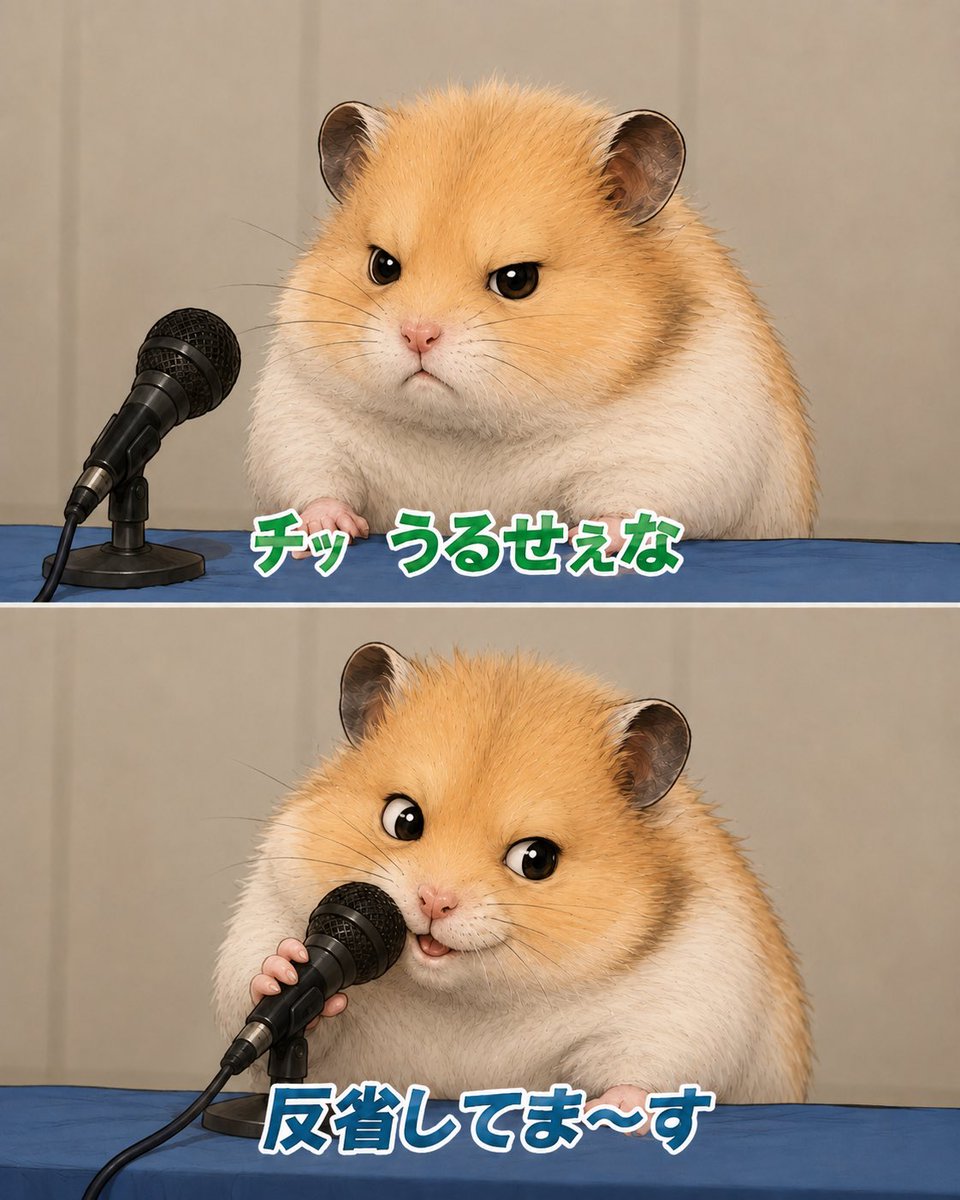
Apologizing Hamster Meme
Creates a two-panel Japanese meme-style image of a fluffy hamster giving a sarcastic press conference apology.
Il s'agit d'un exemple de visuel pour la catégorie { GPT Image 2 Illustration et art . Utilisez le visuel ci-dessous pour générer des éléments visuels similaires et vérifiez les conditions d'utilisation (attribution Awesome GPT Image 2 Prompts et droits d'utilisation commerciale) avant toute réutilisation.
Besoin de l'ensemble complet des invites ? Utilisez le Illustration et art Consultez le centre thématique pour plus d'exemples connexes, ou ouvrez le GPT Image 2 catalogue rapide pour l'index complet des exemples, les structures réutilisables et l'attribution des sources.
Free 1K preview
Generate one preview image instantly, no sign-up required.
2236/4000
Prompt
invite prête à être copiée
Goal: Create a cute two-panel vertical meme image featuring the same fluffy golden-and-white hamster at a press conference table, apologizing into a microphone.

Canvas: Square-to-portrait social media format, about 4:5 ratio, split horizontally into exactly 2 equal panels with a thin white divider line between them. Use realistic-but-adorable animal rendering with soft studio lighting, shallow depth of field, and a beige curtain backdrop.

Layout: Both panels show a blue tablecloth across the bottom third, beige curtain background, and a black wired handheld microphone on a small desk stand at the left side. The hamster is centered-right, large and close-up, with golden fur on the head and back, white cheeks and body, round ears, glossy black eyes, tiny pink nose, and visible little paws resting on the table.

Panel 1: The hamster looks annoyed and unimpressed, facing forward with narrowed eyes and a small stern mouth. The microphone sits to the hamster’s left, angled toward it but not being touched. Add bold Japanese meme text along the lower center of this panel reading {argument name="top caption" default="チッ うるせぇな"}. Style the text as thick rounded characters, green fill, white outline, subtle dark shadow.

Panel 2: The same hamster now leans toward the microphone and holds it with one tiny paw, looking performatively cheerful and apologetic with wide eyes and a small open smiling mouth. Add bold Japanese meme text along the lower center reading {argument name="bottom caption" default="反省してま〜す"}. Style this text as thick rounded characters, blue fill, white outline, subtle dark shadow.

Subject details: Use a hamster with {argument name="fur color" default="golden orange and white"} plush fur, highly detailed individual hairs, small whiskers, soft chubby body, and expressive cartoon-like eyes while keeping the rest photorealistic. The microphone is black with a metal mesh grille, cable trailing off the lower left, and a compact black stand.

Visual style: Japanese internet meme screenshot, realistic cute animal parody of a press apology conference, crisp focus on hamster and microphone, clean composition, no extra characters, no logos, no watermark, no additional text beyond the two captions.
Variables d'invite
Espaces réservés aux arguments modifiables présents dans l'invite, avec leurs valeurs par défaut.
Variable
top caption
Défaut
チッ うるせぇな
Variable
bottom caption
Défaut
反省してま〜す
Variable
fur color
Défaut
golden orange and white
Best for
- - Illustration et art visual exploration
- - Image generation and reference-image edits
- - Reusable briefs that keep source attribution visible
Change these parts
- - Subject, product, character, or scene
- - Aspect ratio, camera, lighting, and background
- - Brand, text, color, and output constraints
Recommended model and settings
- - Model: gpt-image-2
- - Input mode: Texte vers image
- - Aspect ratio: source
- - Commercial status: review original source
How to use this prompt
- 1. Copy the prompt and preserve its structure for the first test.
- 2. Replace the subject, context, and publishing channel.
- 3. Change one camera, lighting, or style variable per iteration.
- 4. Inspect the output, source, text, and rights before reuse.
Limitations, source, and reuse cautions
- - Generated output is an editable draft, not factual, legal, or rights evidence.
- - Review the linked source, people, brands, logos, text, and third-party media before commercial use.
Importé de Awesome GPT Image 2 Prompts . L'attribution est requise. Le statut d'utilisation commerciale est allowed ; veuillez vérifier les droits d'auteur avant toute utilisation payante.
Plus de cas dans cette catégorie
Priorisé par catégorie, compatibilité du mode d'entrée, qualité et risque moindre.



Réutilisation et notes de source
Utilisez cette invite en toute sécurité après avoir prévisualisé le dossier.
- 1.Copiez l'invite ou ouvrez-la directement dans Dovoo avec le bouton de génération.
- 2.Ajustez les variables, le format d'image et les images de référence en fonction de votre cas d'utilisation.
- 3.Avant toute publication ou utilisation payante, vérifiez les droits d'auteur, les exigences d'attribution et les risques liés à la marque ou à l'image.