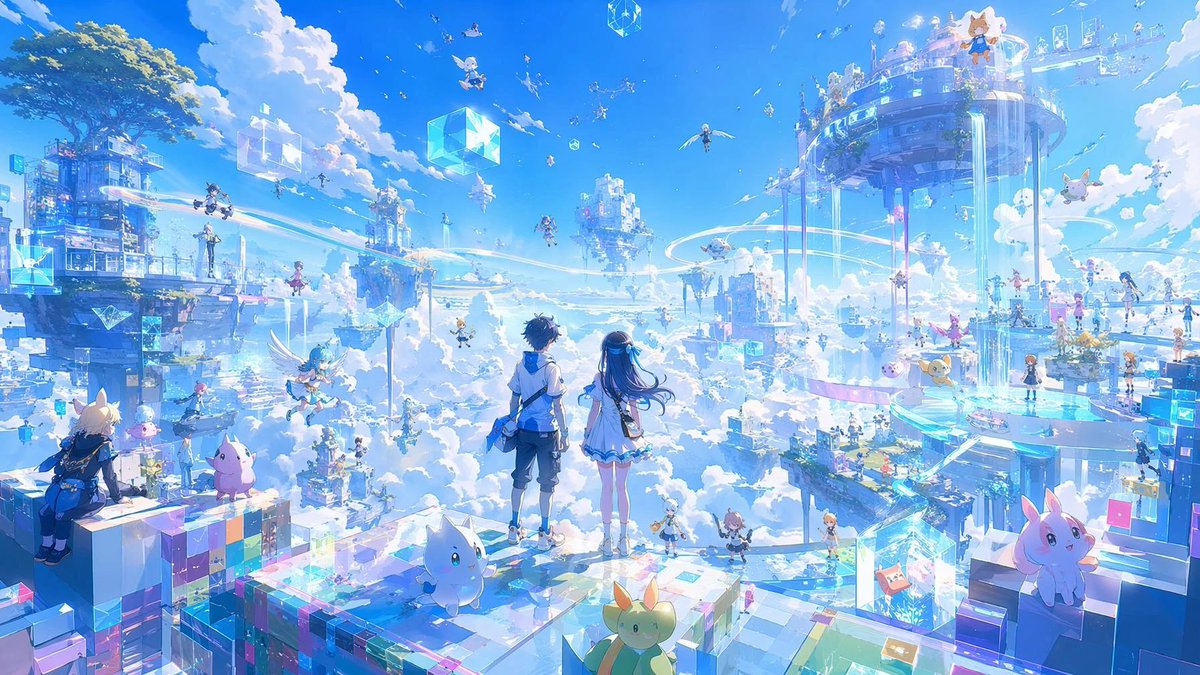
Anime Sky City Fantasy
Génère une scène panoramique de ville céleste fantastique de style anime, idéale pour les illustrations clés de films, les concepts de mondes de jeux ou les illustrations de science-fiction magiques.
Il s'agit d'un exemple de visuel pour la catégorie { GPT Image 2 Anime et jeux . Utilisez le visuel ci-dessous pour générer des éléments visuels similaires et vérifiez les conditions d'utilisation (attribution Awesome GPT Image 2 Prompts et droits d'utilisation commerciale) avant toute réutilisation.
Free 1K preview
Generate one preview image instantly, no sign-up required.
Prompt
invite prête à être copiée
Create a breathtaking ultra-wide anime fantasy illustration of a radiant sky city above the clouds, a futuristic magical floating metropolis made of transparent glass platforms, glowing cyan holographic cubes, pastel pixel blocks, suspended towers, and circular sky bridges. In the foreground, place {argument name="main characters" default="two anime teenagers, a boy and a girl"} standing from behind on a glassy prismatic platform, gazing over the vast world; the boy has short dark hair, a white-and-blue jacket, shorts, and boots, and the girl has long flowing dark blue hair, a white dress with blue trim, and a soft glowing accessory. Surround them with exactly 5 prominent cute mascot creatures in the foreground and near foreground: a small white cat-like creature at center front, a yellow-green rabbit-like creature at bottom center, a pink rabbit-cat creature on the right block, a pink blob creature on the left platform, and a small yellow floating creature near the right midground. Add at least 20 tiny anime adventurers scattered across platforms and flying through the sky, including winged characters, students, and miniature riders, plus exactly 4 large floating crystalline cubes visible in the sky and city. The environment should feel like a cheerful fantasy MMO hub in the clouds, with enormous floating islands on the left and right, a grand circular tower-city at upper right spilling vertical streams of light and water, smaller levitating buildings in the distance, luminous rail trails curving through the air, waterfalls of light, and sparkling particles. Use {argument name="color palette" default="brilliant sky blue, cyan, white, lavender, and pastel rainbow highlights"}, high-key daylight, huge fluffy cumulus clouds, clear saturated blue sky, shimmering reflections, iridescent glass, soft bloom, magical holographic UI-like fragments, and exquisite tiny details. Style: {argument name="art style" default="highly detailed anime key visual, fantasy sci-fi concept art"}, expansive cinematic composition, 16:9 aspect ratio, crisp linework blended with painterly lighting, joyful sense of wonder, no text, no logo, no watermark.Variables d'invite
Espaces réservés aux arguments modifiables présents dans l'invite, avec leurs valeurs par défaut.
Best for
- - Anime et jeux visual exploration
- - Image generation and reference-image edits
- - Reusable briefs that keep source attribution visible
Change these parts
- - Subject, product, character, or scene
- - Aspect ratio, camera, lighting, and background
- - Brand, text, color, and output constraints
Recommended model and settings
- - Model: gpt-image-2
- - Input mode: Texte vers image
- - Aspect ratio: source
- - Commercial status: review original source
How to use this prompt
- 1. Copy the prompt and preserve its structure for the first test.
- 2. Replace the subject, context, and publishing channel.
- 3. Change one camera, lighting, or style variable per iteration.
- 4. Inspect the output, source, text, and rights before reuse.
Limitations, source, and reuse cautions
- - Generated output is an editable draft, not factual, legal, or rights evidence.
- - Review the linked source, people, brands, logos, text, and third-party media before commercial use.
Plus de cas dans cette catégorie
Priorisé par catégorie, compatibilité du mode d'entrée, qualité et risque moindre.






Réutilisation et notes de source
Utilisez cette invite en toute sécurité après avoir prévisualisé le dossier.
- 1.Copiez l'invite ou ouvrez-la directement dans Dovoo avec le bouton de génération.
- 2.Ajustez les variables, le format d'image et les images de référence en fonction de votre cas d'utilisation.
- 3.Avant toute publication ou utilisation payante, vérifiez les droits d'auteur, les exigences d'attribution et les risques liés à la marque ou à l'image.