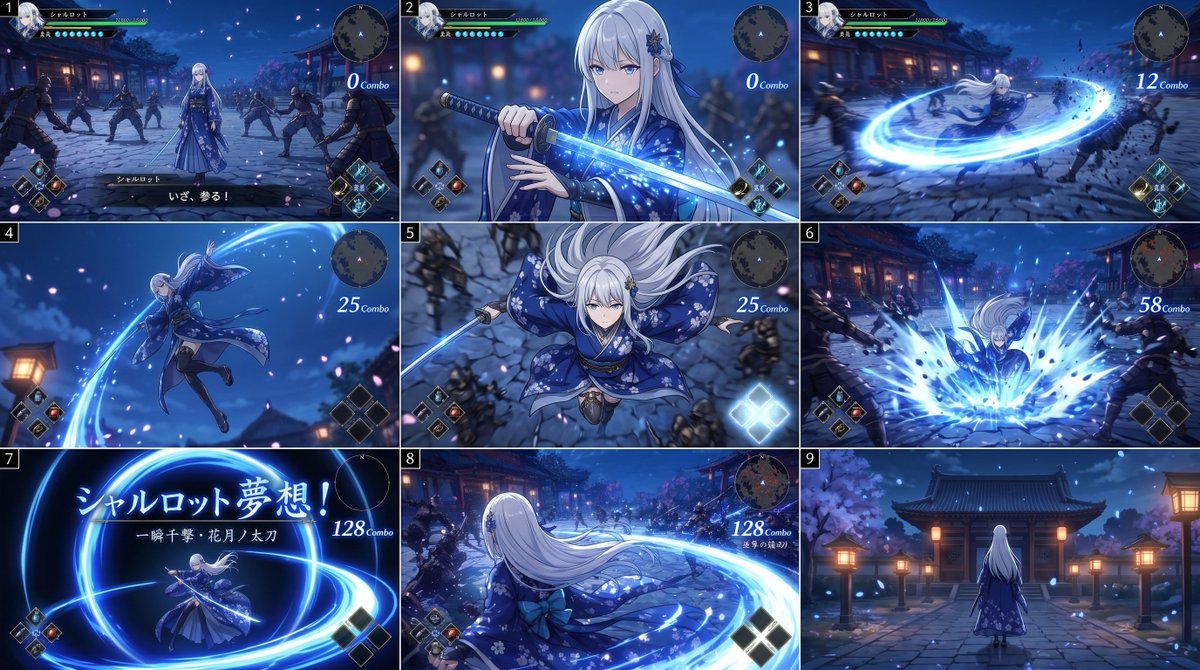
Storyboard d'attaque à l'épée d'un RPG d'anime
Un storyboard de jeu d'action en 9 panneaux montrant une élégante épéiste aux cheveux blancs exécutant un combo de katana lumineux dans la cour d'un temple japonais au clair de lune, utile pour les concepts artistiques cinématiques de jeux et les maquettes de combat intégrées à l'interface utilisateur.
Il s'agit d'un exemple de visuel pour la catégorie { GPT Image 2 Anime et jeux . Utilisez le visuel ci-dessous pour générer des éléments visuels similaires et vérifiez les conditions d'utilisation (attribution Awesome GPT Image 2 Prompts et droits d'utilisation commerciale) avant toute réutilisation.
Free 1K preview
Generate one preview image instantly, no sign-up required.
Prompt
invite prête à être copiée
{
  "type": "anime action game storyboard sheet",
  "style": "high-end Japanese action RPG cinematic storyboard, polished 3D anime rendering, dramatic blue night lighting, glowing sword effects, sakura petals, motion blur, fantasy samurai atmosphere",
  "subject": {
    "character": {
      "name": "{argument name=\"character name\" default=\"シャルロット\"}",
      "gender_presentation": "young woman",
      "hair": {
        "color": "{argument name=\"hair color\" default=\"silver white\"}",
        "style": "very long straight hair with soft bangs, floral hair ornament on one side"
      },
      "outfit": {
        "primary_color": "deep indigo blue",
        "description": "elegant floral kimono-inspired battle dress with long flowing sleeves, layered skirt, obi-style waist, patterned fabric with white blossoms and gold details"
      },
      "weapon": "katana with luminous blue blade"
    },
    "enemies": {
      "count": 8,
      "description": "black-clad ninja swordsmen surrounding her across the courtyard"
    }
  },
  "environment": {
    "location": "traditional Japanese temple courtyard at night",
    "details": [
      "stone paving",
      "wooden shrine buildings",
      "warm paper lanterns",
      "cherry blossom trees",
      "falling petals",
      "deep blue sky"
    ]
  },
  "ui": {
    "components": [
      "character status bar at top left",
      "circular minimap at top right",
      "skill icons at lower corners",
      "combo counter text on right side",
      "subtitle or move text in some panels"
    ]
  },
  "layout": {
    "grid": {
      "rows": 3,
      "columns": 3,
      "count": 9
    },
    "numbered_panels": true,
    "sections": [
      {
        "title": "1",
        "position": "top-left",
        "count": 1,
        "description": "wide gameplay view, the heroine stands centered in the temple courtyard while 8 ninja enemies encircle her; game HUD visible; dialogue text at bottom; combo counter reads 0"
      },
      {
        "title": "2",
        "position": "top-center",
        "count": 1,
        "description": "close-up of the heroine drawing or gripping the glowing katana in front of her chest, blue spark-like particles around the blade, confident pre-attack pose; combo counter reads 0"
      },
      {
        "title": "3",
        "position": "top-right",
        "count": 1,
        "description": "fast spinning horizontal slash, bright circular blue energy ring expands from her sword and knocks enemies back; combo counter reads 12"
      },
      {
        "title": "4",
        "position": "middle-left",
        "count": 1,
        "description": "dynamic midair leap, full-body side view, robe and long hair flowing, a sweeping blue arc trails from the blade; combo counter reads 25"
      },
      {
        "title": "5",
        "position": "middle-center",
        "count": 1,
        "description": "top-down action shot as she descends toward the ground with sword aimed downward, sleeves spread like wings, enemies below; combo counter reads 25"
      },
      {
        "title": "6",
        "position": "middle-right",
        "count": 1,
        "description": "impact frame, she lands and unleashes a large blue energy burst from the ground, enemies thrown outward by the shockwave; combo counter reads 58"
      },
      {
        "title": "7",
        "position": "bottom-left",
        "count": 1,
        "description": "special move title card on a dark blue background with luminous sword circles; large Japanese text includes the character name and attack title; combo counter reads 128",
        "visible_text": [
          "シャルロット夢想!",
          "一瞬十撃・花月ノ太刀",
          "128 Combo"
        ]
      },
      {
        "title": "8",
        "position": "bottom-center",
        "count": 1,
        "description": "rear three-quarter gameplay view, the heroine completes a huge sweeping circular slash across the courtyard, long white hair and kimono trailing behind, enemies scattered at distance; combo counter reads 128"
      },
      {
        "title": "9",
        "position": "bottom-right",
        "count": 1,
        "description": "quiet ending shot from behind, the heroine stands alone facing a temple gate and lanterns in the moonlit courtyard, petals drifting, no active combat motion"
      }
    ],
    "reading_order": "left to right, top to bottom"
  },
  "color_palette": {
    "dominant": [
      "midnight blue",
      "electric cyan",
      "silver white",
      "indigo",
      "lantern gold"
    ]
  },
  "camera_and_mood": "cinematic action storyboard progression from calm standoff to sword draw, spinning combo attack, aerial strike, finishing special move, then serene aftermath; each panel framed like game screenshots with visible HUD"
}
Variables d'invite
Espaces réservés aux arguments modifiables présents dans l'invite, avec leurs valeurs par défaut.
Best for
- - Anime et jeux visual exploration
- - Image generation and reference-image edits
- - Reusable briefs that keep source attribution visible
Change these parts
- - Subject, product, character, or scene
- - Aspect ratio, camera, lighting, and background
- - Brand, text, color, and output constraints
Recommended model and settings
- - Model: gpt-image-2
- - Input mode: Texte vers image
- - Aspect ratio: source
- - Commercial status: review original source
How to use this prompt
- 1. Copy the prompt and preserve its structure for the first test.
- 2. Replace the subject, context, and publishing channel.
- 3. Change one camera, lighting, or style variable per iteration.
- 4. Inspect the output, source, text, and rights before reuse.
Limitations, source, and reuse cautions
- - Generated output is an editable draft, not factual, legal, or rights evidence.
- - Review the linked source, people, brands, logos, text, and third-party media before commercial use.
Plus de cas dans cette catégorie
Priorisé par catégorie, compatibilité du mode d'entrée, qualité et risque moindre.






Réutilisation et notes de source
Utilisez cette invite en toute sécurité après avoir prévisualisé le dossier.
- 1.Copiez l'invite ou ouvrez-la directement dans Dovoo avec le bouton de génération.
- 2.Ajustez les variables, le format d'image et les images de référence en fonction de votre cas d'utilisation.
- 3.Avant toute publication ou utilisation payante, vérifiez les droits d'auteur, les exigences d'attribution et les risques liés à la marque ou à l'image.