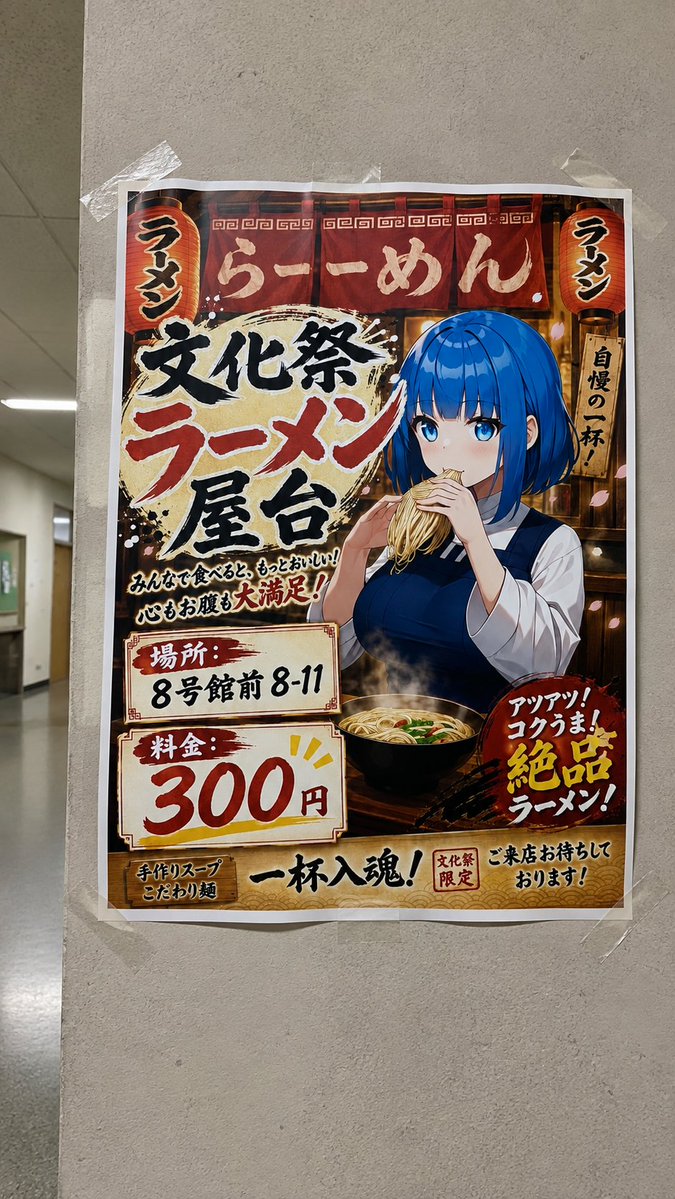
Taped Anime Ramen Festival Poster
Generates a realistic hallway photo of a Japanese school festival ramen poster featuring an anime girl eating noodles by hand.
Il s'agit d'un exemple de visuel pour la catégorie { GPT Image 2 Graphique et affiche . Utilisez le visuel ci-dessous pour générer des éléments visuels similaires et vérifiez les conditions d'utilisation (attribution Awesome GPT Image 2 Prompts et droits d'utilisation commerciale) avant toute réutilisation.
Besoin de l'ensemble complet des invites ? Utilisez le Graphique et affiche Consultez le centre thématique pour plus d'exemples connexes, ou ouvrez le GPT Image 2 catalogue rapide pour l'index complet des exemples, les structures réutilisables et l'attribution des sources.
Free 1K preview
Generate one preview image instantly, no sign-up required.
3186/4000
Prompt
invite prête à être copiée
Goal: Create a realistic smartphone photo of a printed Japanese school festival ramen stall poster taped to a gray concrete pillar in an indoor hallway. The image should look like a casual photo of a physical poster, not a flat digital design.

Canvas: Vertical 9:16 photo, slightly wide-angle phone perspective. The poster is centered and fills most of the frame, with visible hallway depth on the left, ceiling panels, fluorescent lighting, and a polished floor. The wall/pillar texture is rough beige-gray concrete. The poster has a white paper border and is attached with exactly 6 pieces of clear tape: top left, top center, top right, right middle, bottom left, and bottom center/right.

Poster layout: A busy, colorful Japanese festival flyer with a warm ramen-shop theme. Use red, cream, black, gold, and dark wood tones with brush textures, steam, lantern light, decorative borders, and energetic hand-painted typography. Include exactly 2 red paper lanterns, one at the upper left and one at the upper right, both labeled 「ラーメン」. Background shows a ramen stall interior with noren curtains, wood beams, and warm lights.

Main subject: On the right half of the poster, draw a polished anime-style schoolgirl with {argument name="hair color" default="bright cobalt blue"} bob-cut hair, blue eyes, pale skin, and a calm expression. She wears a navy sleeveless school uniform over a white blouse. She is eating ramen by hand: both hands hold a lifted bundle of noodles directly to her mouth, with no chopsticks visible. Below her is a black ramen bowl on a wooden counter, steaming, filled with noodles, broth, green onion, and toppings.

Text content: Recreate the poster with prominent Japanese text in a hand-painted festival style. Include these 13 visible text blocks: 1) top curtain headline 「らーめん」, 2) large main title 「文化祭」, 3) large red title 「ラーメン」, 4) large black title 「屋台」, 5) small slogan 「みんなで食べると、もっとおいしい!心もお腹も大満足!」, 6) location label 「場所:」, 7) location value 「8号館前 8-11」, 8) price label 「料金:」, 9) huge price 「300円」, 10) right vertical sign 「自慢の一杯!」, 11) red burst text 「アツアツ!コクうま!絶品ラーメン!」, 12) bottom left 「手作りスープ こだわり麺」, 13) bottom center/right 「一杯入魂!」「文化祭限定」「ご来店お待ちしております!」.

Customizable key values: Keep the main event as {argument name="event title" default="文化祭ラーメン屋台"}, the price as {argument name="price" default="300 yen"}, the location as {argument name="location" default="In front of Building 8, Rooms 8-11"}, and the food style as {argument name="food item" default="ramen"}.

Visual style: Blend high-quality anime illustration for the poster art with realistic photography for the environment. The poster paper should show slight wrinkles, creases, uneven edges, mild glare, and shadows from the tape. Make the Japanese typography bold, imperfect, and brushy, like a real student festival advertisement. Warm poster colors contrast with the dull institutional hallway.

Constraints: No chopsticks, fork, spoon, or utensils in the girl's hands. The noodles must be visibly grabbed by hand and raised to her mouth. Keep exactly 2 lanterns and 6 tape pieces. Do not add extra characters, QR codes, brand logos, watermarks, or English replacement text.
Variables d'invite
Espaces réservés aux arguments modifiables présents dans l'invite, avec leurs valeurs par défaut.
Variable
hair color
Défaut
bright cobalt blue
Variable
event title
Défaut
文化祭ラーメン屋台
Variable
price
Défaut
300 yen
Variable
location
Défaut
In front of Building 8, Rooms 8-11
Variable
food item
Défaut
ramen
Best for
- - Graphique et affiche visual exploration
- - Image generation and reference-image edits
- - Reusable briefs that keep source attribution visible
Change these parts
- - Subject, product, character, or scene
- - Aspect ratio, camera, lighting, and background
- - Brand, text, color, and output constraints
Recommended model and settings
- - Model: gpt-image-2
- - Input mode: Texte vers image
- - Aspect ratio: source
- - Commercial status: review original source
How to use this prompt
- 1. Copy the prompt and preserve its structure for the first test.
- 2. Replace the subject, context, and publishing channel.
- 3. Change one camera, lighting, or style variable per iteration.
- 4. Inspect the output, source, text, and rights before reuse.
Limitations, source, and reuse cautions
- - Generated output is an editable draft, not factual, legal, or rights evidence.
- - Review the linked source, people, brands, logos, text, and third-party media before commercial use.
Importé de Awesome GPT Image 2 Prompts . L'attribution est requise. Le statut d'utilisation commerciale est allowed ; veuillez vérifier les droits d'auteur avant toute utilisation payante.
Plus de cas dans cette catégorie
Priorisé par catégorie, compatibilité du mode d'entrée, qualité et risque moindre.

Manga Desert Radio Telescope Road Trip
Texte vers image

Android Quantum Lab Workstation
Texte vers image

Greyscale Puzzle Portrait with Color Accent
Texte vers image

Glitch Aesthetic Surreal Portrait
Texte vers image

Asymmetrical Realistic Human Face
Texte vers image

Y2K Style Photo Booth Collage
Texte vers image
Réutilisation et notes de source
Utilisez cette invite en toute sécurité après avoir prévisualisé le dossier.
- 1.Copiez l'invite ou ouvrez-la directement dans Dovoo avec le bouton de génération.
- 2.Ajustez les variables, le format d'image et les images de référence en fonction de votre cas d'utilisation.
- 3.Avant toute publication ou utilisation payante, vérifiez les droits d'auteur, les exigences d'attribution et les risques liés à la marque ou à l'image.