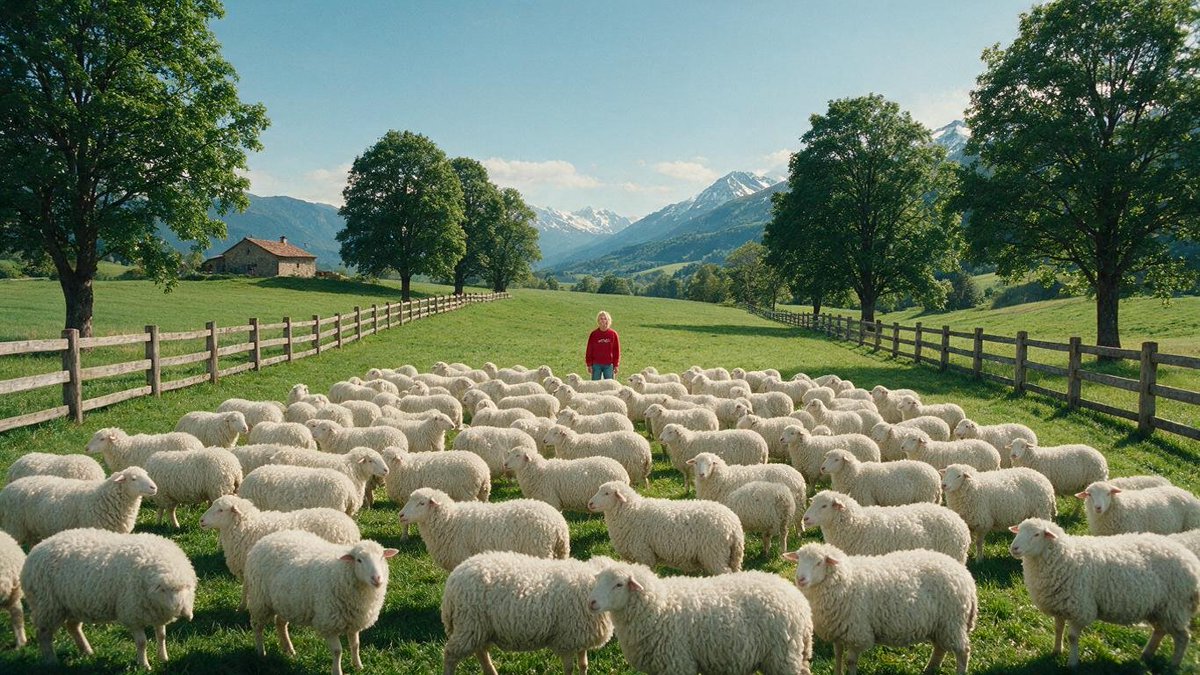
Alpine Meadow Sheep Flock
A photorealistic pastoral Alpine landscape featuring a child standing among a large flock of sheep, ideal for cinematic nature or rural scene generation.
Il s'agit d'un exemple de visuel pour la catégorie { GPT Image 2 Paysage et nature . Utilisez le visuel ci-dessous pour générer des éléments visuels similaires et vérifiez les conditions d'utilisation (attribution Awesome GPT Image 2 Prompts et droits d'utilisation commerciale) avant toute réutilisation.
Besoin de l'ensemble complet des invites ? Utilisez le Paysage et nature Consultez le centre thématique pour plus d'exemples connexes, ou ouvrez le GPT Image 2 catalogue rapide pour l'index complet des exemples, les structures réutilisables et l'attribution des sources.
Free 1K preview
Generate one preview image instantly, no sign-up required.
1201/4000
Prompt
invite prête à être copiée
Create a photorealistic wide-angle landscape scene in a bright Alpine meadow: a large flock of exactly 85 fluffy white sheep fills the foreground and middle ground, spread across lush green grass, with many sheep facing different directions and overlapping naturally. In the center background of the flock stands a small lone child wearing a {argument name="hoodie color" default="red"} hoodie and {argument name="pants color" default="teal blue"} pants, facing the camera calmly, partially surrounded by the animals. The pasture is bordered by two long rustic wooden rail fences, one on the left and one on the right, converging toward the distance to create strong depth. Include a small stone farmhouse with a reddish roof on the left hillside, rows of mature leafy green trees lining both sides of the meadow, and dramatic snow-capped mountains in the far background under a clear pale blue sky with a few soft clouds. Use {argument name="time of day" default="sunny late morning"} natural light, crisp shadows, soft atmospheric haze over the mountains, highly detailed grass and wool texture, realistic proportions, cinematic composition, 16:9 aspect ratio, no text, no watermark, no stylization.Variables d'invite
Espaces réservés aux arguments modifiables présents dans l'invite, avec leurs valeurs par défaut.
Variable
hoodie color
Défaut
red
Variable
pants color
Défaut
teal blue
Variable
time of day
Défaut
sunny late morning
Best for
- - Paysage et nature visual exploration
- - Image generation and reference-image edits
- - Reusable briefs that keep source attribution visible
Change these parts
- - Subject, product, character, or scene
- - Aspect ratio, camera, lighting, and background
- - Brand, text, color, and output constraints
Recommended model and settings
- - Model: gpt-image-2
- - Input mode: Texte vers image
- - Aspect ratio: source
- - Commercial status: review original source
How to use this prompt
- 1. Copy the prompt and preserve its structure for the first test.
- 2. Replace the subject, context, and publishing channel.
- 3. Change one camera, lighting, or style variable per iteration.
- 4. Inspect the output, source, text, and rights before reuse.
Limitations, source, and reuse cautions
- - Generated output is an editable draft, not factual, legal, or rights evidence.
- - Review the linked source, people, brands, logos, text, and third-party media before commercial use.
Importé de Awesome GPT Image 2 Prompts . L'attribution est requise. Le statut d'utilisation commerciale est allowed ; veuillez vérifier les droits d'auteur avant toute utilisation payante.
Plus de cas dans cette catégorie
Priorisé par catégorie, compatibilité du mode d'entrée, qualité et risque moindre.

MotoGP POV Cornering Shot
Texte vers image

Hiker in Red Jacket
Texte vers image

Luxury Travel Fashion Portrait Prompt
Texte vers image

Street Selfie with Cat in Matching Cap
Texte vers image

Gray Denim Lace-Up Top Prompt for GPT Image 2
Texte vers image

GPT Image 2 Prompt: Garden Dappled Light
Texte vers image
Réutilisation et notes de source
Utilisez cette invite en toute sécurité après avoir prévisualisé le dossier.
- 1.Copiez l'invite ou ouvrez-la directement dans Dovoo avec le bouton de génération.
- 2.Ajustez les variables, le format d'image et les images de référence en fonction de votre cas d'utilisation.
- 3.Avant toute publication ou utilisation payante, vérifiez les droits d'auteur, les exigences d'attribution et les risques liés à la marque ou à l'image.