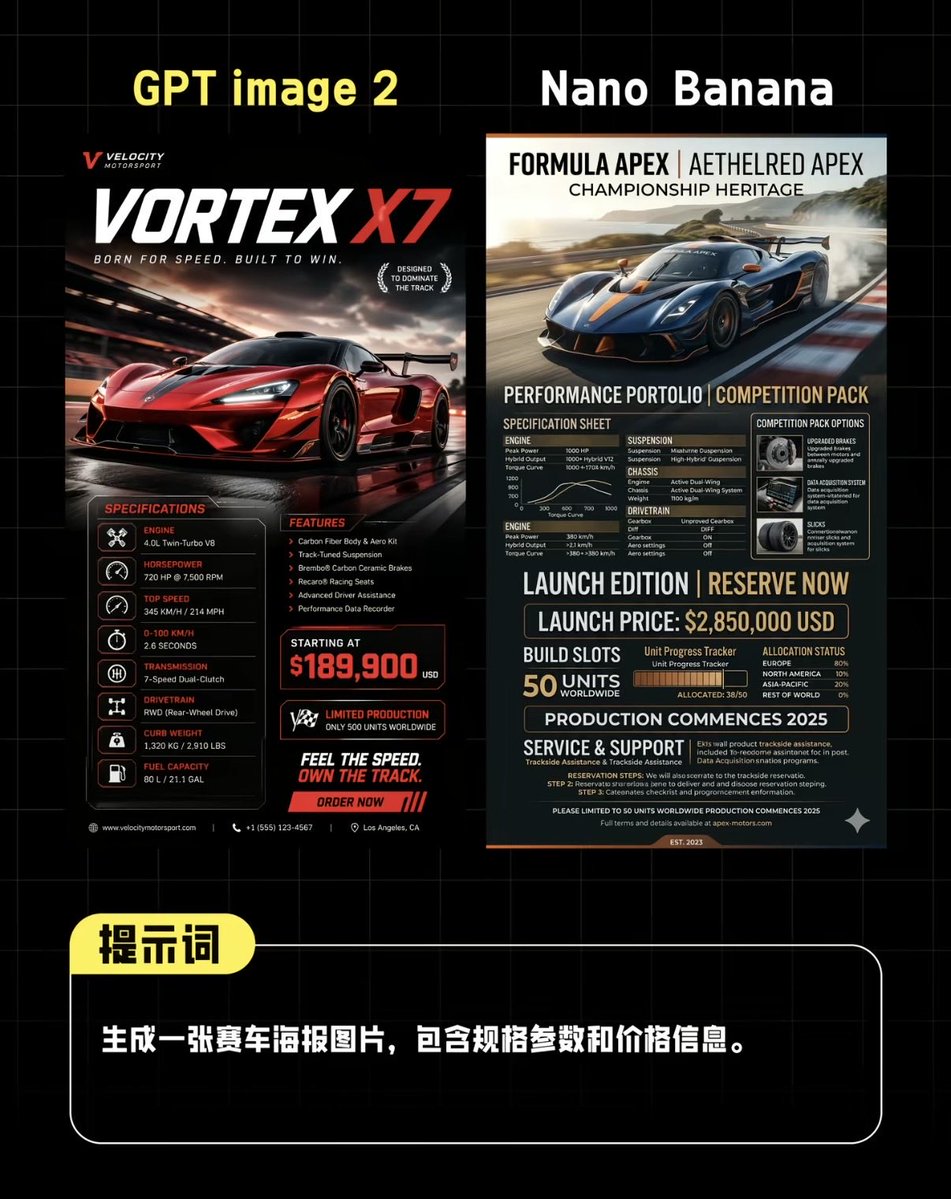
Comparaison d'affiches de supercars IA
Une image comparative côte à côte, de style réseaux sociaux, montrant deux affiches de course générées par IA au-dessus d'une boîte de dialogue en chinois, utile pour l'évaluation comparative des modèles d'images.
Il s'agit d'un exemple de visuel pour la catégorie { GPT Image 2 Graphique et affiche . Utilisez le visuel ci-dessous pour générer des éléments visuels similaires et vérifiez les conditions d'utilisation (attribution Awesome GPT Image 2 Prompts et droits d'utilisation commerciale) avant toute réutilisation.
Free 1K preview
Generate one preview image instantly, no sign-up required.
Prompt
invite prête à être copiée
Create a side-by-side comparison image on a black background with a light gray grid, in a style similar to benchmark posts on Chinese social media, for comparing two AI-generated supercar posters. Place 2 large headings at the top: “GPT image 2” in bold yellow text on the left, and “Nano Banana” in bold white text on the right. Below them, centered, display 2 different vertical racing car poster designs side-by-side with a narrow gap in between. The left poster should be presented in a high-end racing car advertisement style, using a black, red, and white color scheme, depicting a bright red supercar speeding on a wet track at dusk, with cinematic reflections, motion blur, and strong lighting effects. Add a small brand logo in the upper left corner, a large title “VORTEX X7” with “X7” in bright red, and subtitles such as “BORN FOR SPEED. BUILT TO WIN.” Add 2 laurel leaf-like badges to the right of the title area. In the lower half, include 3 content blocks: on the left, a “SPECIFICATIONS” column with 7 lines of lists containing icon symbols and labels, covering engine, horsepower, top speed, acceleration, transmission, drive system, curb weight, and compactly listing fuel capacity (if applicable) on the last line; in the middle, a “FEATURES” column with 5 key points; and a bold “PRICE” block displaying “STARTING AT” and a prominent red price displayed as {argument name="price" default="$189,900"}. Add 1 limited edition badge, 1 slogan block reading “FEEL THE SPEED. OWN THE TRACK.”, and 1 red call-to-action bar reading “ORDER NOW”. Use tiny footer details and micro-text in a contact information style along the bottom edge. The right poster should look more editorial and technical, using navy blue, charcoal gray, beige, and orange accents, depicting a deep blue supercar drifting on a track with smoke and landscape in the background. At the top, use a high-end magazine-style header with 3 stacked titles: “FORMULA APEX | AETHELRED APEX”, “CHAMPIONSHIP HERITAGE”, and a performance subtitle. In the lower half, create a dense specification sheet layout with 8 main sections: “SPECIFICATION SHEET”, “COMPETITION PACK OPTIONS”, “ENGINE”, “SUSPENSION”, “CHASSIS”, “DRIVETRAIN”, “LAUNCH EDITION | RESERVE NOW”, and “SERVICE & SUPPORT”. Include a small performance chart, a boxed options panel with 3 icon cards, a line displaying the launch price as {argument name="launch price" default="$2,850,000 USD"}, an area displaying a production quota of 50 units globally, a segmented bar for allocation or progress tracking, a line stating that production begins on {argument name="production year" default="2025"}, and dense, detailed technical specifications text. Below the two posters, add a rounded black prompt box with a white border spanning most of the width. Overlay a yellow rounded label in the upper left corner containing the Chinese characters “Prompt”. Inside the box, place a line of bold white Chinese text: {argument name="prompt text" default="Generate a racing car poster image, including specifications and pricing information."}. The overall composition should be a sophisticated social media AI image comparison screenshot, with sharp typography, high contrast, neat alignment, and realistic poster mock-up proportions.Variables d'invite
Espaces réservés aux arguments modifiables présents dans l'invite, avec leurs valeurs par défaut.
Best for
- - Graphique et affiche visual exploration
- - Image generation and reference-image edits
- - Reusable briefs that keep source attribution visible
Change these parts
- - Subject, product, character, or scene
- - Aspect ratio, camera, lighting, and background
- - Brand, text, color, and output constraints
Recommended model and settings
- - Model: gpt-image-2
- - Input mode: Texte vers image
- - Aspect ratio: source
- - Commercial status: review original source
How to use this prompt
- 1. Copy the prompt and preserve its structure for the first test.
- 2. Replace the subject, context, and publishing channel.
- 3. Change one camera, lighting, or style variable per iteration.
- 4. Inspect the output, source, text, and rights before reuse.
Limitations, source, and reuse cautions
- - Generated output is an editable draft, not factual, legal, or rights evidence.
- - Review the linked source, people, brands, logos, text, and third-party media before commercial use.
Plus de cas dans cette catégorie
Priorisé par catégorie, compatibilité du mode d'entrée, qualité et risque moindre.






Réutilisation et notes de source
Utilisez cette invite en toute sécurité après avoir prévisualisé le dossier.
- 1.Copiez l'invite ou ouvrez-la directement dans Dovoo avec le bouton de génération.
- 2.Ajustez les variables, le format d'image et les images de référence en fonction de votre cas d'utilisation.
- 3.Avant toute publication ou utilisation payante, vérifiez les droits d'auteur, les exigences d'attribution et les risques liés à la marque ou à l'image.