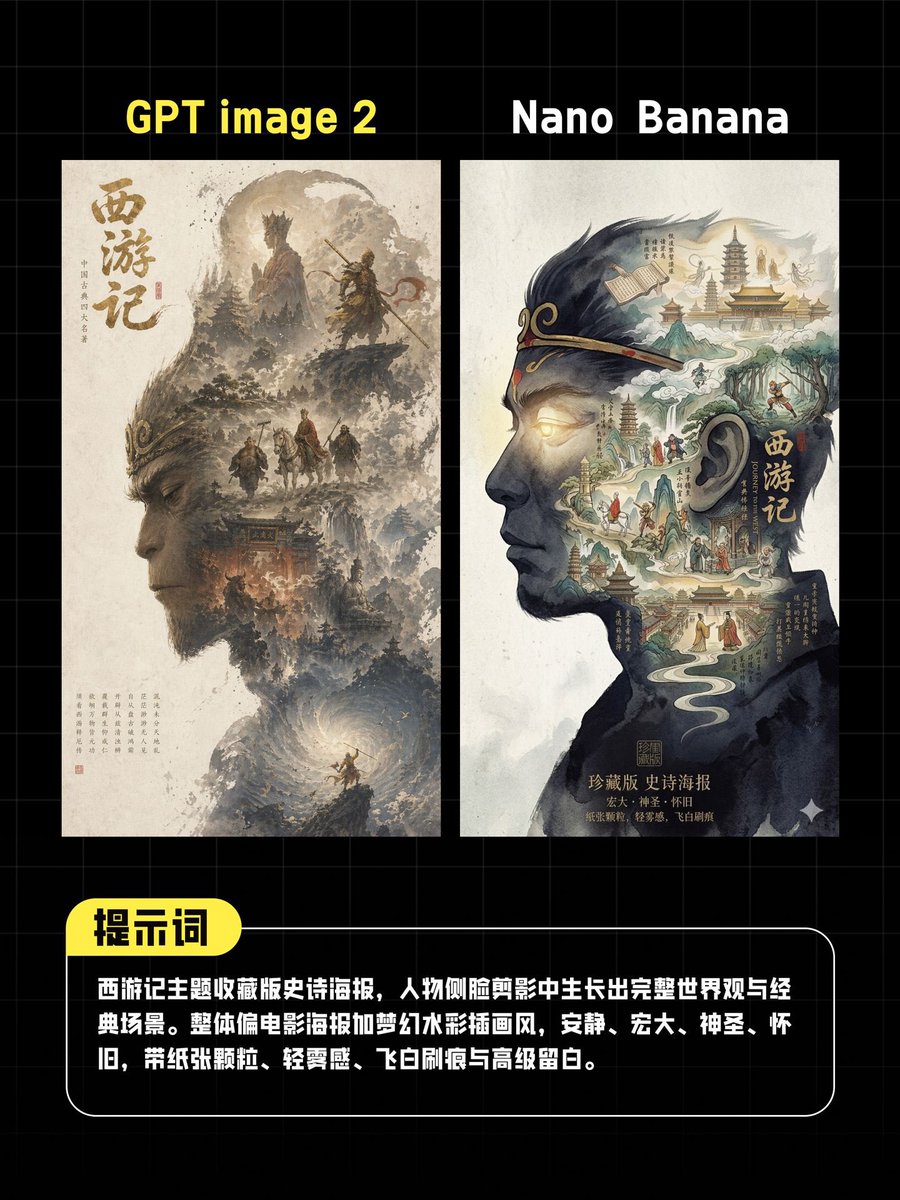
Comparaison d'affiches par IA (miniature)
Un graphique comparatif soigné pour les réseaux sociaux, présentant deux affiches côte à côte du film « La Pérégrination vers l'Ouest » avec des légendes chinoises, utile pour les publications de comparaison de modèles d'images IA ou les vignettes de critiques.
Il s'agit d'un exemple de visuel pour la catégorie { GPT Image 2 Graphique et affiche . Utilisez le visuel ci-dessous pour générer des éléments visuels similaires et vérifiez les conditions d'utilisation (attribution Awesome GPT Image 2 Prompts et droits d'utilisation commerciale) avant toute réutilisation.
Free 1K preview
Generate one preview image instantly, no sign-up required.
Prompt
invite prête à être copiée
A vertical social media comparison poster with a black background and subtle gray grid, designed in the style of a concise tech review chart. At the top are two large, side-by-side titles: bright yellow text “GPT image 2” on the left and white text “Nano Banana” on the right. Below the titles are two closely spaced, side-by-side high-fidelity poster mockups, both in an off-white paper style. The left mockup displays a traditional Chinese ink fantasy poster inspired by “Journey to the West,” with a large vertical Chinese calligraphy “Journey to the West” on the left side. The image includes soft brown and gray ink mountains, cliffs, clouds, temple architecture, and 4 miniature character silhouettes: 2 heroic figures on a rock ledge in the upper center, and 2 travelers at the bottom of the scene. A rotating, glowing cloud vortex appears at the bottom of the image. The right mockup displays a more graphic, surreal poster built within a left-facing head silhouette, filled with a Chinese fantasy landscape containing pagodas, streams, paths, and figures. The silhouette features a vertical title “Journey to the West” and is rendered in deep navy blue and black ink against a cream-colored paper background. A centered vertical rectangular blur block with soft edges and a gray-beige tone covers the middle area of both posters. At the bottom is a rounded-corner black description panel with a thin white border. A bright yellow capsule-shaped label with bold black Chinese characters “Prompt” is attached to the upper left corner. The bottom panel contains multiple lines of bold white Chinese text. The text should read: “Journey to the West themed collector’s edition epic poster, with a complete worldview and classic scenes growing out of a character profile silhouette. Overall style leans towards movie posters and dreamy watercolor illustrations, quiet, grand, sacred, nostalgic, with paper texture, light fog, flying white brushstrokes, and sophisticated negative space.” The overall style is a refined Chinese tech comparison thumbnail, high contrast, edited layout, centered composition, and a 4:5 vertical aspect ratio.
Best for
- - Graphique et affiche visual exploration
- - Image generation and reference-image edits
- - Reusable briefs that keep source attribution visible
Change these parts
- - Subject, product, character, or scene
- - Aspect ratio, camera, lighting, and background
- - Brand, text, color, and output constraints
Recommended model and settings
- - Model: gpt-image-2
- - Input mode: Texte vers image
- - Aspect ratio: source
- - Commercial status: review original source
How to use this prompt
- 1. Copy the prompt and preserve its structure for the first test.
- 2. Replace the subject, context, and publishing channel.
- 3. Change one camera, lighting, or style variable per iteration.
- 4. Inspect the output, source, text, and rights before reuse.
Limitations, source, and reuse cautions
- - Generated output is an editable draft, not factual, legal, or rights evidence.
- - Review the linked source, people, brands, logos, text, and third-party media before commercial use.
Plus de cas dans cette catégorie
Priorisé par catégorie, compatibilité du mode d'entrée, qualité et risque moindre.






Réutilisation et notes de source
Utilisez cette invite en toute sécurité après avoir prévisualisé le dossier.
- 1.Copiez l'invite ou ouvrez-la directement dans Dovoo avec le bouton de génération.
- 2.Ajustez les variables, le format d'image et les images de référence en fonction de votre cas d'utilisation.
- 3.Avant toute publication ou utilisation payante, vérifiez les droits d'auteur, les exigences d'attribution et les risques liés à la marque ou à l'image.