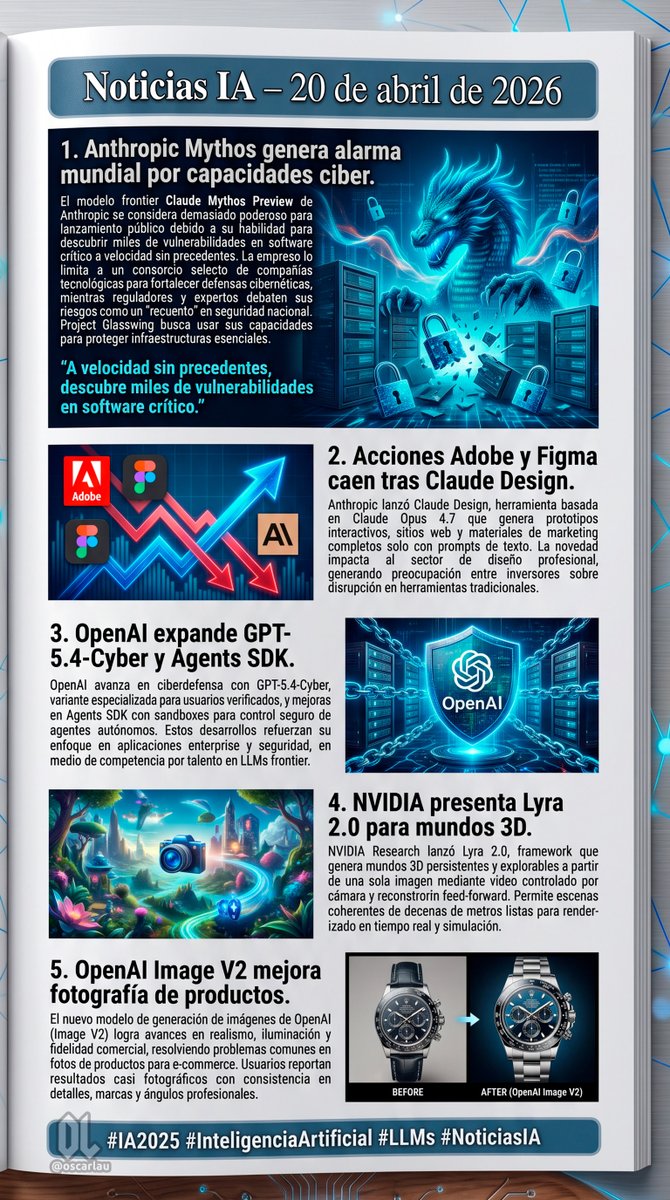
Mise en page de la newsletter AI News
Génère une page de newsletter numérique structurée comprenant 5 sections d'actualités distinctes, accompagnées d'illustrations thématiques et de blocs de texte.
Il s'agit d'un exemple de visuel pour la catégorie { GPT Image 2 Graphique et affiche . Utilisez le visuel ci-dessous pour générer des éléments visuels similaires et vérifiez les conditions d'utilisation (attribution Awesome GPT Image 2 Prompts et droits d'utilisation commerciale) avant toute réutilisation.
Free 1K preview
Generate one preview image instantly, no sign-up required.
Prompt
invite prête à être copiée
{
  "type": "digital newsletter page layout",
  "background": "white page resting on a dark surface with glowing blue digital nodes and connecting lines",
  "header": {
    "text": "{argument name=\"main headline\" default=\"Noticias IA – 20 de abril de 2026\"}",
    "style": "white text on a dark blue banner with a light blue border"
  },
  "layout": {
    "sections": [
      {
        "id": 1,
        "title": "{argument name=\"news item 1 title\" default=\"1. Anthropic Mythos genera alarma mundial por capacidades ciber.\"}",
        "image_description": "A glowing blue cyber dragon emerging from servers, surrounded by floating digital padlocks.",
        "layout_style": "Image on the right, title and text on the left, with a cyan pull quote at the bottom left."
      },
      {
        "id": 2,
        "title": "{argument name=\"news item 2 title\" default=\"2. Acciones Adobe y Figma caen tras Claude Design.\"}",
        "image_description": "A stylized stock chart showing jagged red arrows pointing down and a glowing blue arrow pointing up, featuring logos for Adobe, Figma, and an 'AI' icon.",
        "layout_style": "Image on the left, title and text on the right."
      },
      {
        "id": 3,
        "title": "{argument name=\"news item 3 title\" default=\"3. OpenAI expande GPT-5.4-Cyber y Agents SDK.\"}",
        "image_description": "A glowing blue holographic shield with the OpenAI logo in the center, surrounded by digital chains and a server background.",
        "layout_style": "Title and text on the left, image on the right."
      },
      {
        "id": 4,
        "title": "4. NVIDIA presenta Lyra 2.0 para mundos 3D.",
        "image_description": "A vibrant, surreal 3D fantasy landscape with glowing flora, floating islands, and a glowing blue camera icon in the foreground.",
        "layout_style": "Image on the left, title and text on the right."
      },
      {
        "id": 5,
        "title": "5. OpenAI Image V2 mejora fotografía de productos.",
        "image_description": "A side-by-side comparison of a luxury chronograph watch. The left side is labeled 'BEFORE' (darker, less detailed), and the right side is labeled 'AFTER (OpenAI Image V2)' (bright, highly detailed, professional lighting).",
        "layout_style": "Title and text on the left, image on the right."
      }
    ],
    "count": 5
  },
  "footer": {
    "text": "{argument name=\"footer hashtags\" default=\"#IA2025 #InteligenciaArtificial #LLMs #NoticiasIA\"}",
    "logo": "OL logo with '@oscarlau'",
    "style": "white text on a dark blue banner at the bottom"
  }
}
Variables d'invite
Espaces réservés aux arguments modifiables présents dans l'invite, avec leurs valeurs par défaut.
Best for
- - Graphique et affiche visual exploration
- - Image generation and reference-image edits
- - Reusable briefs that keep source attribution visible
Change these parts
- - Subject, product, character, or scene
- - Aspect ratio, camera, lighting, and background
- - Brand, text, color, and output constraints
Recommended model and settings
- - Model: gpt-image-2
- - Input mode: Texte vers image
- - Aspect ratio: source
- - Commercial status: review original source
How to use this prompt
- 1. Copy the prompt and preserve its structure for the first test.
- 2. Replace the subject, context, and publishing channel.
- 3. Change one camera, lighting, or style variable per iteration.
- 4. Inspect the output, source, text, and rights before reuse.
Limitations, source, and reuse cautions
- - Generated output is an editable draft, not factual, legal, or rights evidence.
- - Review the linked source, people, brands, logos, text, and third-party media before commercial use.
Plus de cas dans cette catégorie
Priorisé par catégorie, compatibilité du mode d'entrée, qualité et risque moindre.






Réutilisation et notes de source
Utilisez cette invite en toute sécurité après avoir prévisualisé le dossier.
- 1.Copiez l'invite ou ouvrez-la directement dans Dovoo avec le bouton de génération.
- 2.Ajustez les variables, le format d'image et les images de référence en fonction de votre cas d'utilisation.
- 3.Avant toute publication ou utilisation payante, vérifiez les droits d'auteur, les exigences d'attribution et les risques liés à la marque ou à l'image.