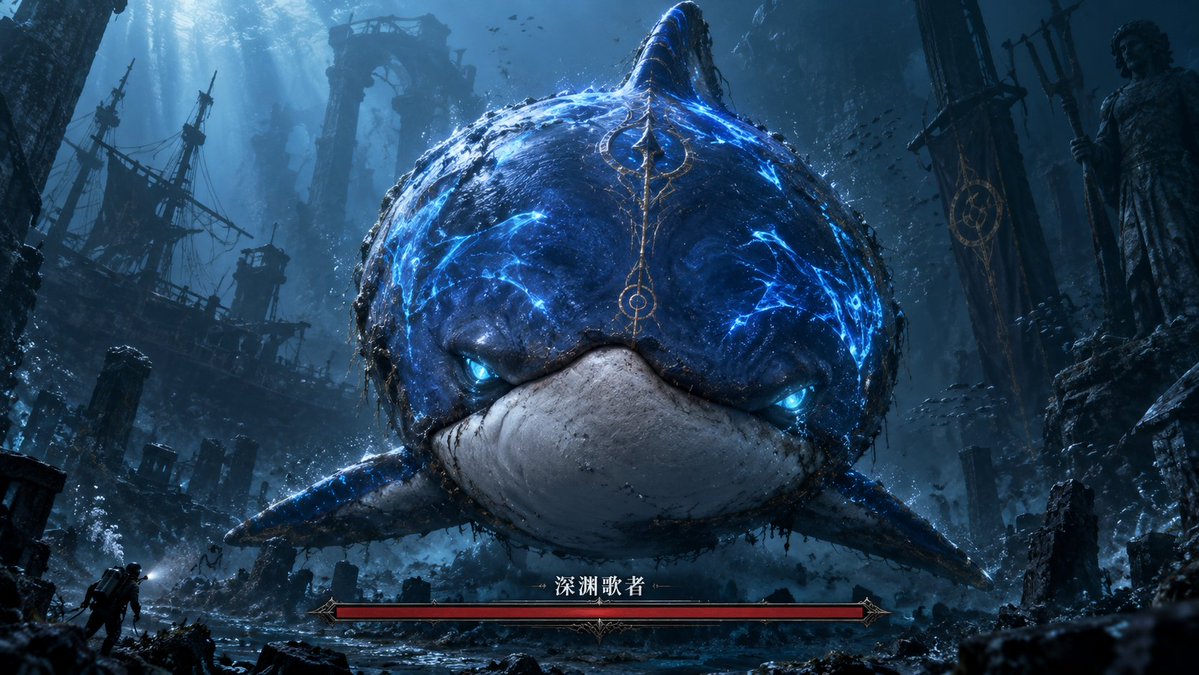
Abyssal Dolphin Boss Transformation
Transforms a simple dolphin sketch into a cinematic underwater dark-fantasy boss encounter with ruins and a game-style health bar.
Il s'agit d'un exemple de visuel pour la catégorie { GPT Image 2 Anime et jeux . Utilisez le visuel ci-dessous pour générer des éléments visuels similaires et vérifiez les conditions d'utilisation (attribution Awesome GPT Image 2 Prompts et droits d'utilisation commerciale) avant toute réutilisation.
Free 1K preview
Generate one preview image instantly, no sign-up required.
Free text preview doesn’t preserve reference-image consistency.
Prompt
invite prête à être copiée
Using the provided reference image as the rough silhouette and color guide, transform the simple blue dolphin sketch into a cinematic dark-fantasy underwater boss encounter. Keep the same front-facing rounded dolphin/whale-like body, central dorsal fin, side fins, blue upper body, and pale lower mouth area, but render it as a massive realistic sea monster with cracked glowing electric-blue markings, bioluminescent blue eyes, wet rough skin, barnacles, grime, and ornate ancient-gold markings running down the forehead.

Scene: Place the creature in a vast abyssal ruined city with dramatic blue shafts of light from above, floating debris, bubbles, schools of tiny fish, broken stone arches, pillars, statues, and a ruined shipwreck silhouette on the left. Add a tiny explorer/diver figure near the lower left to emphasize the monster's enormous scale. Make the composition widescreen and centered, with the monster looming directly toward the viewer.

Game UI addition: Add exactly 1 boss health bar at the bottom center: a long red bar in an ornate dark-metal fantasy frame, labeled in Chinese with {argument name="boss name" default="Abyssal Singer"}. Do not add any other UI panels.

Style: Ultra-detailed AAA game key art, dark souls-like fantasy atmosphere, underwater volumetric lighting, high contrast, moody teal-blue palette, cinematic realism, dramatic scale, sharp focus on the creature's face.

Customizable details: creature glow color {argument name="glow color" default="electric blue"}, environment theme {argument name="environment theme" default="abyssal ruined city"}, mood {argument name="mood" default="ominous and epic"}, aspect ratio {argument name="aspect ratio" default="16:9 widescreen"}.
Variables d'invite
Espaces réservés aux arguments modifiables présents dans l'invite, avec leurs valeurs par défaut.
Best for
- - Anime et jeux visual exploration
- - Image generation and reference-image edits
- - Reusable briefs that keep source attribution visible
Change these parts
- - Subject, product, character, or scene
- - Aspect ratio, camera, lighting, and background
- - Brand, text, color, and output constraints
Recommended model and settings
- - Model: gpt-image-2
- - Input mode: Image vers image
- - Aspect ratio: source
- - Commercial status: review original source
How to use this prompt
- 1. Copy the prompt and preserve its structure for the first test.
- 2. Replace the subject, context, and publishing channel.
- 3. Change one camera, lighting, or style variable per iteration.
- 4. Inspect the output, source, text, and rights before reuse.
Limitations, source, and reuse cautions
- - Generated output is an editable draft, not factual, legal, or rights evidence.
- - Review the linked source, people, brands, logos, text, and third-party media before commercial use.
Plus de cas dans cette catégorie
Priorisé par catégorie, compatibilité du mode d'entrée, qualité et risque moindre.






Réutilisation et notes de source
Utilisez cette invite en toute sécurité après avoir prévisualisé le dossier.
- 1.Copiez l'invite ou ouvrez-la directement dans Dovoo avec le bouton de génération.
- 2.Ajustez les variables, le format d'image et les images de référence en fonction de votre cas d'utilisation.
- 3.Avant toute publication ou utilisation payante, vérifiez les droits d'auteur, les exigences d'attribution et les risques liés à la marque ou à l'image.