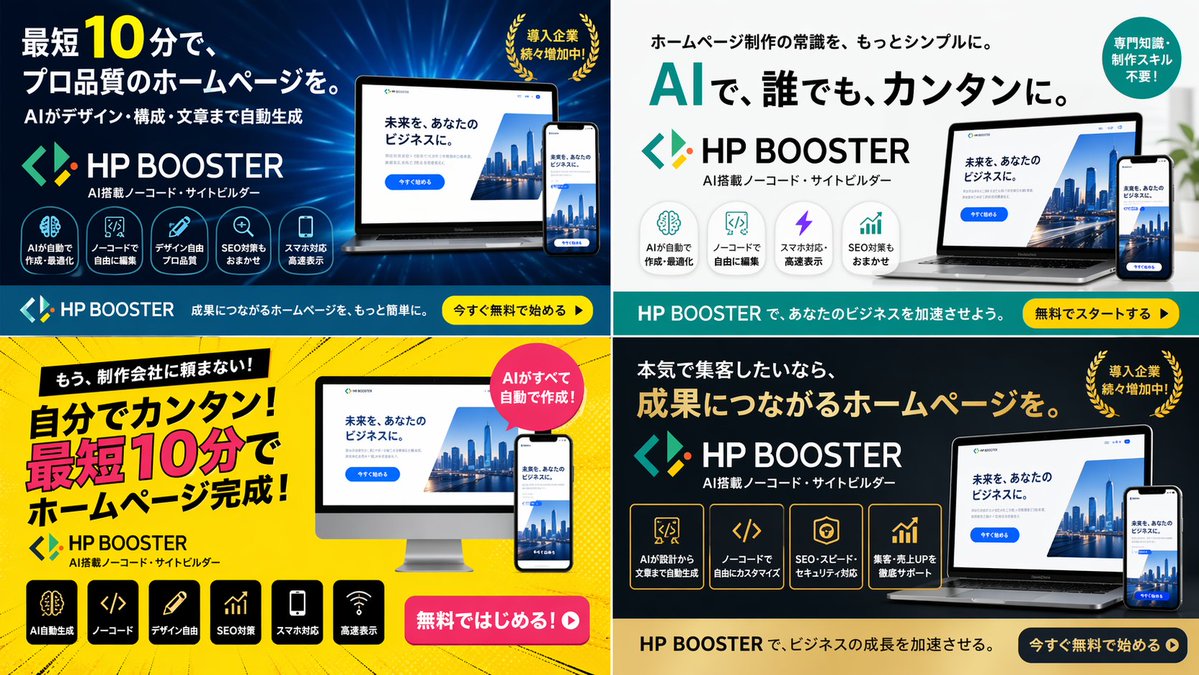
Variantes de bannières publicitaires SaaS à 4 panneaux
Génère une grille 2x2 de bannières publicitaires numériques pour un produit logiciel, présentant différents thèmes de couleurs, mises en page et variations de textes marketing.
Il s'agit d'un exemple de visuel pour la catégorie { GPT Image 2 Produit et commercial . Utilisez le visuel ci-dessous pour générer des éléments visuels similaires et vérifiez les conditions d'utilisation (attribution Awesome GPT Image 2 Prompts et droits d'utilisation commerciale) avant toute réutilisation.
Free 1K preview
Generate one preview image instantly, no sign-up required.
Prompt
invite prête à être copiée
{
  "type": "4-panel ad banner variation grid",
  "product": {
    "name": "{argument name=\"product name\" default=\"HP BOOSTER\"}",
    "subtitle": "AI搭載ノーコード・サイトビルダー",
    "logo": "blue and green angle brackets with a diamond"
  },
  "common_elements": {
    "device_mockups": "laptop and smartphone (desktop monitor in bottom-left panel) displaying a website with a city skyline, text '未来を、あなたのビジネスに。', and a blue '今すぐ始める' button"
  },
  "layout": {
    "grid": "2x2",
    "panels": [
      {
        "position": "top-left",
        "theme": "dark blue gradient with tech lines",
        "headline": "{argument name=\"main headline 1\" default=\"最短10分で、プロ品質のホームページを。\"}",
        "sub_headline": "AIがデザイン・構成・文章まで自動生成",
        "badge": "Golden laurel wreath with the text “The number of companies being introduced is steadily increasing!”",
        "icon_count": 5,
        "icon_labels": [
          "AIが自動で作成・最適化",
          "ノーコードで自由に編集",
          "デザイン自由プロ品質",
          "SEO対策もおまかせ",
          "スマホ対応高速表示"
        ],
        "bottom_bar": "teal background, yellow button '今すぐ無料で始める ▶'"
      },
      {
        "position": "top-right",
        "theme": "white and light gray",
        "headline": "{argument name=\"main headline 2\" default=\"AIで、誰でも、カンタンに。\"}",
        "pre_headline": "ホームページ制作の常識を、もっとシンプルに。",
        "badge": "teal circle with text '専門知識・制作スキル不要!'",
        "icon_count": 4,
        "icon_labels": [
          "AIが自動で作成・最適化",
          "ノーコードで自由に編集",
          "スマホ対応高速表示",
          "SEO対策もおまかせ"
        ],
        "bottom_bar": "teal background, yellow button '無料でスタートする ▶'"
      },
      {
        "position": "bottom-left",
        "theme": "bright yellow with comic-book action lines",
        "headline": "{argument name=\"main headline 3\" default=\"自分でカンタン!最短10分でホームページ完成!\"}",
        "pre_headline": "もう、制作会社に頼まない!",
        "badge": "pink circle with text 'AIがすべて自動で作成!'",
        "icon_count": 6,
        "icon_labels": [
          "AI automatic generation",
          "ノーコード",
          "デザイン自由",
          "SEO optimization",
          "スマホ対応",
          "Fast loading"
        ],
        "call_to_action": "pink pill button '無料ではじめる!▶'"
      },
      {
        "position": "bottom-right",
        "theme": "dark gray and black",
        "headline": "{argument name=\"main headline 4\" default=\"成果につながるホームページを。\"}",
        "pre_headline": "本気で集客したいなら、",
        "badge": "Golden laurel wreath with the text “The number of companies being introduced is steadily increasing!”",
        "icon_count": 4,
        "icon_labels": [
          "AIが設計から文章まで自動生成",
          "ノーコードで自由にカスタマイズ",
          "SEO・スピード・セキュリティ対応",
          "集客・売上UPを徹底サポート"
        ],
        "bottom_bar": "gold background, dark blue button '今すぐ無料で始める ▶'"
      }
    ]
  }
}
Variables d'invite
Espaces réservés aux arguments modifiables présents dans l'invite, avec leurs valeurs par défaut.
Best for
- - Produit et commercial visual exploration
- - Image generation and reference-image edits
- - Reusable briefs that keep source attribution visible
Change these parts
- - Subject, product, character, or scene
- - Aspect ratio, camera, lighting, and background
- - Brand, text, color, and output constraints
Recommended model and settings
- - Model: gpt-image-2
- - Input mode: Texte vers image
- - Aspect ratio: source
- - Commercial status: review original source
How to use this prompt
- 1. Copy the prompt and preserve its structure for the first test.
- 2. Replace the subject, context, and publishing channel.
- 3. Change one camera, lighting, or style variable per iteration.
- 4. Inspect the output, source, text, and rights before reuse.
Limitations, source, and reuse cautions
- - Generated output is an editable draft, not factual, legal, or rights evidence.
- - Review the linked source, people, brands, logos, text, and third-party media before commercial use.
Plus de cas dans cette catégorie
Priorisé par catégorie, compatibilité du mode d'entrée, qualité et risque moindre.






Réutilisation et notes de source
Utilisez cette invite en toute sécurité après avoir prévisualisé le dossier.
- 1.Copiez l'invite ou ouvrez-la directement dans Dovoo avec le bouton de génération.
- 2.Ajustez les variables, le format d'image et les images de référence en fonction de votre cas d'utilisation.
- 3.Avant toute publication ou utilisation payante, vérifiez les droits d'auteur, les exigences d'attribution et les risques liés à la marque ou à l'image.