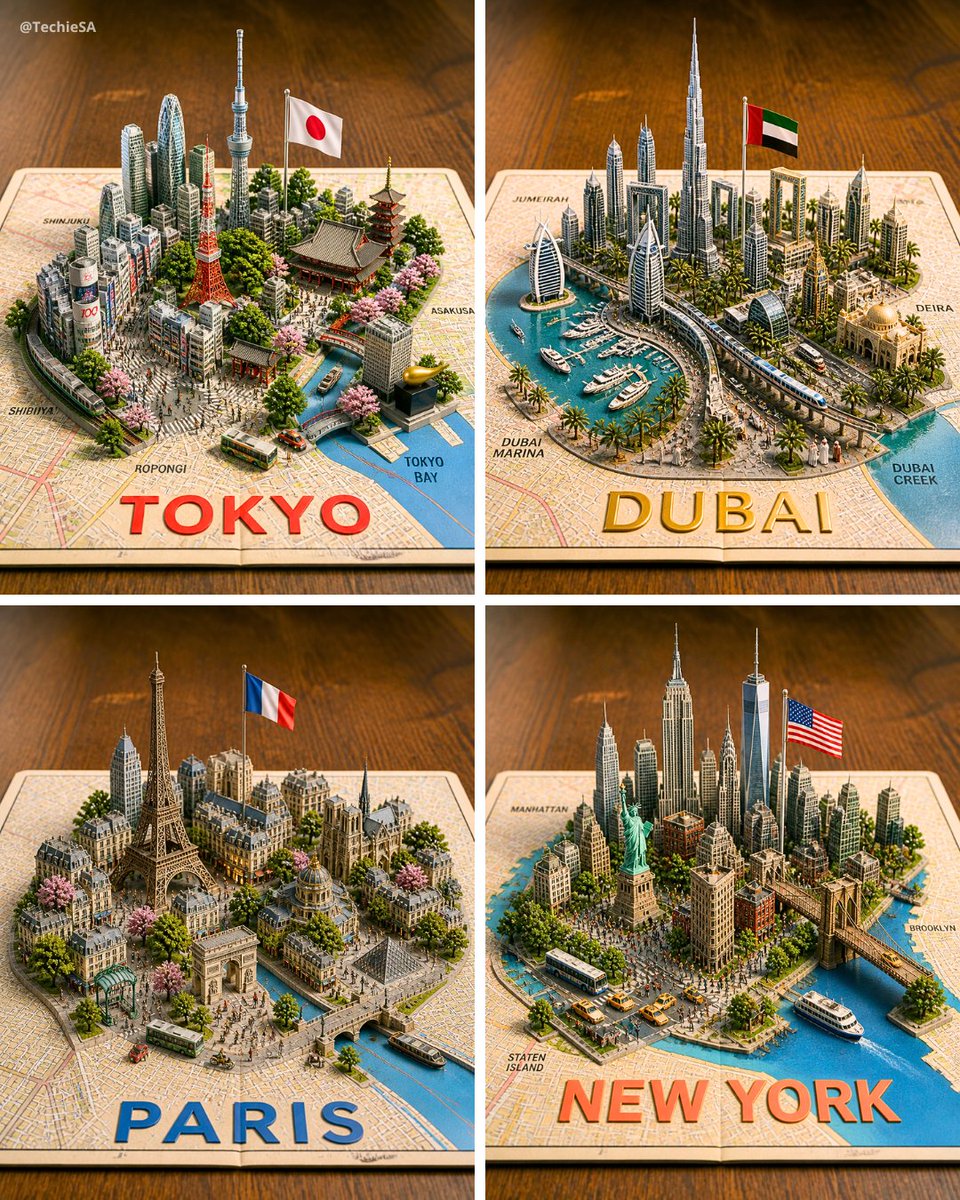
Four 3D Miniature City Maps
Generates a four-panel photorealistic 3D diorama of Tokyo, Dubai, Paris, and New York rising from printed maps for travel or city showcase visuals.
Il s'agit d'un exemple de visuel pour la catégorie { GPT Image 2 Paysage et nature . Utilisez le visuel ci-dessous pour générer des éléments visuels similaires et vérifiez les conditions d'utilisation (attribution Awesome GPT Image 2 Prompts et droits d'utilisation commerciale) avant toute réutilisation.
Besoin de l'ensemble complet des invites ? Utilisez le Paysage et nature Consultez le centre thématique pour plus d'exemples connexes, ou ouvrez le GPT Image 2 catalogue rapide pour l'index complet des exemples, les structures réutilisables et l'attribution des sources.
Free 1K preview
Generate one preview image instantly, no sign-up required.
3198/4000
Prompt
invite prête à être copiée
Goal: Create a photorealistic 3D miniature city-map showcase featuring exactly 4 square panels arranged in a 2×2 grid, each panel showing a famous world city as a raised diorama emerging from a printed paper street map on a warm wooden tabletop.

Canvas: Square image, evenly divided by thin white gutters into four equal quadrants. Use an isometric three-quarter view from above, shallow depth of field, warm studio lighting, crisp miniature details, and realistic shadows.

Layout: The 4 panels are: top-left Tokyo, top-right Dubai, bottom-left Paris, bottom-right New York. Each city sits on an open map sheet with a large bold city name printed along the bottom edge of its panel in bright color. Include small neighborhood labels on the map surface.

Panel 1 — Tokyo: Build a dense miniature Tokyo skyline with exactly 6 key recognizable landmarks: Tokyo Tower, Tokyo Skytree, a traditional pagoda, a large temple roof, a modern cluster of skyscrapers, and a canal leading to Tokyo Bay. Add a Japanese flag on a pole, cherry blossom trees, small buses, tiny streets, and map labels such as Shinjuku, Shibuya, Roppongi, Asakusa, and Tokyo Bay. Large bottom text: {argument name="Tokyo label" default="TOKYO"} in bold red letters.

Panel 2 — Dubai: Build a futuristic Dubai marina diorama with exactly 6 key recognizable elements: Burj Khalifa, Burj Al Arab, twin sail-like towers, Dubai Frame, a yacht-filled marina, and a curving elevated transit line. Add palm trees, modern high-rises, an Emirati flag on a pole, blue water, boats, and map labels such as Jumeira, Dubai Marina, Deira, and Dubai Creek. Large bottom text: {argument name="Dubai label" default="DUBAI"} in bold gold letters.

Panel 3 — Paris: Build a classic Paris miniature with exactly 6 key recognizable landmarks: Eiffel Tower, Arc de Triomphe, Notre-Dame-style cathedral, Louvre-like glass pyramid, Haussmann apartment blocks, and a Seine river with bridges. Add a French flag on a pole, tree-lined boulevards, pink blossoms, tiny buses, pedestrians, and warm stone architecture. Large bottom text: {argument name="Paris label" default="PARIS"} in bold blue letters.

Panel 4 — New York: Build a dense Manhattan miniature with exactly 6 key recognizable landmarks: Statue of Liberty, One World Trade Center, Empire State Building, Chrysler Building, Brooklyn Bridge, and a harbor with ferries. Add an American flag on a pole, yellow taxis, buses, crowded streets, waterfront piers, greenery, and map labels such as Manhattan, Brooklyn, and Staten Island. Large bottom text: {argument name="New York label" default="NEW YORK"} in bold orange-red letters.

Visual style: Hyper-detailed 3D paper-map diorama, realistic plastic-and-paper miniature scale model, tilt-shift photography effect, vibrant but natural colors, warm wooden background, soft bokeh at the edges, high-resolution commercial render quality.

Constraints: Keep exactly 4 panels and exactly the 4 city themes listed. Do not add extra cities. Keep all text legible, with the city names large and centered near the lower edge of each panel. Include a small creator watermark in the top-left corner reading {argument name="watermark text" default="@TechieSA"}.
Variables d'invite
Espaces réservés aux arguments modifiables présents dans l'invite, avec leurs valeurs par défaut.
Variable
Tokyo label
Défaut
TOKYO
Variable
Dubai label
Défaut
DUBAI
Variable
Paris label
Défaut
PARIS
Variable
New York label
Défaut
NEW YORK
Variable
watermark text
Défaut
@TechieSA
Best for
- - Paysage et nature visual exploration
- - Image generation and reference-image edits
- - Reusable briefs that keep source attribution visible
Change these parts
- - Subject, product, character, or scene
- - Aspect ratio, camera, lighting, and background
- - Brand, text, color, and output constraints
Recommended model and settings
- - Model: gpt-image-2
- - Input mode: Texte vers image
- - Aspect ratio: source
- - Commercial status: review original source
How to use this prompt
- 1. Copy the prompt and preserve its structure for the first test.
- 2. Replace the subject, context, and publishing channel.
- 3. Change one camera, lighting, or style variable per iteration.
- 4. Inspect the output, source, text, and rights before reuse.
Limitations, source, and reuse cautions
- - Generated output is an editable draft, not factual, legal, or rights evidence.
- - Review the linked source, people, brands, logos, text, and third-party media before commercial use.
Importé de Awesome GPT Image 2 Prompts . L'attribution est requise. Le statut d'utilisation commerciale est allowed ; veuillez vérifier les droits d'auteur avant toute utilisation payante.
Plus de cas dans cette catégorie
Priorisé par catégorie, compatibilité du mode d'entrée, qualité et risque moindre.

Cute Focus Desk Flat Lay and Kawaii Illustration
Texte vers image

Matte Black B.AI Keyboard Keycap
Texte vers image

Studio Portrait of Woman with Sunglasses
Texte vers image

Tuxedo Cat Photo and Line Art Diptych
Texte vers image

Orange Rooftop Fashion Photo Prompt
Texte vers image

Luxury Travel Fashion Portrait Prompt
Texte vers image
Réutilisation et notes de source
Utilisez cette invite en toute sécurité après avoir prévisualisé le dossier.
- 1.Copiez l'invite ou ouvrez-la directement dans Dovoo avec le bouton de génération.
- 2.Ajustez les variables, le format d'image et les images de référence en fonction de votre cas d'utilisation.
- 3.Avant toute publication ou utilisation payante, vérifiez les droits d'auteur, les exigences d'attribution et les risques liés à la marque ou à l'image.