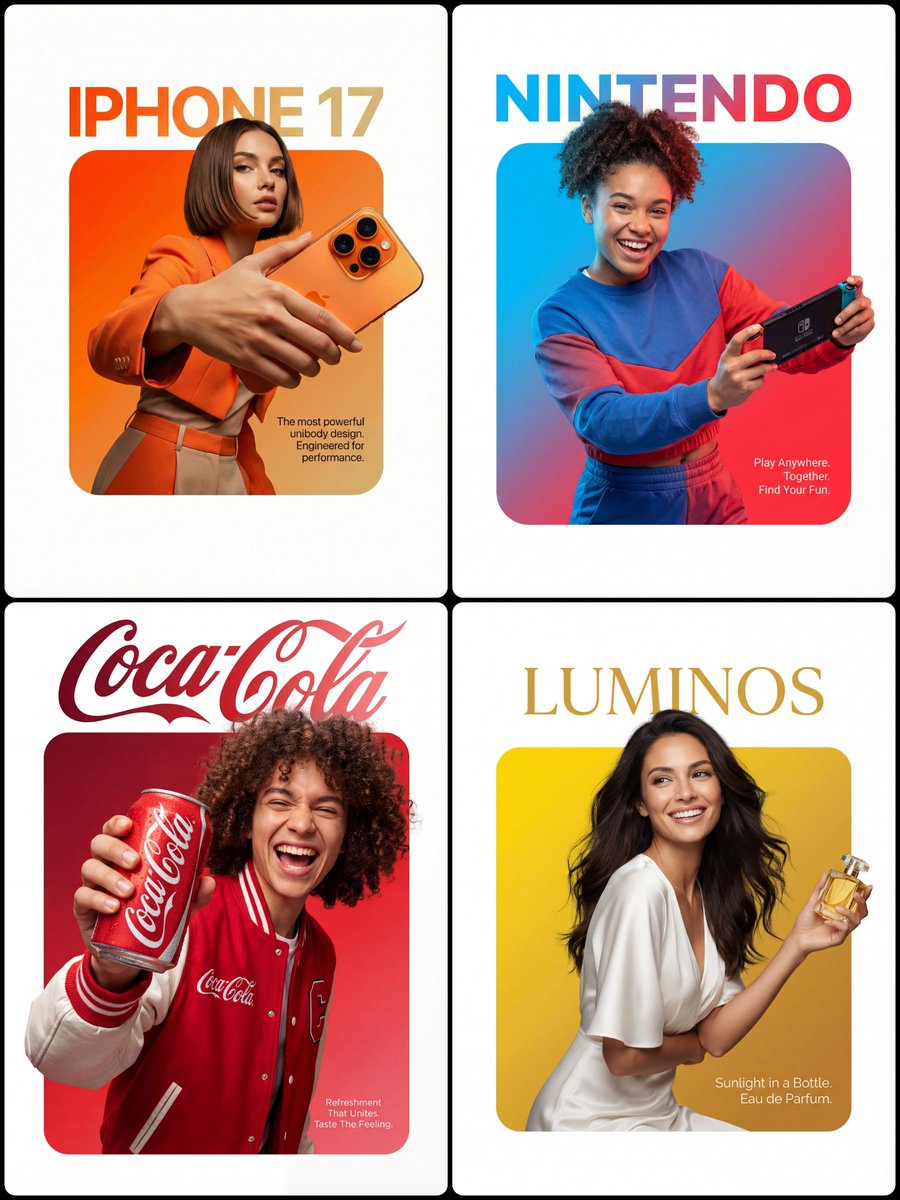
3D Breakout Effect Editorial Ad
A creative prompt for a premium advertising layout where the subject and product appear to break out of a central frame.
Il s'agit d'un exemple de visuel pour la catégorie { GPT Image 2 Produit et commercial . Utilisez le visuel ci-dessous pour générer des éléments visuels similaires et vérifiez les conditions d'utilisation (attribution Awesome GPT Image 2 Prompts et droits d'utilisation commerciale) avant toute réutilisation.
Besoin de l'ensemble complet des invites ? Utilisez le Produit et commercial Consultez le centre thématique pour plus d'exemples connexes, ou ouvrez le GPT Image 2 catalogue rapide pour l'index complet des exemples, les structures réutilisables et l'attribution des sources.
Free 1K preview
Generate one preview image instantly, no sign-up required.
1577/4000
Prompt
invite prête à être copiée
A sophisticated advertising layout featuring a clean white background. At the center is a perfectly symmetrical, solid, rounded-square shape (filled, not outlined) filled with a smooth and vibrant gradient transitioning from [Top Left Color/Hex Code] to [Bottom Right Color/Hex Code]. Position a {argument name="character description" default="Top-Left Color through to Bottom-Right Color"} so that the lower edge of their torso aligns with the bottom edge of the square, leaving no color bands below. The figure and clothing should maintain realistic colors and textures, lit with professional studio lighting completely separate from the background gradient, ensuring no color spill onto skin or clothing. They confidently and realistically hold {argument name="product" default="Description of Character"}. Crucially, the head and hair should extend beyond the top edge of the square and into the white area, while the hands and {argument name="product name" default="Product Description"} should also cross the sides, creating a strong 3D breakout effect, appearing to spill onto the canvas. Typography: Above the square, within the appropriate white space, place the {argument name="font style" default="Font style"} brand logo “[Brand Name]” in [Top Text Color]. Inside the square, in the bottom right corner, overlaid on the gradient, place a small, slender, and concise body of text in [Bottom Text Color] reading “[Slogan/Tagline]”. Lighting should be [Lighting Type: e.g., Sharp/Soft], clear and commercial, fully showcasing the texture of the person and the product.Variables d'invite
Espaces réservés aux arguments modifiables présents dans l'invite, avec leurs valeurs par défaut.
Variable
character description
Défaut
Top-Left Color through to Bottom-Right Color
Variable
product
Défaut
Description of Character
Variable
product name
Défaut
Product Description
Variable
font style
Défaut
Font style
Best for
- - Produit et commercial visual exploration
- - Image generation and reference-image edits
- - Reusable briefs that keep source attribution visible
Change these parts
- - Subject, product, character, or scene
- - Aspect ratio, camera, lighting, and background
- - Brand, text, color, and output constraints
Recommended model and settings
- - Model: gpt-image-2
- - Input mode: Texte vers image
- - Aspect ratio: source
- - Commercial status: review original source
How to use this prompt
- 1. Copy the prompt and preserve its structure for the first test.
- 2. Replace the subject, context, and publishing channel.
- 3. Change one camera, lighting, or style variable per iteration.
- 4. Inspect the output, source, text, and rights before reuse.
Limitations, source, and reuse cautions
- - Generated output is an editable draft, not factual, legal, or rights evidence.
- - Review the linked source, people, brands, logos, text, and third-party media before commercial use.
Importé de Awesome GPT Image 2 Prompts . L'attribution est requise. Le statut d'utilisation commerciale est allowed ; veuillez vérifier les droits d'auteur avant toute utilisation payante.
Plus de cas dans cette catégorie
Priorisé par catégorie, compatibilité du mode d'entrée, qualité et risque moindre.

Transparent Earbuds on Stone Pedestal
Texte vers image

Overhead Pepperoni Pizza Photo
Texte vers image

Wet Transparent Earbud Macro
Texte vers image

Fashion Studio Portrait with Blue Rim Lighting
Texte vers image

Spring Editorial Fashion Collage
Texte vers image

New Chinese-Style Editorial Portrait
Texte vers image
Réutilisation et notes de source
Utilisez cette invite en toute sécurité après avoir prévisualisé le dossier.
- 1.Copiez l'invite ou ouvrez-la directement dans Dovoo avec le bouton de génération.
- 2.Ajustez les variables, le format d'image et les images de référence en fonction de votre cas d'utilisation.
- 3.Avant toute publication ou utilisation payante, vérifiez les droits d'auteur, les exigences d'attribution et les risques liés à la marque ou à l'image.