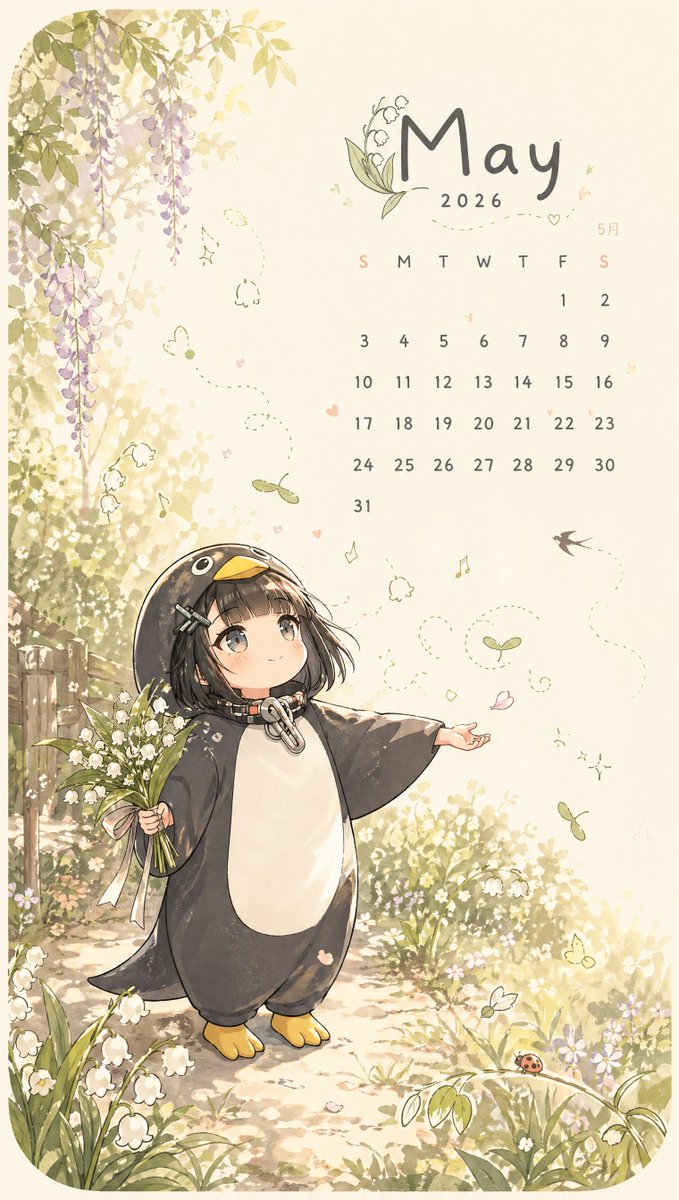
Calendario de primavera de mayo con un toque caprichoso
Una delicada ilustración de calendario mensual estilo anime con acuarela que muestra a un niño con un kigurumi de pingüino rodeado de lirios del valle y detalles de un jardín primaveral, ideal para papel tapiz imprimible o como arte para planificadores estacionales.
Este es un ejemplo GPT Image 2 para Diseño gráfico y carteles . Utilice la plantilla lista para copiar que aparece a continuación para generar imágenes similares y revise la atribución de Awesome GPT Image 2 Prompts y los derechos de uso comercial antes de reutilizarla.
Free 1K preview
Generate one preview image instantly, no sign-up required.
Prompt
Mensaje listo para copiar
This is a portrait-oriented illustration calendar page in a fantasy style, suitable for {argument name="month" default="May"} {argument name="year" default="2026"}, using a soft pastel watercolor anime style on warm-toned cream paper. The composition is visually divided into two parts: the left side features a lush spring natural landscape, and the upper right corner has a neat calendar layout. The image includes a young, Q-version anime girl with a black bob haircut, straight bangs, gray-brown large eyes, and a gentle smile, wearing an oversized penguin onesie. The onesie is mainly dark charcoal gray with a white belly, a yellow beak-shaped hood, small yellow feet, and a metal buckle at the neck. She stands next to a sunny garden path on the lower left side of the image, holding a bouquet of lily of the valley tied with a light pink ribbon in her left hand, and extending her right hand as if welcoming spring. She is surrounded by blooming lily of the valley, small white wildflowers, tender green plants, and dappled golden sunlight. The upper left side includes hanging purple wisteria vines, with a rustic wooden fence faintly visible behind the foliage. The page adds delicate fantasy floating details: dotted flight paths, 3 small butterflies, 3 floating green pods, 2 tiny musical notes, 1 flying swallow, scattered pink petals, and tiny heart doodles. The lower right corner contains 1 small red ladybug perched on a curved leaf. The calendar area should include a large month title in a handwritten style, with a small lily of the valley illustration integrated near the title, minimalist day-of-the-week abbreviations (S M T W T F S), and a neat 31-day calendar grid, with Sundays highlighted in a soft pink and the remaining dates in a soft gray. A small Japanese month label “5月” is also included near the calendar. Overall atmosphere: dreamy, pure, light, full of spring, picture book-like, elegant and comfortable, with light beige whitespace and delicate sketch lines.Variables de solicitud
Marcadores de posición de argumentos editables que se encuentran en la solicitud, con sus valores predeterminados.
Best for
- - Diseño gráfico y carteles visual exploration
- - Image generation and reference-image edits
- - Reusable briefs that keep source attribution visible
Change these parts
- - Subject, product, character, or scene
- - Aspect ratio, camera, lighting, and background
- - Brand, text, color, and output constraints
Recommended model and settings
- - Model: gpt-image-2
- - Input mode: Texto a imagen
- - Aspect ratio: source
- - Commercial status: review original source
How to use this prompt
- 1. Copy the prompt and preserve its structure for the first test.
- 2. Replace the subject, context, and publishing channel.
- 3. Change one camera, lighting, or style variable per iteration.
- 4. Inspect the output, source, text, and rights before reuse.
Limitations, source, and reuse cautions
- - Generated output is an editable draft, not factual, legal, or rights evidence.
- - Review the linked source, people, brands, logos, text, and third-party media before commercial use.
Más casos en esta categoría
Priorizados por categoría, compatibilidad con el modo de entrada, calidad y menor riesgo.






Notas sobre la reutilización y la fuente
Utilice esta opción de forma segura después de previsualizar el caso.
- 1.Copia la solicitud o ábrela directamente en Dovoo con el botón de generación.
- 2.Ajusta las variables, la relación de aspecto y las imágenes de referencia según tus necesidades.
- 3.Antes de publicar o utilizar el servicio de forma remunerada, verifique los derechos de autor, los requisitos de atribución y los riesgos relacionados con la marca o la imagen de la persona.