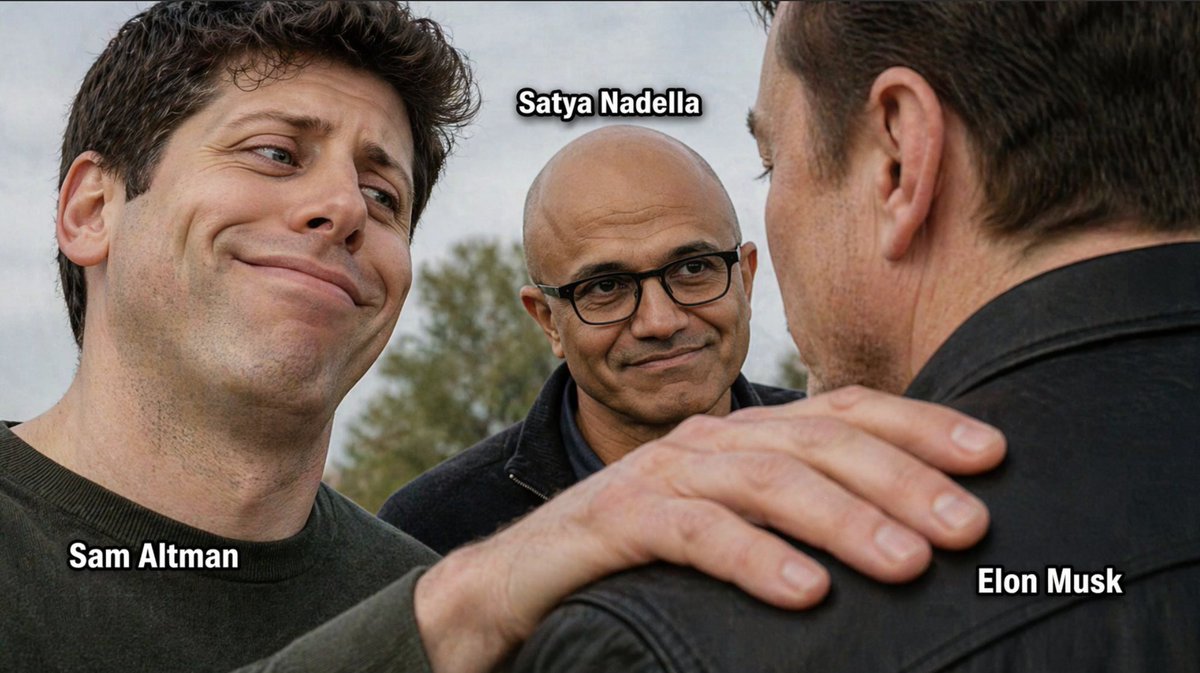
Foto meme del CEO de tecnología
Una foto grupal realista, al estilo de un meme, de tres líderes tecnológicos etiquetados, útil para recrear imágenes virales con comentarios sobre la dinámica de la industria de la IA.
Este es un ejemplo GPT Image 2 para Retrato y personaje . Utilice la plantilla lista para copiar que aparece a continuación para generar imágenes similares y revise la atribución de Awesome GPT Image 2 Prompts y los derechos de uso comercial antes de reutilizarla.
Free 1K preview
Generate one preview image instantly, no sign-up required.
Prompt
Mensaje listo para copiar
A photorealistic meme-style outdoor close-up of three tech CEOs standing together in a subtly tense but friendly composition. On the left foreground is {argument name="left person" default="Sam Altman"}, shown from the chest up, with short dark wavy hair, pale skin, a dark crewneck shirt, and an exaggerated smug, amused expression with raised eyebrows and a crooked smile, looking toward the man on the right. In the center background is {argument name="center person" default="Satya Nadella"}, bald, wearing black rectangular glasses and a dark jacket, calmly smiling and looking at the man on the right. On the right foreground is {argument name="right person" default="Elon Musk"}, seen mostly from the back and side profile, wearing a black leather jacket, with the center figure’s hand resting on his shoulder in a familiar, slightly possessive gesture. Use shallow depth of field, natural overcast daylight, blurred trees in the background, and a candid press-photo realism. Add exactly 3 bold white labels with thick black outline placed near each person: "{argument name="left label" default="Sam Altman"}" near the left figure, "{argument name="center label" default="Satya Nadella"}" above the center figure, and "{argument name="right label" default="Elon Musk"}" near the right figure. The overall mood should feel like an industry-insider meme, with subtle social dynamics and ironic facial expressions.Variables de solicitud
Marcadores de posición de argumentos editables que se encuentran en la solicitud, con sus valores predeterminados.
Best for
- - Retrato y personaje visual exploration
- - Image generation and reference-image edits
- - Reusable briefs that keep source attribution visible
Change these parts
- - Subject, product, character, or scene
- - Aspect ratio, camera, lighting, and background
- - Brand, text, color, and output constraints
Recommended model and settings
- - Model: gpt-image-2
- - Input mode: Texto a imagen
- - Aspect ratio: source
- - Commercial status: review original source
How to use this prompt
- 1. Copy the prompt and preserve its structure for the first test.
- 2. Replace the subject, context, and publishing channel.
- 3. Change one camera, lighting, or style variable per iteration.
- 4. Inspect the output, source, text, and rights before reuse.
Limitations, source, and reuse cautions
- - Generated output is an editable draft, not factual, legal, or rights evidence.
- - Review the linked source, people, brands, logos, text, and third-party media before commercial use.
Más casos en esta categoría
Priorizados por categoría, compatibilidad con el modo de entrada, calidad y menor riesgo.






Notas sobre la reutilización y la fuente
Utilice esta opción de forma segura después de previsualizar el caso.
- 1.Copia la solicitud o ábrela directamente en Dovoo con el botón de generación.
- 2.Ajusta las variables, la relación de aspecto y las imágenes de referencia según tus necesidades.
- 3.Antes de publicar o utilizar el servicio de forma remunerada, verifique los derechos de autor, los requisitos de atribución y los riesgos relacionados con la marca o la imagen de la persona.