SenseNova U1 Pro Landing Page
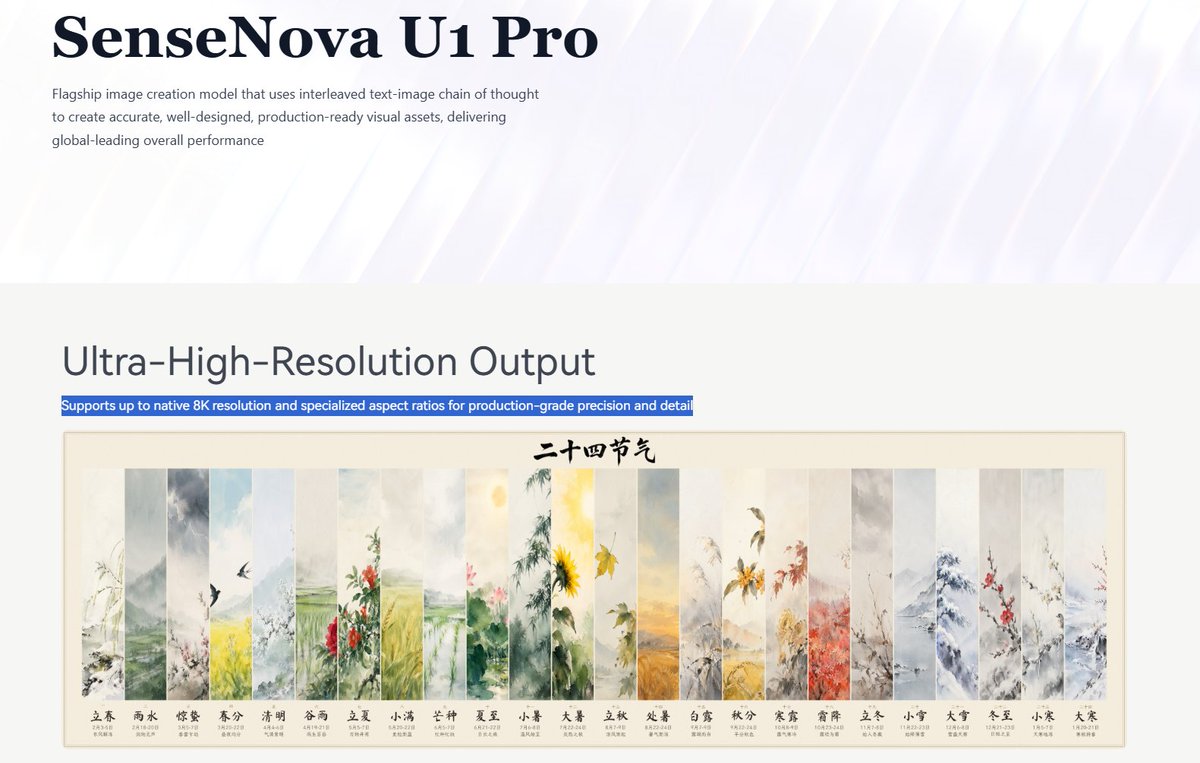
Creates a polished AI product landing-page screenshot featuring an 8K output section and a 24-panel Chinese solar terms artwork preview.
Este es un ejemplo GPT Image 2 para Producto y Comercial . Utilice la plantilla lista para copiar que aparece a continuación para generar imágenes similares y revise la atribución de Awesome GPT Image 2 Prompts y los derechos de uso comercial antes de reutilizarla.
¿Necesitas el conjunto completo de indicaciones? Usa el Producto y Comercial centro de temas para ver más ejemplos relacionados, o abra el GPT Image 2 catálogo de avisos Para ver el índice completo de ejemplos, las estructuras reutilizables y la atribución de fuentes.
Free 1K preview
Generate one preview image instantly, no sign-up required.
3639/4000
Prompt
Mensaje listo para copiar
Objective: Create a concise enterprise-level product landing page header and functional area for {argument name="product name" default="SenseNova U1 Pro"}, showcasing its ultra-high-resolution image generation model.

Canvas: Wide-screen 16:9 screenshot-style composition, approximately 1200x675 pixels, with ample whitespace, presenting a refined aesthetic of a technology company landing page.

Top Header: Use an extremely pale lavender to white background with a subtle translucent diagonal light beam sweeping from the upper right to the lower left. Place a very large, deep navy blue serif font title in the upper left corner, reading “{argument name="product name" default="SenseNova U1 Pro"}”. Below it, add a small-font gray sans-serif paragraph: “Flagship-level image creation model, employing an interleaved graphic-text chain of thought to create precise, well-designed, and production-ready visual assets, offering globally leading comprehensive performance.” Maintain transparency in the header, leaving most of the right side blank.

Functional Area: Below the header, transition to a light warm gray content area. Place a large, dark gray sans-serif title on the left, reading “{argument name="section heading" default="Flagship image creation model that uses interleaved text-image chain of thought to create accurate, well-designed, production-ready visual assets, delivering global-leading overall performance"}”. Directly below it, add a narrow blue highlight bar with white text reading “{argument name="highlight caption" default="Ultra-High-Resolution Output"}”.

Main Visual: Below the title, center a framed traditional Chinese ink painting poster with a fine rice-colored border and a cream-colored paper background. The top center of the poster contains black calligraphy text reading “Twenty-Four Solar Terms”. The poster consists of 24 identical narrow, long, vertical ink panels arranged horizontally, separated by light-colored boundaries, delicately depicting seasonal landscapes, flowers, rain, snow, birds, fields, bamboo forests, mountains, leaves, and flowers. From left to right, the 24 labeled panels are: 1 “Lichun” (early spring branches), 2 “Yushui” (mist and rain), 3 “Jingzhe” (birds and awakening spring), 4 “Chunfen” (yellow-green spring fields), 5 “Qingming” (elegant and refreshing landscape), 6 “Guyu” (red flowers and rain), 7 “Lixia” (lush greenery), 8 “Xiaoman” (green field texture), 9 “Mangzhong” (lotus flowers and wetland atmosphere), 10 “Xiazhi” (bright sunshine and sunflowers), 11 “Xiaoshu” (warm summer plants), 12 “Dashu” (golden heat waves and fields), 13 “Lichu” (fading plants), 14 “Chushu” (yellow autumn tones), 15 “Bailu” (morning dew and grass), 16 “Qiufen” (red-orange leaves), 17 “Hanlu” (golden flowers and cool air), 18 “Shuangjiang” (frost-covered branches), 19 “Lidong” (steady winter plants), 20 “Xiaoxue” (snowy mountains), 21 “Daxue” (thick snow and bluish-gray peaks), 22 “Dongzhi” (bare branches and cold landscape), 23 “Xiaohan” (red plum blossoms), and 24 “Dahan” (sparse frozen branches). Each panel includes its Chinese label and neat miniature date text below it.

Visual Style: A combination of minimalist modern SaaS page design and exquisite Chinese ink painting. Use clear typography, realistic screenshot spacing, soft navy/gray text, blue highlight selection bars, soft watercolor color schemes, and high-resolution sharpness.

Constraints: Retain the 24 solar term panels and their labels, do not add additional UI controls, do not include people, do not add logos except for the product name, no watermarks, and maintain a spacious web page layout.
Variables de solicitud
Marcadores de posición de argumentos editables que se encuentran en la solicitud, con sus valores predeterminados.
Variable
product name
Por defecto
SenseNova U1 Pro
Variable
section heading
Por defecto
Flagship image creation model that uses interleaved text-image chain of thought to create accurate, well-designed, production-ready visual assets, delivering global-leading overall performance
Variable
highlight caption
Por defecto
Ultra-High-Resolution Output
Best for
- - Producto y Comercial visual exploration
- - Image generation and reference-image edits
- - Reusable briefs that keep source attribution visible
Change these parts
- - Subject, product, character, or scene
- - Aspect ratio, camera, lighting, and background
- - Brand, text, color, and output constraints
Recommended model and settings
- - Model: gpt-image-2
- - Input mode: Texto a imagen
- - Aspect ratio: source
- - Commercial status: review original source
How to use this prompt
- 1. Copy the prompt and preserve its structure for the first test.
- 2. Replace the subject, context, and publishing channel.
- 3. Change one camera, lighting, or style variable per iteration.
- 4. Inspect the output, source, text, and rights before reuse.
Limitations, source, and reuse cautions
- - Generated output is an editable draft, not factual, legal, or rights evidence.
- - Review the linked source, people, brands, logos, text, and third-party media before commercial use.
Importado de Awesome GPT Image 2 Prompts . Se requiere atribución. El estado de uso comercial es allowed ; revise los derechos de la fuente antes de su uso comercial.
Más casos en esta categoría
Priorizados por categoría, compatibilidad con el modo de entrada, calidad y menor riesgo.






Notas sobre la reutilización y la fuente
Utilice esta opción de forma segura después de previsualizar el caso.
- 1.Copia la solicitud o ábrela directamente en Dovoo con el botón de generación.
- 2.Ajusta las variables, la relación de aspecto y las imágenes de referencia según tus necesidades.
- 3.Antes de publicar o utilizar el servicio de forma remunerada, verifique los derechos de autor, los requisitos de atribución y los riesgos relacionados con la marca o la imagen de la persona.