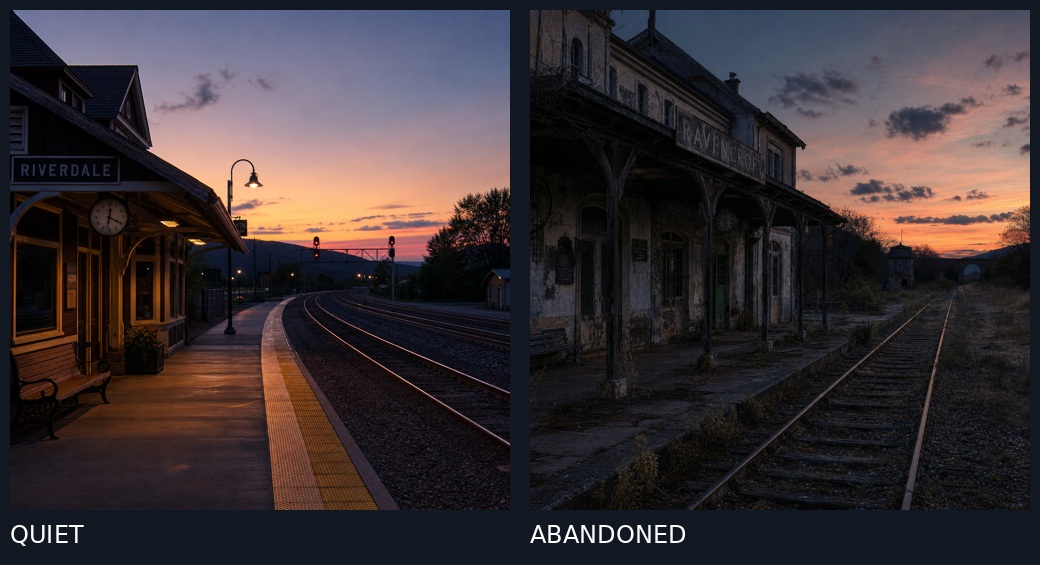
Quiet vs Abandoned Train Station Comparison
Generates a side-by-side comparison showing how changing one word from 'quiet' to 'abandoned' dramatically alters a train station scene at dusk, useful for demonstrating AI prompt sensitivity.
Este es un ejemplo GPT Image 2 para Paisaje y naturaleza . Utilice la plantilla lista para copiar que aparece a continuación para generar imágenes similares y revise la atribución de Awesome GPT Image 2 Prompts y los derechos de uso comercial antes de reutilizarla.
¿Necesitas el conjunto completo de indicaciones? Usa el Paisaje y naturaleza centro de temas para ver más ejemplos relacionados, o abra el GPT Image 2 catálogo de avisos Para ver el índice completo de ejemplos, las estructuras reutilizables y la atribución de fuentes.
Free 1K preview
Generate one preview image instantly, no sign-up required.
909/4000
Prompt
Mensaje listo para copiar
A split-screen comparison of two train station scenes at dusk, separated by a thin vertical line. Left panel: A quiet, well-maintained train station named "RIVERDALE" with warm yellow lighting under the platform canopy, a wooden bench, a round clock on the wall, clean concrete platform with yellow tactile paving edge, curved railway tracks leading into the distance, signal lights glowing red, and a vibrant sunset sky with orange and purple hues over distant hills. Right panel: An abandoned, dilapidated train station named "RAVENSBROOK" with peeling paint, broken windows, overgrown weeds and grass between cracked concrete platforms, rusted railway tracks, weathered wooden support beams, dark and eerie atmosphere, similar sunset sky but more muted and cloudy. Bottom labels: "QUIET" in white text on dark background beneath left image, "ABANDONED" in white text on dark background beneath right image.
Best for
- - Paisaje y naturaleza visual exploration
- - Image generation and reference-image edits
- - Reusable briefs that keep source attribution visible
Change these parts
- - Subject, product, character, or scene
- - Aspect ratio, camera, lighting, and background
- - Brand, text, color, and output constraints
Recommended model and settings
- - Model: gpt-image-2
- - Input mode: Texto a imagen
- - Aspect ratio: source
- - Commercial status: review original source
How to use this prompt
- 1. Copy the prompt and preserve its structure for the first test.
- 2. Replace the subject, context, and publishing channel.
- 3. Change one camera, lighting, or style variable per iteration.
- 4. Inspect the output, source, text, and rights before reuse.
Limitations, source, and reuse cautions
- - Generated output is an editable draft, not factual, legal, or rights evidence.
- - Review the linked source, people, brands, logos, text, and third-party media before commercial use.
Importado de Awesome GPT Image 2 Prompts . Se requiere atribución. El estado de uso comercial es allowed ; revise los derechos de la fuente antes de su uso comercial.
Más casos en esta categoría
Priorizados por categoría, compatibilidad con el modo de entrada, calidad y menor riesgo.

Notas sobre la reutilización y la fuente
Utilice esta opción de forma segura después de previsualizar el caso.
- 1.Copia la solicitud o ábrela directamente en Dovoo con el botón de generación.
- 2.Ajusta las variables, la relación de aspecto y las imágenes de referencia según tus necesidades.
- 3.Antes de publicar o utilizar el servicio de forma remunerada, verifique los derechos de autor, los requisitos de atribución y los riesgos relacionados con la marca o la imagen de la persona.