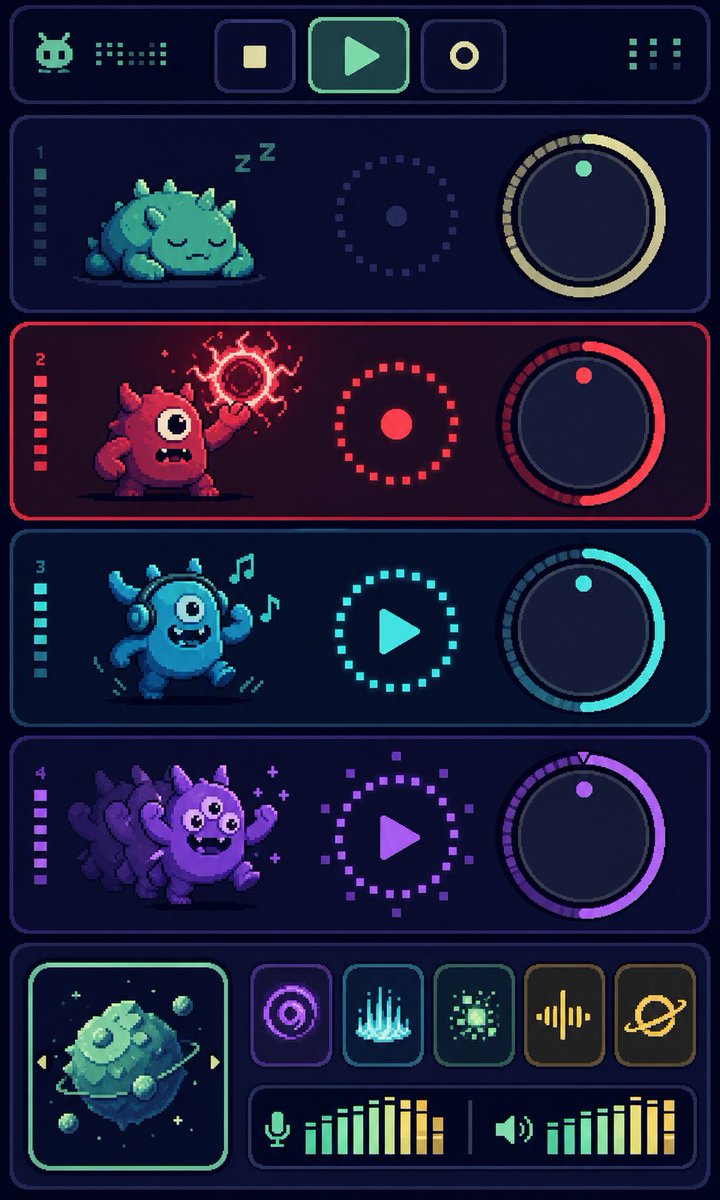
Pixel Monster Music Sequencer UI
Generates a vertical retro pixel-art synth dashboard with four monster tracks, knobs, transport controls, effects, and audio meters.
Este es un ejemplo GPT Image 2 para Anime y juegos . Utilice la plantilla lista para copiar que aparece a continuación para generar imágenes similares y revise la atribución de Awesome GPT Image 2 Prompts y los derechos de uso comercial antes de reutilizarla.
¿Necesitas el conjunto completo de indicaciones? Usa el Anime y juegos centro de temas para ver más ejemplos relacionados, o abra el GPT Image 2 catálogo de avisos Para ver el índice completo de ejemplos, las estructuras reutilizables y la atribución de fuentes.
Free 1K preview
Generate one preview image instantly, no sign-up required.
3896/4000
Prompt
Mensaje listo para copiar
Goal: Create a vertical pixel-art sci-fi music sequencer interface showing four cute monster audio tracks, like a retro game synth dashboard.

Canvas: Tall portrait mobile screen, 720×1200 style, dark navy background with glowing rounded rectangular panels and crisp pixel-art edges. Use a limited neon palette with cyan, mint, red, purple, and yellow accents. Everything should look like high-resolution pixel art, with subtle scanline/dither texture and no photorealism.

Layout: At the very top, create one wide rounded header bar. Inside it place exactly 6 discrete control/readout elements: 1 small alien/robot face icon on the left, 1 dotted equalizer readout beside it, 3 square transport buttons in the center showing stop, play, and record icons, and 1 dotted menu/grid indicator on the right.

Main track area: Stack exactly 4 horizontal rounded track panels, each with a left track number and a vertical level meter, a monster character on the left, a circular dotted status control in the middle, and a large rotary knob on the right.

Track 1: Label number “1”. Mint/teal theme. The creature is a sleepy squat round monster with small horns/spikes, closed eyes, lying down, with “Z Z” sleep marks above it. The middle control is a dotted circular ring with a small center dot. The right knob has a pale yellow arc and one mint indicator dot near the top.

Track 2: Label number “2”. Red theme. The creature is a red one-eyed monster standing aggressively, mouth open with teeth, one arm raised and casting a crackling magical red orb above its hand. The middle control is a red dotted ring with a solid red center dot. The right knob has a red arc and one red indicator dot.

Track 3: Label number “3”. Cyan theme. The creature is a blue dancing one-eyed monster wearing headphones, smiling with a toothy mouth, arms raised, with exactly 2 floating music notes near its head. The middle control is a cyan dotted circle containing a play triangle. The right knob has a cyan arc and one cyan indicator dot.

Track 4: Label number “4”. Purple theme. The creature is a purple energetic monster with multiple ghosted afterimage duplicates behind it, big eyes, waving arms, small sparkle marks around it. The middle control is a purple dotted circle containing a play triangle. The right knob has a purple arc and one purple indicator dot plus a tiny triangular tick at the top.

Bottom mixer section: Create one wide rounded bottom panel. On the left, include exactly 1 square album-art tile with a glowing mint border, showing a floating mossy cube planet or asteroid with small orbiting rocks and tiny stars. To the right of the album art, arrange exactly 5 square effect buttons in one row: 1 purple concentric-circle/radar icon, 1 cyan vertical waveform/spectrum icon, 1 green pixel burst icon, 1 yellow audio waveform icon, and 1 yellow ringed planet icon. Beneath those buttons, add exactly 2 horizontal audio meters: the left meter has a microphone icon followed by green-to-yellow vertical bars, and the right meter has a speaker icon followed by green-to-yellow vertical bars, separated by a thin vertical divider.

Text content: Only include the visible track numbers “1”, “2”, “3”, and “4”; do not add readable labels or words besides the two “Z” sleep marks. Use abstract pixel icons rather than detailed typography.

Style constraints: Retro 16-bit pixel-art UI, dark futuristic synth console, glowing outlines, rounded panels, clean symmetry, high contrast, playful monster characters, no watermark, no realistic 3D rendering. Make the main accent color palette customizable: {argument name="primary neon color" default="mint cyan"}, {argument name="danger track color" default="hot red"}, {argument name="party track color" default="purple"}, {argument name="background color" default="deep navy"}, {argument name="interface theme" default="retro monster music sequencer"}.
Variables de solicitud
Marcadores de posición de argumentos editables que se encuentran en la solicitud, con sus valores predeterminados.
Variable
primary neon color
Por defecto
mint cyan
Variable
danger track color
Por defecto
hot red
Variable
party track color
Por defecto
purple
Variable
background color
Por defecto
deep navy
Variable
interface theme
Por defecto
retro monster music sequencer
Best for
- - Anime y juegos visual exploration
- - Image generation and reference-image edits
- - Reusable briefs that keep source attribution visible
Change these parts
- - Subject, product, character, or scene
- - Aspect ratio, camera, lighting, and background
- - Brand, text, color, and output constraints
Recommended model and settings
- - Model: gpt-image-2
- - Input mode: Texto a imagen
- - Aspect ratio: source
- - Commercial status: review original source
How to use this prompt
- 1. Copy the prompt and preserve its structure for the first test.
- 2. Replace the subject, context, and publishing channel.
- 3. Change one camera, lighting, or style variable per iteration.
- 4. Inspect the output, source, text, and rights before reuse.
Limitations, source, and reuse cautions
- - Generated output is an editable draft, not factual, legal, or rights evidence.
- - Review the linked source, people, brands, logos, text, and third-party media before commercial use.
Importado de Awesome GPT Image 2 Prompts . Se requiere atribución. El estado de uso comercial es allowed ; revise los derechos de la fuente antes de su uso comercial.
Más casos en esta categoría
Priorizados por categoría, compatibilidad con el modo de entrada, calidad y menor riesgo.

Anime Girl Heterochromia Portrait
Texto a imagen

Cute Speech Bubble Mascot Profile Icon
Texto a imagen

Autumn Cozy Casual Outfit Prompt
Texto a imagen

Cute Focus Desk Flat Lay and Kawaii Illustration
Texto a imagen

Street Selfie with Cat in Matching Cap
Texto a imagen

Morning Bed Stretching Legs Prompt
Texto a imagen
Notas sobre la reutilización y la fuente
Utilice esta opción de forma segura después de previsualizar el caso.
- 1.Copia la solicitud o ábrela directamente en Dovoo con el botón de generación.
- 2.Ajusta las variables, la relación de aspecto y las imágenes de referencia según tus necesidades.
- 3.Antes de publicar o utilizar el servicio de forma remunerada, verifique los derechos de autor, los requisitos de atribución y los riesgos relacionados con la marca o la imagen de la persona.