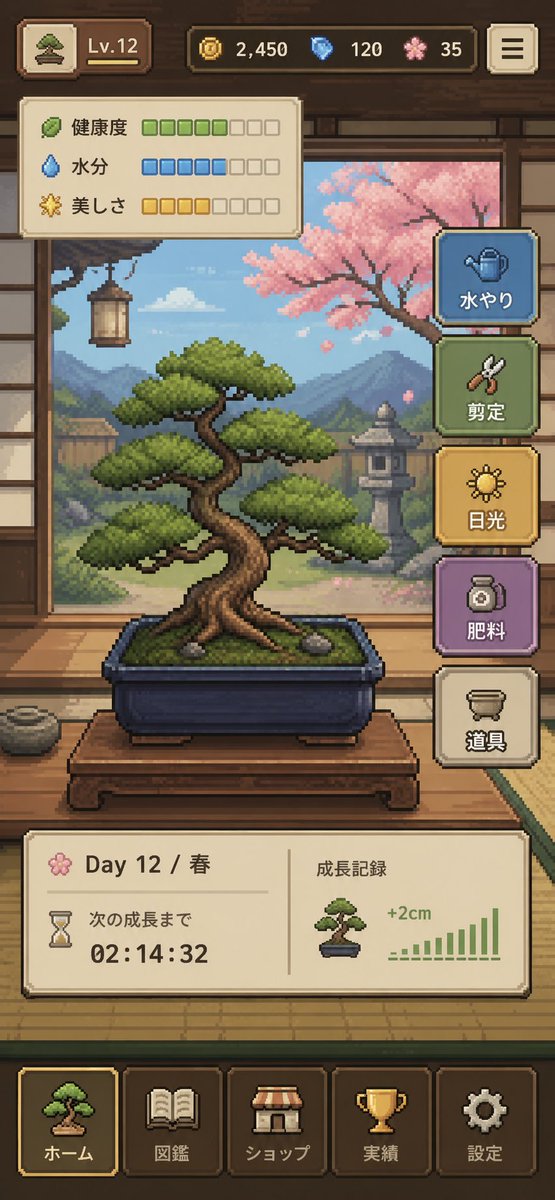
Interfaz de usuario del juego Pixel Art Bonsai
Una interfaz de juego móvil vertical y pulida que muestra un acogedor simulador de cuidado de bonsáis con gráficos pixelados, ideal para la conceptualización de interfaces de usuario, maquetas de juegos independientes y presentaciones para tiendas de aplicaciones.
Este es un ejemplo GPT Image 2 para Anime y juegos . Utilice la plantilla lista para copiar que aparece a continuación para generar imágenes similares y revise la atribución de Awesome GPT Image 2 Prompts y los derechos de uso comercial antes de reutilizarla.
¿Necesitas el conjunto completo de indicaciones? Usa el Anime y juegos centro de temas para ver más ejemplos relacionados, o abra el GPT Image 2 catálogo de avisos Para ver el índice completo de ejemplos, las estructuras reutilizables y la atribución de fuentes.
Free 1K preview
Generate one preview image instantly, no sign-up required.
4000/4000
Prompt
Mensaje listo para copiar
{
  "type": "pixel art mobile game UI mockup",
  "theme": "cozy Japanese bonsai cultivation simulator",
  "style": {
    "rendering": "detailed 2D pixel art, polished retro game aesthetic, crisp sprites, warm lighting, soft atmospheric background",
    "aspect_ratio": "9:16 portrait",
    "camera": "straight-on view of a traditional Japanese room interior framing the bonsai in the center"
  },
  "subject": {
    "main_object": "bonsai tree in a rectangular dark blue ceramic pot",
    "bonsai": {
      "species_look": "pine-like bonsai with layered rounded foliage pads",
      "trunk": "thick twisted brown trunk with exposed roots",
      "placement": "on a low wooden display table",
      "soil": "mossy green surface with 2 small visible stones"
    }
  },
  "environment": {
    "setting": "traditional Japanese tatami room with open shoji view to a garden",
    "background_elements": [
      "wooden beams and wall trim",
      "hanging lantern on the left",
      "mountains in the distance",
      "stone lantern in the garden",
      "pink cherry blossom tree on the right",
      "soft blue sky with clouds"
    ],
    "mood": "calm, handcrafted, meditative"
  },
  "ui": {
    "top_bar": {
      "count": 5,
      "elements": [
        "small bonsai icon button at top left",
        "level badge showing \"Lv.12\"",
        "coin counter showing \"2,450\"",
        "blue gem counter showing \"120\"",
        "pink blossom currency counter showing \"35\""
      ],
      "top_right": "menu button with 3 horizontal lines"
    },
    "status_panel": {
      "position": "upper left below top bar",
      "count": 3,
      "rows": [
        {
          "label": "Health",
          "icon": "leaf",
          "filled": 5,
          "total": 8,
          "color": "green"
        },
        {
          "label": "Moisture",
          "icon": "water droplet",
          "filled": 5,
          "total": 8,
          "color": "blue"
        },
        {
          "label": "美しさ",
          "icon": "sparkle flower",
          "filled": 4,
          "total": 8,
          "color": "gold"
        }
      ]
    },
    "action_buttons": {
      "position": "right side vertical stack",
      "count": 5,
      "buttons": [
        {
          "label": "水やり",
          "icon": "watering can",
          "color": "blue"
        },
        {
          "label": "Pruning",
          "icon": "shears",
          "color": "green"
        },
        {
          "label": "Light",
          "icon": "sun",
          "color": "gold"
        },
        {
          "label": "Fertilizing",
          "icon": "fertilizer jar",
          "color": "purple"
        },
        {
          "label": "Tools",
          "icon": "pot or tools container",
          "color": "cream"
        }
      ]
    },
    "info_panel": {
      "position": "lower middle above navigation",
      "count": 2,
      "sections": [
        {
          "label": "Day 12 / Spring",
          "subitems": [
            "flower icon",
            "hourglass icon",
            "text \"次の成長まで\"",
            "countdown timer \"02:14:32\""
          ]
        },
        {
          "label": "Growth Record",
          "subitems": [
            "small bonsai thumbnail",
            "text \"+2cm\"",
            "green bar chart with 10 ascending bars"
          ]
        }
      ]
    },
    "bottom_navigation": {
      "position": "bottom",
      "count": 5,
      "tabs": [
        "ホーム",
        "Pokedex",
        "ショップ",
        "Achievements",
        "Settings"
      ],
      "icons": [
        "bonsai",
        "book",
        "shop awning",
        "trophy",
        "gear"
      ],
      "active_tab": "ホーム"
    }
  },
  "composition": "central bonsai hero object, UI panels framing the scene without covering the tree, game-ready mockup that looks like a screenshot from a finished mobile app",
  "color_palette": {
    "dominant": [
      "warm wood brown",
      "tatami beige",
      "moss green",
      "sky blue",
      "cherry blossom pink",
      "muted gold"
    ],
    "accent_buttons": [
      "dusty blue",
      "sage green",
      "mustard gold",
      "soft purple",
      "cream"
    ]
  },
  "quality": "clean, legible interface, professional indie game prototype, charming and highly cohesive"
}
Best for
- - Anime y juegos visual exploration
- - Image generation and reference-image edits
- - Reusable briefs that keep source attribution visible
Change these parts
- - Subject, product, character, or scene
- - Aspect ratio, camera, lighting, and background
- - Brand, text, color, and output constraints
Recommended model and settings
- - Model: gpt-image-2
- - Input mode: Texto a imagen
- - Aspect ratio: source
- - Commercial status: review original source
How to use this prompt
- 1. Copy the prompt and preserve its structure for the first test.
- 2. Replace the subject, context, and publishing channel.
- 3. Change one camera, lighting, or style variable per iteration.
- 4. Inspect the output, source, text, and rights before reuse.
Limitations, source, and reuse cautions
- - Generated output is an editable draft, not factual, legal, or rights evidence.
- - Review the linked source, people, brands, logos, text, and third-party media before commercial use.
Importado de Awesome GPT Image 2 Prompts . Se requiere atribución. El estado de uso comercial es allowed ; revise los derechos de la fuente antes de su uso comercial.
Más casos en esta categoría
Priorizados por categoría, compatibilidad con el modo de entrada, calidad y menor riesgo.






Notas sobre la reutilización y la fuente
Utilice esta opción de forma segura después de previsualizar el caso.
- 1.Copia la solicitud o ábrela directamente en Dovoo con el botón de generación.
- 2.Ajusta las variables, la relación de aspecto y las imágenes de referencia según tus necesidades.
- 3.Antes de publicar o utilizar el servicio de forma remunerada, verifique los derechos de autor, los requisitos de atribución y los riesgos relacionados con la marca o la imagen de la persona.