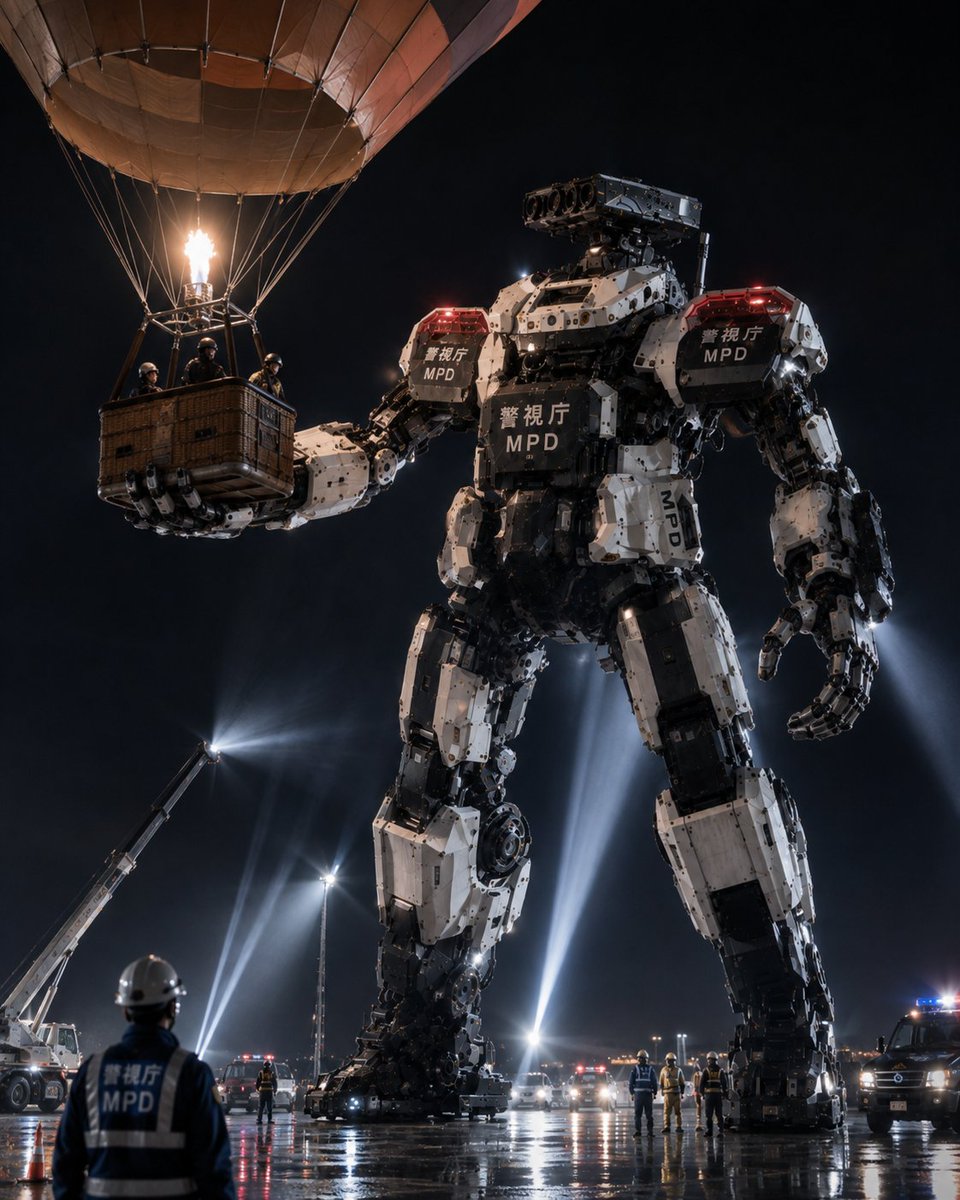
MPD Robot Arrests Balloon Escapees
A cinematic photorealistic prompt for generating a giant Japanese police mecha stopping suspects escaping by hot air balloon at night.
Este es un ejemplo GPT Image 2 para Anime y juegos . Utilice la plantilla lista para copiar que aparece a continuación para generar imágenes similares y revise la atribución de Awesome GPT Image 2 Prompts y los derechos de uso comercial antes de reutilizarla.
¿Necesitas el conjunto completo de indicaciones? Usa el Anime y juegos centro de temas para ver más ejemplos relacionados, o abra el GPT Image 2 catálogo de avisos Para ver el índice completo de ejemplos, las estructuras reutilizables y la atribución de fuentes.
Free 1K preview
Generate one preview image instantly, no sign-up required.
2353/4000
Prompt
Mensaje listo para copiar
Create a cinematic photorealistic night scene of the Tokyo Metropolitan Police Department heavy machinery robot unit arresting criminals escaping in a hot air balloon. A colossal white-and-black humanoid police mecha, about 25 meters tall, stands in a wet industrial lot under a black sky, holding the wicker basket of a hot air balloon in its left hand. The hot air balloon occupies the upper left of the frame with a tan fabric envelope partly cropped by the image edge, many suspension ropes, a bright burner flame, and exactly 4 helmeted suspects/officers visible inside the basket. The giant robot has bulky segmented armor, exposed hydraulic joints, mechanical fingers, red police warning lights on both shoulders, and readable markings on its chest, shoulders, and leg: Japanese police text plus “MPD”; use {argument name="police marking" default="Tokyo Metropolitan Police Department MPD"} as the main markings. Its right hand hangs open near its thigh, while its left arm extends horizontally to secure the basket. The robot’s head is a rectangular sensor/camera turret with multiple circular lenses instead of a face. In the foreground, show one police officer seen from behind wearing a white helmet and dark vest labeled “MPD,” watching the operation. Around the robot’s feet, include exactly 9 smaller human figures in helmets or safety gear spread across the wet pavement, exactly 3 police vehicles with flashing red and blue lights in the midground/right background, and exactly 1 crane or aerial work truck on the left shining a strong spotlight upward. Add multiple tall searchlight beams behind the robot, reflections on rain-slick asphalt, emergency cones, distant city/airport lights, mist and dramatic haze. Visual style: ultra-detailed, realistic, high-contrast cinematic news photo, low-angle perspective, 4:5 vertical composition, sharp mechanical detail, believable scale, dramatic lighting, no anime styling, no illustration look. Customize the scene as {argument name="location" default="Tokyo industrial waterfront"}, the robot unit name as {argument name="unit name" default="Heavy Machinery Countermeasure Robot Unit"}, the escaping vehicle as {argument name="escape vehicle" default="hot air balloon"}, and the time/weather mood as {argument name="atmosphere" default="rainy night with searchlights and emergency lights"}.Variables de solicitud
Marcadores de posición de argumentos editables que se encuentran en la solicitud, con sus valores predeterminados.
Variable
police marking
Por defecto
Tokyo Metropolitan Police Department MPD
Variable
location
Por defecto
Tokyo industrial waterfront
Variable
unit name
Por defecto
Heavy Machinery Countermeasure Robot Unit
Variable
escape vehicle
Por defecto
hot air balloon
Variable
atmosphere
Por defecto
rainy night with searchlights and emergency lights
Best for
- - Anime y juegos visual exploration
- - Image generation and reference-image edits
- - Reusable briefs that keep source attribution visible
Change these parts
- - Subject, product, character, or scene
- - Aspect ratio, camera, lighting, and background
- - Brand, text, color, and output constraints
Recommended model and settings
- - Model: gpt-image-2
- - Input mode: Texto a imagen
- - Aspect ratio: source
- - Commercial status: review original source
How to use this prompt
- 1. Copy the prompt and preserve its structure for the first test.
- 2. Replace the subject, context, and publishing channel.
- 3. Change one camera, lighting, or style variable per iteration.
- 4. Inspect the output, source, text, and rights before reuse.
Limitations, source, and reuse cautions
- - Generated output is an editable draft, not factual, legal, or rights evidence.
- - Review the linked source, people, brands, logos, text, and third-party media before commercial use.
Importado de Awesome GPT Image 2 Prompts . Se requiere atribución. El estado de uso comercial es allowed ; revise los derechos de la fuente antes de su uso comercial.
Más casos en esta categoría
Priorizados por categoría, compatibilidad con el modo de entrada, calidad y menor riesgo.
Notas sobre la reutilización y la fuente
Utilice esta opción de forma segura después de previsualizar el caso.
- 1.Copia la solicitud o ábrela directamente en Dovoo con el botón de generación.
- 2.Ajusta las variables, la relación de aspecto y las imágenes de referencia según tus necesidades.
- 3.Antes de publicar o utilizar el servicio de forma remunerada, verifique los derechos de autor, los requisitos de atribución y los riesgos relacionados con la marca o la imagen de la persona.