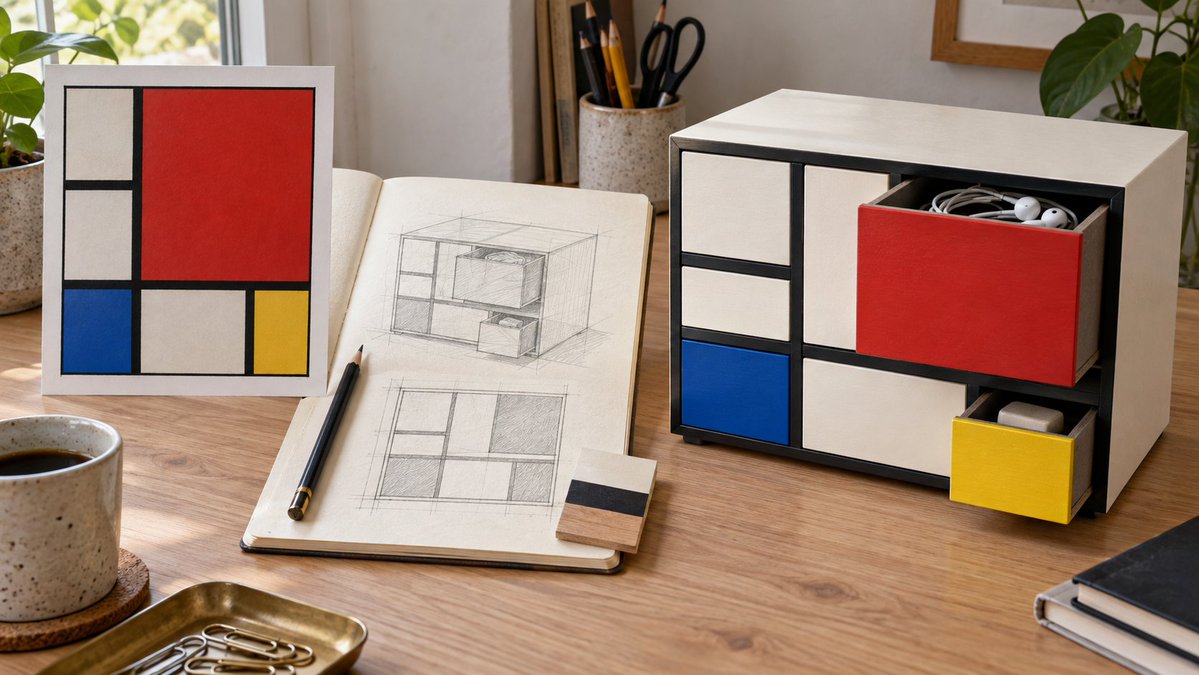
Mondrian Style Storage Cabinet Design
A prompt that transforms Piet Mondrian's famous abstract art into a functional desktop storage cabinet design with 3D depth and realism.
Este es un ejemplo GPT Image 2 para Producto y Comercial . Utilice la plantilla lista para copiar que aparece a continuación para generar imágenes similares y revise la atribución de Awesome GPT Image 2 Prompts y los derechos de uso comercial antes de reutilizarla.
¿Necesitas el conjunto completo de indicaciones? Usa el Producto y Comercial centro de temas para ver más ejemplos relacionados, o abra el GPT Image 2 catálogo de avisos Para ver el índice completo de ejemplos, las estructuras reutilizables y la atribución de fuentes.
Free 1K preview
Generate one preview image instantly, no sign-up required.
986/4000
Prompt
Mensaje listo para copiar
Generate a 16:9 horizontal desktop design presentation. On the left, place a painting reference of {argument name="艺术参考" default="Mondrian's 'Composition with Red, Blue and Yellow'"}. In the middle, show the front grid and perspective pencil sketch of a desktop storage cabinet, and on the right, show the final effect in use. The cabinet is made of ivory-white painted wood, with thick black divider strips forming an asymmetrical rectangular grid. Large red drawers, small blue drawers, small yellow drawers, and white compartments form the front. The red drawer is pulled open, containing {argument name="收纳物品" default="headphones and coiled cables"}; the yellow drawer is slightly pulled out, revealing an eraser. Drawers must have realistic side walls, thickness, and internal space, aligning with their respective openings. Show fine wood grain, contact shadows, and desktop wear, with natural side lighting. The sketch must match the cabinet layout, with no text, logos, or URLs.Variables de solicitud
Marcadores de posición de argumentos editables que se encuentran en la solicitud, con sus valores predeterminados.
Variable
艺术参考
Por defecto
Mondrian's 'Composition with Red, Blue and Yellow'
Variable
收纳物品
Por defecto
headphones and coiled cables
Best for
- - Producto y Comercial visual exploration
- - Image generation and reference-image edits
- - Reusable briefs that keep source attribution visible
Change these parts
- - Subject, product, character, or scene
- - Aspect ratio, camera, lighting, and background
- - Brand, text, color, and output constraints
Recommended model and settings
- - Model: gpt-image-2
- - Input mode: Texto a imagen
- - Aspect ratio: source
- - Commercial status: review original source
How to use this prompt
- 1. Copy the prompt and preserve its structure for the first test.
- 2. Replace the subject, context, and publishing channel.
- 3. Change one camera, lighting, or style variable per iteration.
- 4. Inspect the output, source, text, and rights before reuse.
Limitations, source, and reuse cautions
- - Generated output is an editable draft, not factual, legal, or rights evidence.
- - Review the linked source, people, brands, logos, text, and third-party media before commercial use.
Importado de Awesome GPT Image 2 Prompts . Se requiere atribución. El estado de uso comercial es allowed ; revise los derechos de la fuente antes de su uso comercial.
Más casos en esta categoría
Priorizados por categoría, compatibilidad con el modo de entrada, calidad y menor riesgo.






Notas sobre la reutilización y la fuente
Utilice esta opción de forma segura después de previsualizar el caso.
- 1.Copia la solicitud o ábrela directamente en Dovoo con el botón de generación.
- 2.Ajusta las variables, la relación de aspecto y las imágenes de referencia según tus necesidades.
- 3.Antes de publicar o utilizar el servicio de forma remunerada, verifique los derechos de autor, los requisitos de atribución y los riesgos relacionados con la marca o la imagen de la persona.