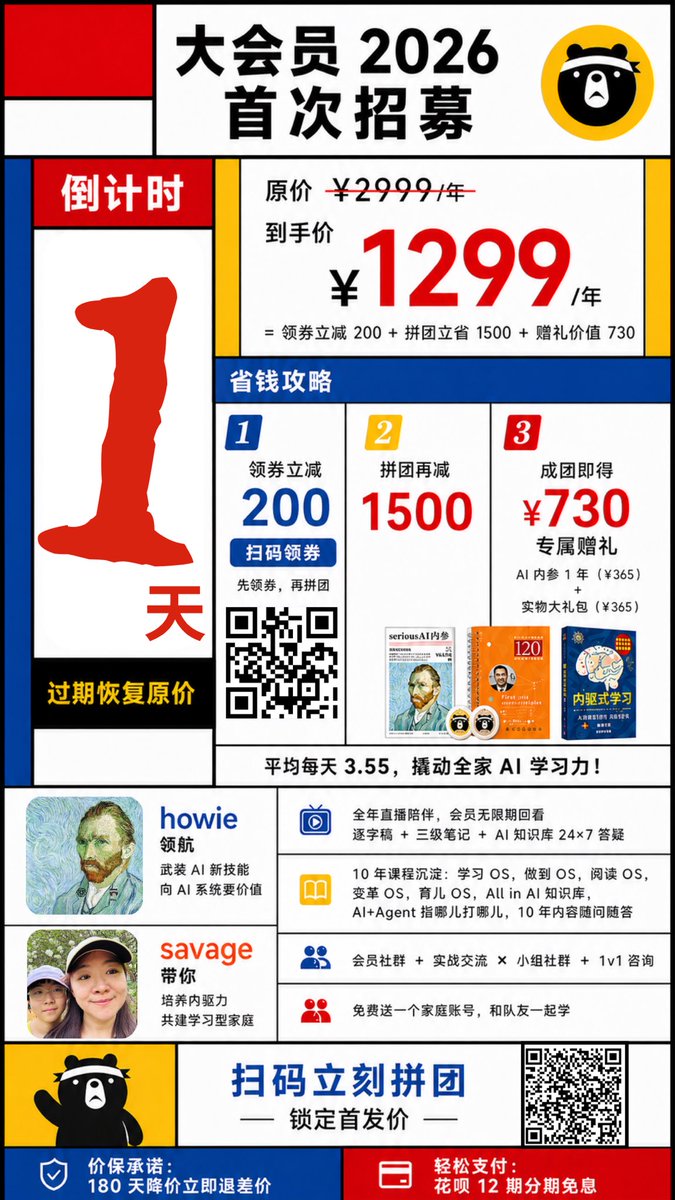
Cartel promocional chino al estilo Mondrian
Esta función genera un colorido póster geométrico chino para la captación de miembros, ideal para campañas de marketing, promociones de ventas y gráficos para redes sociales.
Este es un ejemplo GPT Image 2 para Diseño gráfico y carteles . Utilice la plantilla lista para copiar que aparece a continuación para generar imágenes similares y revise la atribución de Awesome GPT Image 2 Prompts y los derechos de uso comercial antes de reutilizarla.
¿Necesitas el conjunto completo de indicaciones? Usa el Diseño gráfico y carteles centro de temas para ver más ejemplos relacionados, o abra el GPT Image 2 catálogo de avisos Para ver el índice completo de ejemplos, las estructuras reutilizables y la atribución de fuentes.
Free 1K preview
Generate one preview image instantly, no sign-up required.
4000/4000
Prompt
Mensaje listo para copiar
Create a bold Chinese promotional poster in the style of Mondrian, Fauvism, and slight Cubism, featuring thick black grid lines, flat primary color blocks, and a simple white background. The poster should be a vertical mobile format, with a highly structured layout reminiscent of retail advertising, high contrast, sharp edges like a vector graphic, a playful design style, and a strong sales orientation. At the top center, a large white panel contains the prominent black Chinese characters “大会员 2026 首次招募” (Grand Membership 2026 First Recruitment), with a yellow circular badge in the upper right corner featuring a simple black cartoon bear face icon. The upper left corner includes 3 abstract rectangular blocks in a Mondrian-style composition: a red square, a white rectangle, and a blue vertical rectangle. Create a tall countdown bar on the left side, with the red title “倒计时” (Countdown) at the top, a large, thick-bordered red number “1” in the center, and a red “天” (days) near the bottom. A black stripe at the bottom contains the yellow text “过期恢复原价” (Price reverts to original upon expiration). On the right side, a main pricing panel displays the small black text “原价 ¥2999/年” (Original Price ¥2999/year) with a strikethrough, followed by the larger black text “到手价” (Final Price), and the oversized red price “¥1299”, followed by black “/年” (per year). Below this, a smaller black formula reads: “= 领券立减 200 + 拼团立省 1500 + 赠礼价值 730” (= ¥200 off with coupon + ¥1500 off with group purchase + ¥730 value of gifts). Below this, place a full-width blue section labeled “省钱攻略” (Money-Saving Guide). Below that, construct a 3-column money-saving guide with 3 numbered panels: Panel 1 has a blue badge “1”, the text “领券立减 200” (¥200 off with coupon), a blue button-shaped strip “扫码领券” (Scan to get coupon), small text below “先领券,再拼团” (Get coupon first, then group purchase), and a black and white QR code; Panel 2 has a yellow badge “2”, the text “拼团再减 1500” (¥1500 off with group purchase), and a small thumbnail of a book or magazine cover at the bottom; Panel 3 has a red badge “3”, the text “成团即得 ¥730 专属赠礼” (Get ¥730 exclusive gift upon successful group purchase), small text below “AI 内参 1 年(¥365)” (1 year of AI Insights ¥365) and “实物大礼包(¥365)” (Physical Gift Package ¥365), and 2 small gift thumbnails at the bottom. Add a white strip below the 3 columns with the bold black text: “平均每天 3.55,撬动全家 AI 学习力!” (Average of ¥3.55 per day, unlock the AI learning potential of the whole family!). In the middle-lower section, place 2 host/profile blocks on the left: the first displays a square avatar, the blue name “howie”, and the small black text “领航” (Leading) plus “武装 AI 新技能” (Equip new AI skills) and “向 AI 系统要价值” (Extract value from AI systems); the second displays a square avatar, the orange-red name “savage”, and the small black text “带你” (Take you) plus “培养内驱力” (Cultivate intrinsic motivation) and “共建学习型家庭” (Build a learning family). To the right of these profile blocks, create a list of 4 horizontally arranged benefits, each with a colored icon on the left and black text on a white background: The first row uses a blue TV or screen icon, with text about all-year live streaming, replay permissions, transcripts, notes, and 24/7 AI knowledge support; The second row uses a yellow book icon, with text about 10 years of in-depth experience, Learning OS, Becoming OS, Reading OS, Variable OS, Parenting OS, all in the AI knowledge base, and long-term Q&A support; The third row uses a blue person icon, with text about membership communities, practical exchanges, group communities, and 1-on-1 consultation; The fourth row uses a red person icon, with text about a free family account for teammates to learn together. Near the bottom, add a yellow panel on the left with a waving full-body black cartoon bear mascot. Place a prominent blue call-to-action text in the bottom center: “扫码立刻拼团” (Scan to group purchase now), followed by a black decorative short line and the subtitle “锁定首发价” (Lock in the initial price). Place a large black and white QR code in the lower right corner. Finally, divide the bottom bar into 2 colored areas: a blue area on the left with a white shield icon and white text “价保承诺:180 天降价立即退差价” (Price Guarantee: 180-day price drop, immediate refund of the difference); and a red area on the right with a white card/payment icon and white text “轻松支付:花呗 12 期分期免息” (Easy Payment: 12 interest-free installments with Huabei). Use thick black borders around each block, asymmetrical geometric composition, minimal shadows, poster-level typography hierarchy, Chinese e-commerce event design, vibrant and colorful.
Best for
- - Diseño gráfico y carteles visual exploration
- - Image generation and reference-image edits
- - Reusable briefs that keep source attribution visible
Change these parts
- - Subject, product, character, or scene
- - Aspect ratio, camera, lighting, and background
- - Brand, text, color, and output constraints
Recommended model and settings
- - Model: gpt-image-2
- - Input mode: Texto a imagen
- - Aspect ratio: source
- - Commercial status: review original source
How to use this prompt
- 1. Copy the prompt and preserve its structure for the first test.
- 2. Replace the subject, context, and publishing channel.
- 3. Change one camera, lighting, or style variable per iteration.
- 4. Inspect the output, source, text, and rights before reuse.
Limitations, source, and reuse cautions
- - Generated output is an editable draft, not factual, legal, or rights evidence.
- - Review the linked source, people, brands, logos, text, and third-party media before commercial use.
Importado de Awesome GPT Image 2 Prompts . Se requiere atribución. El estado de uso comercial es allowed ; revise los derechos de la fuente antes de su uso comercial.
Más casos en esta categoría
Priorizados por categoría, compatibilidad con el modo de entrada, calidad y menor riesgo.






Notas sobre la reutilización y la fuente
Utilice esta opción de forma segura después de previsualizar el caso.
- 1.Copia la solicitud o ábrela directamente en Dovoo con el botón de generación.
- 2.Ajusta las variables, la relación de aspecto y las imágenes de referencia según tus necesidades.
- 3.Antes de publicar o utilizar el servicio de forma remunerada, verifique los derechos de autor, los requisitos de atribución y los riesgos relacionados con la marca o la imagen de la persona.