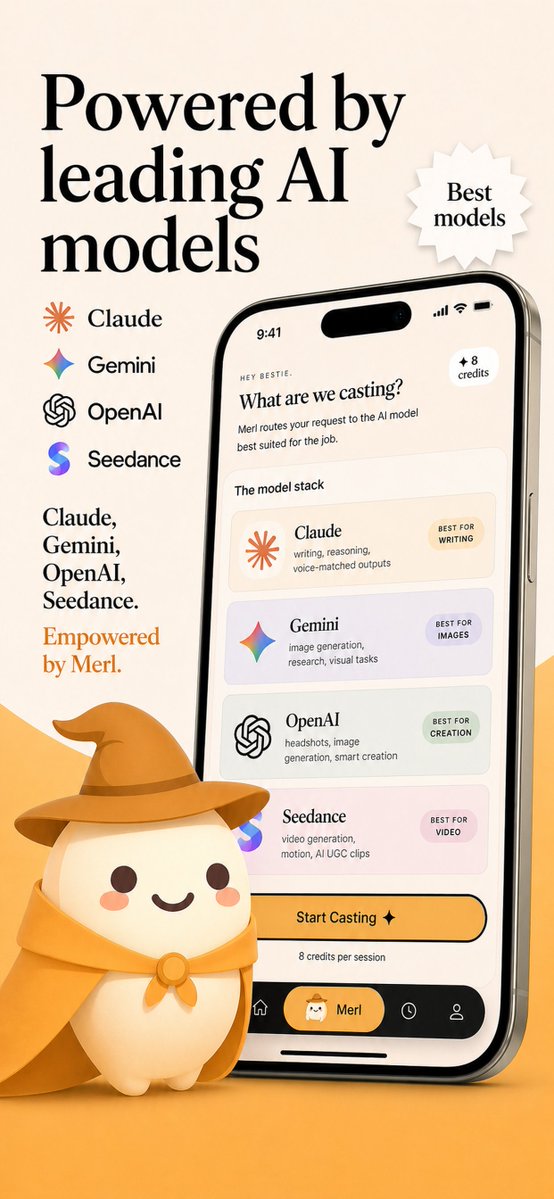
Captura de pantalla de la tienda de aplicaciones del enrutador con modelo de IA
Captura de pantalla de marketing de una aplicación móvil premium que muestra una interfaz de enrutamiento de modelos de IA de marca con logotipos de proveedores, texto promocional y una simpática mascota, ideal para listados en la App Store o elementos visuales de lanzamiento de una startup.
Este es un ejemplo GPT Image 2 para Producto y Comercial . Utilice la plantilla lista para copiar que aparece a continuación para generar imágenes similares y revise la atribución de Awesome GPT Image 2 Prompts y los derechos de uso comercial antes de reutilizarla.
Free 1K preview
Generate one preview image instantly, no sign-up required.
Prompt
Mensaje listo para copiar
Create a polished App Store promotional screenshot in a warm beige and golden-orange brand palette, portrait orientation, with a premium friendly startup aesthetic. The layout is a single vertically composed marketing graphic with a soft cream background and an orange gradient floor at the bottom. On the left upper side, place a very large elegant black serif headline split across 3 lines reading {argument name="headline text" default="Powered by leading AI models"}. To the right of the headline, add a small white jagged starburst badge with a subtle drop shadow containing 2 lines of serif text: {argument name="badge text" default="Best models"}. Beneath the headline on the left, show a vertical list of exactly 4 AI providers with icon plus name, evenly spaced: Claude with an orange sunburst icon, Gemini with a multicolor four-point sparkle icon, OpenAI with a black knot logo, and Seedance with a purple-blue gradient S icon. Below that, add a left-aligned serif body copy block with 2 parts: first a black text list on 4 lines reading "Claude, Gemini, OpenAI, Seedance.", then a final brand-colored orange line reading {argument name="tagline text" default="Empowered by Merl."}. On the right half, place a large realistic modern smartphone angled slightly left, with a reflective silver frame, black screen border, dynamic-island style top cutout, visible side button, and soft shadow. The phone screen should show a clean cream-colored app UI for an AI model-routing app. At the very top of the phone display, include the status time 9:41 and standard signal, wifi, and battery icons. Inside the app, show a tiny greeting line "HEY BESTIE.", then a bold serif question title {argument name="screen title" default="What are we casting?"}, followed by a short sans-serif subtitle about routing the request to the best AI model for the job. Add a small rounded badge in the upper right of the app content reading "+ 8 credits". Below that, include a section label "The model stack" and a stack of exactly 4 rounded cards, each in a lightly tinted pastel background. Card 1: Claude, with orange sunburst icon, description "writing, reasoning, voice-matched outputs", and a small pill label "BEST FOR WRITING". Card 2: Gemini, with multicolor sparkle icon, description "image generation, research, visual tasks", and pill label "BEST FOR IMAGES". Card 3: OpenAI, with black knot icon, description "headshots, image generation, smart creation", and pill label "BEST FOR CREATION". Card 4: Seedance, with purple-blue gradient S icon, description "video generation, motion, AI UGC clips", and pill label "BEST FOR VIDEO". Under the cards, place a large rounded yellow-orange CTA button reading "Start Casting ✦", with a small line below saying "8 credits per session". At the bottom of the phone UI, create a black tab bar with exactly 4 navigation items: home icon, a selected center pill with a small mascot face and the label {argument name="app name" default="Merl"}, a clock/history icon, and a profile icon. In front of the lower left of the phone, place a cute 3D mascot character: a rounded cream-colored blob with tiny feet, dark brown dot eyes, rosy cheeks, and a smiling mouth, wearing a golden wizard hat and matching cape tied with a round clasp. The mascot should overlap the phone slightly and sit on the orange floor, casting a soft shadow. Overall style: luxury-friendly tech branding, crisp typography, subtle realism, soft shadows, clean app mockup, App Store screenshot quality, consistent visual branding, highly legible, high resolution.Variables de solicitud
Marcadores de posición de argumentos editables que se encuentran en la solicitud, con sus valores predeterminados.
Best for
- - Producto y Comercial visual exploration
- - Image generation and reference-image edits
- - Reusable briefs that keep source attribution visible
Change these parts
- - Subject, product, character, or scene
- - Aspect ratio, camera, lighting, and background
- - Brand, text, color, and output constraints
Recommended model and settings
- - Model: gpt-image-2
- - Input mode: Texto a imagen
- - Aspect ratio: source
- - Commercial status: review original source
How to use this prompt
- 1. Copy the prompt and preserve its structure for the first test.
- 2. Replace the subject, context, and publishing channel.
- 3. Change one camera, lighting, or style variable per iteration.
- 4. Inspect the output, source, text, and rights before reuse.
Limitations, source, and reuse cautions
- - Generated output is an editable draft, not factual, legal, or rights evidence.
- - Review the linked source, people, brands, logos, text, and third-party media before commercial use.
Más casos en esta categoría
Priorizados por categoría, compatibilidad con el modo de entrada, calidad y menor riesgo.






Notas sobre la reutilización y la fuente
Utilice esta opción de forma segura después de previsualizar el caso.
- 1.Copia la solicitud o ábrela directamente en Dovoo con el botón de generación.
- 2.Ajusta las variables, la relación de aspecto y las imágenes de referencia según tus necesidades.
- 3.Antes de publicar o utilizar el servicio de forma remunerada, verifique los derechos de autor, los requisitos de atribución y los riesgos relacionados con la marca o la imagen de la persona.