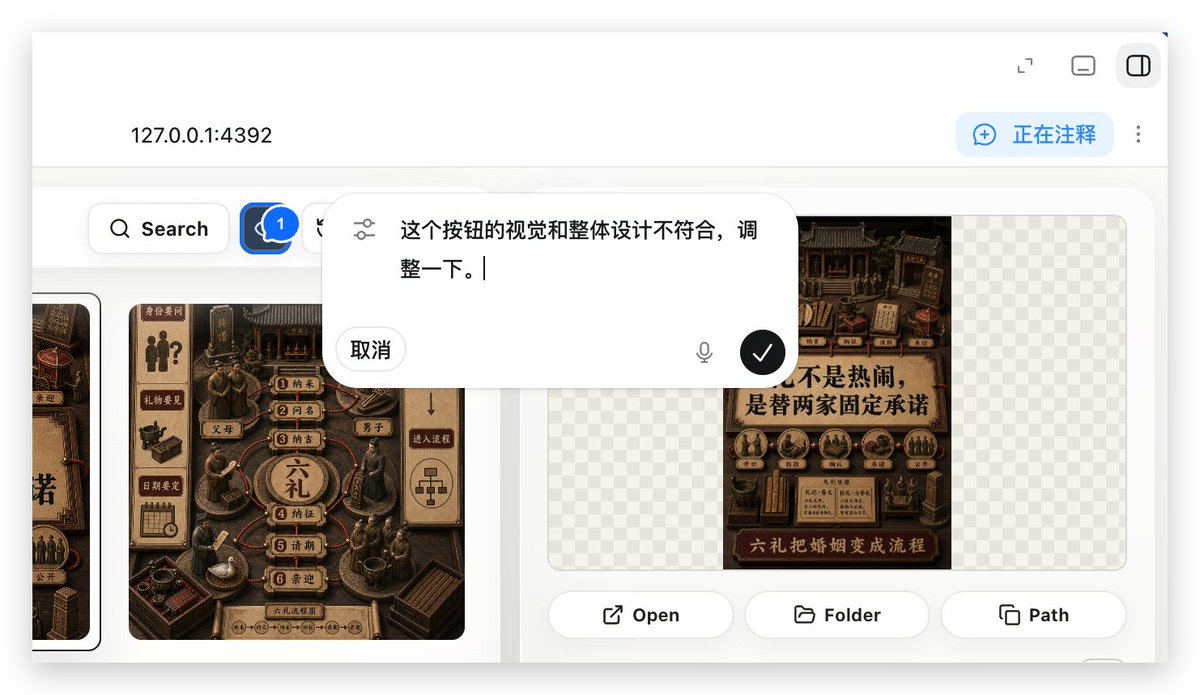
Demostración de anotaciones de aplicaciones web locales
Genera una vista previa realista de una aplicación web local que muestra una superposición de anotaciones utilizada para solicitar ajustes de la interfaz de usuario en un flujo de trabajo de creación de aplicaciones web.
Este es un ejemplo GPT Image 2 para Otra inspiración . Utilice la plantilla lista para copiar que aparece a continuación para generar imágenes similares y revise la atribución de Awesome GPT Image 2 Prompts y los derechos de uso comercial antes de reutilizarla.
Free 1K preview
Generate one preview image instantly, no sign-up required.
Prompt
Mensaje listo para copiar
With REFERENCE_0 as context, create a follow-up screenshot demonstrating the “Build Web Apps” tool running as a local web app preview. Replace the plugin list view with a browser-style localhost workspace for {argument name="local address" default="127.0.0.1:4392"}, employing a clean white UI, soft shadows, and rounded corner panels.

Key Changes: Showcase an app building/annotation interface instead of the original plugin directory. Add a top bar with the local address displayed on the left and 3 small window/control icons on the right. Include a blue annotation status capsule in the upper right corner with the text {argument name="annotation status" default="Commenting"}, accompanied by a vertical three-dot menu.

Content Area: Create a gallery-style UI showcasing Chinese poster/card designs within rounded white panels. Include a left-side toolbar row with a search button and a blue comment/annotation button marked with “1”. Display at least two visible poster/card thumbnails in a dark brown, traditional Chinese visual style, while maintaining some grid-pattern transparent placeholder areas on the right panel.

Overlay: Position a large, floating, rounded corner annotation input bubble centered in the upper-middle of the content area. It should resemble an embedded AI comment editor, with slider/settings icons on the left, containing Chinese instruction text {argument name="comment text" default="The visual and overall design of this button doesn't align, please adjust it."}, a “Cancel” button, a microphone icon, and a black circular confirmation button with a white checkmark.

Bottom of the right preview panel: Add 3 operation buttons labeled “Open”, “Folder”, and “Path”, each accompanied by a simple line icon. Maintain the realism of the screenshot, as if it were a product demo requesting UI optimization using Build Web Apps combined with built-in HTML annotation.
Variables de solicitud
Marcadores de posición de argumentos editables que se encuentran en la solicitud, con sus valores predeterminados.
Best for
- - Otra inspiración visual exploration
- - Image generation and reference-image edits
- - Reusable briefs that keep source attribution visible
Change these parts
- - Subject, product, character, or scene
- - Aspect ratio, camera, lighting, and background
- - Brand, text, color, and output constraints
Recommended model and settings
- - Model: gpt-image-2
- - Input mode: Texto a imagen
- - Aspect ratio: source
- - Commercial status: review original source
How to use this prompt
- 1. Copy the prompt and preserve its structure for the first test.
- 2. Replace the subject, context, and publishing channel.
- 3. Change one camera, lighting, or style variable per iteration.
- 4. Inspect the output, source, text, and rights before reuse.
Limitations, source, and reuse cautions
- - Generated output is an editable draft, not factual, legal, or rights evidence.
- - Review the linked source, people, brands, logos, text, and third-party media before commercial use.
Related prompt packs
Más casos en esta categoría
Priorizados por categoría, compatibilidad con el modo de entrada, calidad y menor riesgo.






Notas sobre la reutilización y la fuente
Utilice esta opción de forma segura después de previsualizar el caso.
- 1.Copia la solicitud o ábrela directamente en Dovoo con el botón de generación.
- 2.Ajusta las variables, la relación de aspecto y las imágenes de referencia según tus necesidades.
- 3.Antes de publicar o utilizar el servicio de forma remunerada, verifique los derechos de autor, los requisitos de atribución y los riesgos relacionados con la marca o la imagen de la persona.