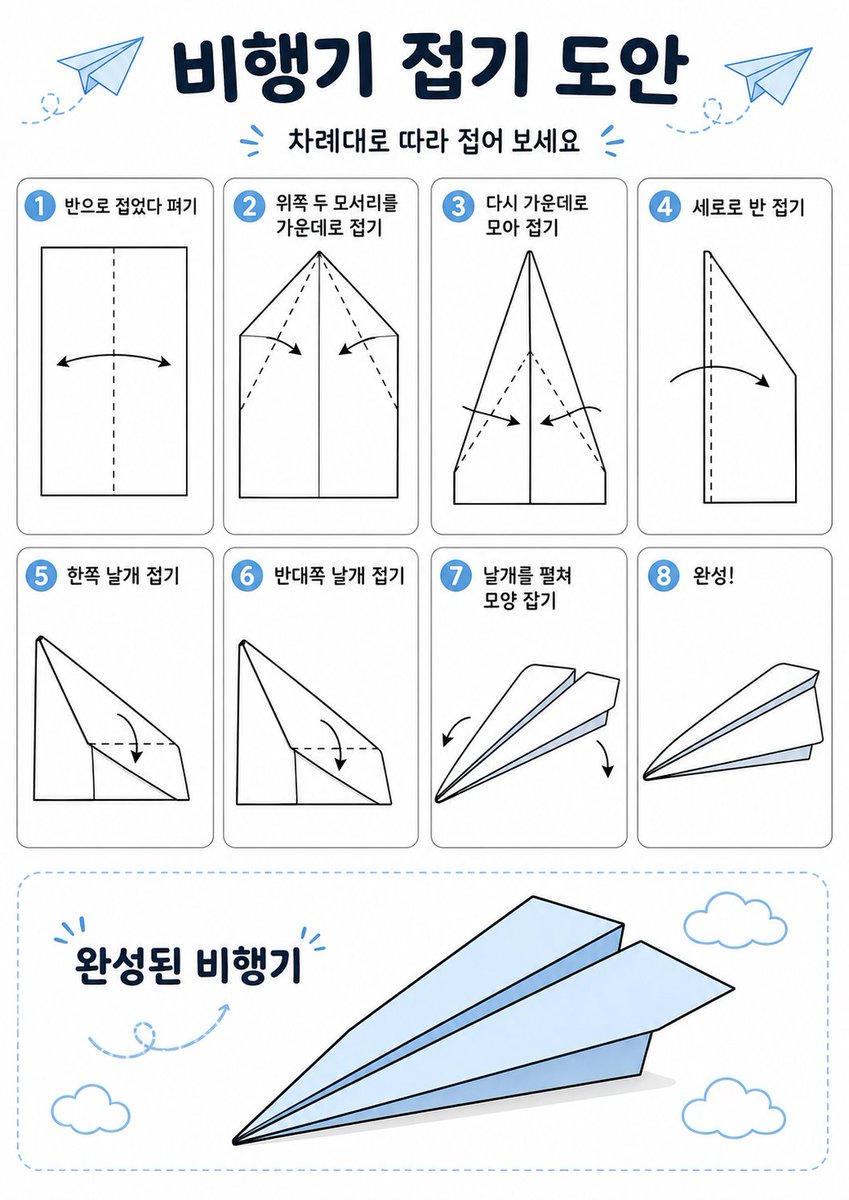
Póster plegable de avión de papel coreano
Esta solicitud genera una infografía clara con instrucciones de origami en coreano para enseñar cómo doblar un avión de papel en 8 pasos etiquetados.
Este es un ejemplo GPT Image 2 para Diseño gráfico y carteles . Utilice la plantilla lista para copiar que aparece a continuación para generar imágenes similares y revise la atribución de Awesome GPT Image 2 Prompts y los derechos de uso comercial antes de reutilizarla.
¿Necesitas el conjunto completo de indicaciones? Usa el Diseño gráfico y carteles centro de temas para ver más ejemplos relacionados, o abra el GPT Image 2 catálogo de avisos Para ver el índice completo de ejemplos, las estructuras reutilizables y la atribución de fuentes.
Free 1K preview
Generate one preview image instantly, no sign-up required.
3948/4000
Prompt
Mensaje listo para copiar
{
  "type": "origami instruction poster",
  "topic": "paper airplane folding guide",
  "language": "Korean",
  "style": {
    "overall": "clean educational infographic, simple vector line art, friendly classroom worksheet aesthetic",
    "palette": {
      "background": "white",
      "primary": "dark navy",
      "accent": "light sky blue",
      "line": "black",
      "shadow": "soft light gray"
    },
    "rendering": "flat 2D layout with crisp outlines and minimal shading"
  },
  "canvas": {
    "orientation": "portrait",
    "margin": "generous white margins"
  },
  "header": {
    "title": "{argument name=\"headline text\" default=\"비행기 접기 도안\"}",
    "subtitle": "{argument name=\"subtitle text\" default=\"차례대로 따라 접어 보세요\"}",
    "decorations": {
      "paper_airplanes": 2,
      "dashed_flight_paths": 2,
      "blue_accent_marks": 2
    }
  },
  "layout": {
    "grid": {
      "columns": 4,
      "rows": 2,
      "step_cards": 8
    },
    "sections": [
      {
        "title": "steps row 1",
        "position": "upper middle",
        "count": 4,
        "labels": [
          "1 반으로 접었다 펴기",
          "2 위쪽 두 모서리를 가운데로 접기",
          "3 다시 가운데로 모아 접기",
          "4 세로로 반 접기"
        ]
      },
      {
        "title": "steps row 2",
        "position": "middle",
        "count": 4,
        "labels": [
          "5 한쪽 날개 접기",
          "6 반대쪽 날개 접기",
          "7 날개를 펼쳐 모양 잡기",
          "8 완성!"
        ]
      },
      {
        "title": "finished airplane display",
        "position": "bottom",
        "count": 1,
        "labels": [
          "완성된 비행기"
        ]
      }
    ]
  },
  "step_cards": [
    {
      "step": 1,
      "badge": "1",
      "text": "반으로 접었다 펴기",
      "diagram": "vertical rectangle sheet with a centered vertical dashed fold line and a curved double-headed arrow indicating folding inward and reopening"
    },
    {
      "step": 2,
      "badge": "2",
      "text": "위쪽 두 모서리를 가운데로 접기",
      "diagram": "paper with pointed top, both upper corners folded to the center line, dashed diagonal guide lines, two inward arrows"
    },
    {
      "step": 3,
      "badge": "3",
      "text": "다시 가운데로 모아 접기",
      "diagram": "narrower pointed shape, side edges folded again toward the center line, dashed diagonal guides, two inward arrows near the lower middle"
    },
    {
      "step": 4,
      "badge": "4",
      "text": "세로로 반 접기",
      "diagram": "side-view folded shape with a vertical dashed center line and one large curved arrow showing the model folded in half lengthwise"
    },
    {
      "step": 5,
      "badge": "5",
      "text": "한쪽 날개 접기",
      "diagram": "triangular side-view airplane body with one wing folded downward, dashed horizontal guide near the top edge and a curved arrow"
    },
    {
      "step": 6,
      "badge": "6",
      "text": "반대쪽 날개 접기",
      "diagram": "same side-view as step 5, folding the opposite wing downward with matching dashed guide and curved arrow"
    },
    {
      "step": 7,
      "badge": "7",
      "text": "날개를 펼쳐 모양 잡기",
      "diagram": "3D paper airplane opening into shape, two curved arrows pointing downward and outward on each side"
    },
    {
      "step": 8,
      "badge": "8",
      "text": "완성!",
      "diagram": "completed paper airplane in simple perspective, light blue top faces, black outline, no arrows"
    }
  ],
  "bottom_panel": {
    "container": "large rounded rectangle with light blue dashed border",
    "label": "완성된 비행기",
    "main_object": "large completed paper airplane angled from lower left to upper right, pale blue surfaces with black outline and subtle gray shadow beneath",
    "decorations": {
      "clouds": 3,
      "swirl_arrow": 1
    }
  },
  "text_style": {
    "title": "bold rounded Korean display font in dark navy",
    "subtitle": "smaller bold Korean text",
    "step_labels": "bold black Korean text",
    "number_badges": "white numbers inside blue circles"
  }
}
Variables de solicitud
Marcadores de posición de argumentos editables que se encuentran en la solicitud, con sus valores predeterminados.
Variable
headline text
Por defecto
비행기 접기 도안
Variable
subtitle text
Por defecto
차례대로 따라 접어 보세요
Best for
- - Diseño gráfico y carteles visual exploration
- - Image generation and reference-image edits
- - Reusable briefs that keep source attribution visible
Change these parts
- - Subject, product, character, or scene
- - Aspect ratio, camera, lighting, and background
- - Brand, text, color, and output constraints
Recommended model and settings
- - Model: gpt-image-2
- - Input mode: Texto a imagen
- - Aspect ratio: source
- - Commercial status: review original source
How to use this prompt
- 1. Copy the prompt and preserve its structure for the first test.
- 2. Replace the subject, context, and publishing channel.
- 3. Change one camera, lighting, or style variable per iteration.
- 4. Inspect the output, source, text, and rights before reuse.
Limitations, source, and reuse cautions
- - Generated output is an editable draft, not factual, legal, or rights evidence.
- - Review the linked source, people, brands, logos, text, and third-party media before commercial use.
Importado de Awesome GPT Image 2 Prompts . Se requiere atribución. El estado de uso comercial es allowed ; revise los derechos de la fuente antes de su uso comercial.
Más casos en esta categoría
Priorizados por categoría, compatibilidad con el modo de entrada, calidad y menor riesgo.






Notas sobre la reutilización y la fuente
Utilice esta opción de forma segura después de previsualizar el caso.
- 1.Copia la solicitud o ábrela directamente en Dovoo con el botón de generación.
- 2.Ajusta las variables, la relación de aspecto y las imágenes de referencia según tus necesidades.
- 3.Antes de publicar o utilizar el servicio de forma remunerada, verifique los derechos de autor, los requisitos de atribución y los riesgos relacionados con la marca o la imagen de la persona.