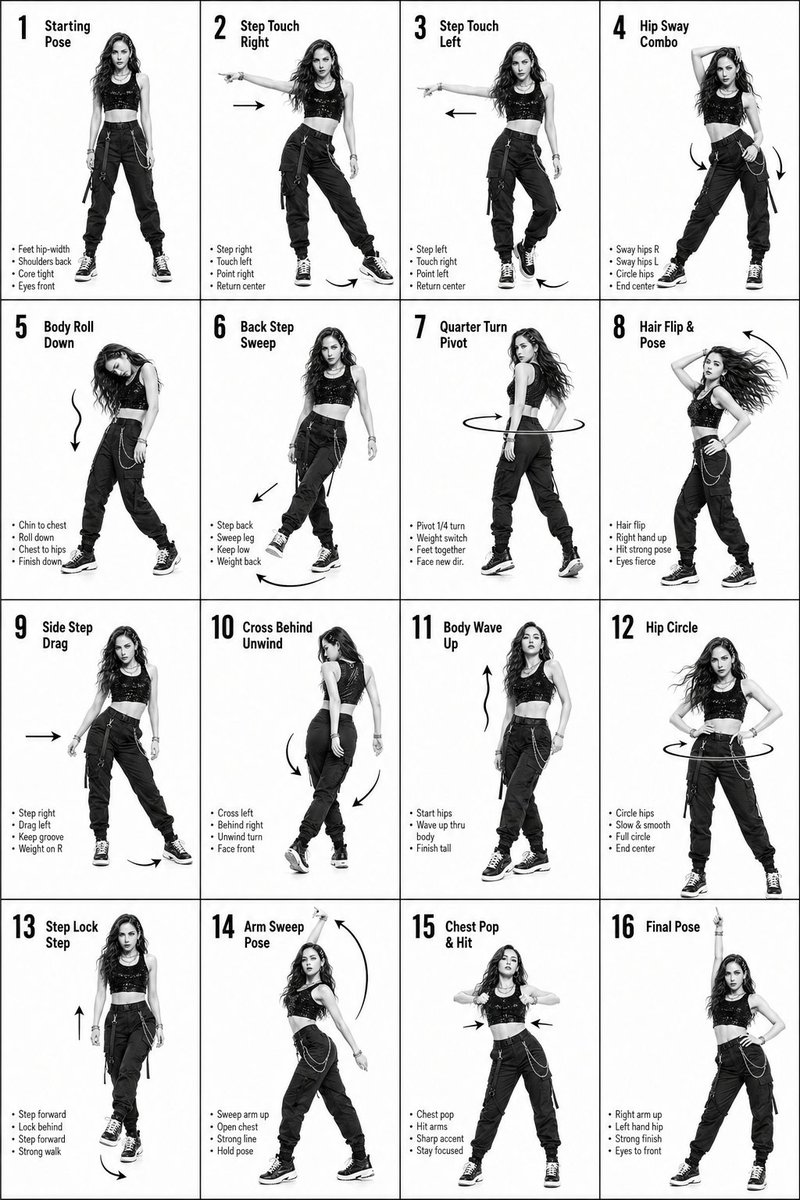
Hoja de instrucciones de 16 pasos para baile K-Pop
Una cuadrícula instructiva detallada para crear una guía de 4x4 que muestre pasos de baile con flechas de movimiento y etiquetas de texto.
Este es un ejemplo GPT Image 2 para Diseño gráfico y carteles . Utilice la plantilla lista para copiar que aparece a continuación para generar imágenes similares y revise la atribución de Awesome GPT Image 2 Prompts y los derechos de uso comercial antes de reutilizarla.
¿Necesitas el conjunto completo de indicaciones? Usa el Diseño gráfico y carteles centro de temas para ver más ejemplos relacionados, o abra el GPT Image 2 catálogo de avisos Para ver el índice completo de ejemplos, las estructuras reutilizables y la atribución de fuentes.
Free 1K preview
Generate one preview image instantly, no sign-up required.
1921/4000
Prompt
Mensaje listo para copiar
K-Pop Dance 16-Step Instruction Sheet (4×4 Grid)

[VISUAL STYLE]
High-end K-pop choreography guide in monochrome grayscale
Crisp, studio-lit composition with strong contrast
Modern, editorial + performance aesthetic
Clean white background, no distractions

[GRID LAYOUT, STRICT]
4×4 grid (16 equal panels)
Thin black divider lines
Each panel clearly numbered 1–16
Top-left: Step number + short title
Bottom-left: 3–4 short instruction lines
Overlay: arrows + motion guides (curved, straight, circular)

[CHARACTER]
Korean female dancer (K-pop idol look)
Slim, athletic build
Long styled hair (soft waves or straight, dynamic movement)
Confident, expressive K-pop performance energy
Same character across all 16 panels (consistent face and proportions)

[WARDROBE  K-POP STYLE]
Fitted crop top (stylish, performance-ready)
High-waisted loose-fit jeans (street dance vibe)
Sneakers
Outfit should feel trendy, idol-stage inspired
Fabric reacts naturally to motion (subtle folds, movement)

🔢 [16 DANCE STEPS, SEQUENCE FLOW]
Starting Pose
Step Touch Right
Step Touch Left
Hip Sway Combo
Body Roll Down
Back Step Sweep
Quarter Turn Pivot
Hair Flip & Pose
Side Step Drag
Cross Behind Unwind
Body Wave Up
Hip Circle
Step Lock Step
Arm Sweep Pose
Chest Pop & Hit
Final Pose

[PANEL STRUCTURE,  EACH FRAME]
Center: full-body pose (clear choreography position)
Bottom-left: short bullet instructions (clean typography)
Motion arrows showing direction, spins, and flow
Emphasize rhythm, weight shift, and sharp K-pop accents

[MOTION STYLE]
Mix of sharp hits + smooth transitions (K-pop signature)
Clean isolations (hips, chest, arms)
Expressive poses with attitude

[RENDER QUALITY]
Ultra-detailed, high-resolution
Sharp anatomy and pose clarity
Smooth grayscale shading
No blur, no distortion, no clutter

[RESTRICTIONS]
No background elements
No extra characters
No color (strict grayscale)
Maintain clean instructional aesthetic
Best for
- - Diseño gráfico y carteles visual exploration
- - Image generation and reference-image edits
- - Reusable briefs that keep source attribution visible
Change these parts
- - Subject, product, character, or scene
- - Aspect ratio, camera, lighting, and background
- - Brand, text, color, and output constraints
Recommended model and settings
- - Model: gpt-image-2
- - Input mode: Texto a imagen
- - Aspect ratio: source
- - Commercial status: review original source
How to use this prompt
- 1. Copy the prompt and preserve its structure for the first test.
- 2. Replace the subject, context, and publishing channel.
- 3. Change one camera, lighting, or style variable per iteration.
- 4. Inspect the output, source, text, and rights before reuse.
Limitations, source, and reuse cautions
- - Generated output is an editable draft, not factual, legal, or rights evidence.
- - Review the linked source, people, brands, logos, text, and third-party media before commercial use.
Importado de Awesome GPT Image 2 Prompts . Se requiere atribución. El estado de uso comercial es allowed ; revise los derechos de la fuente antes de su uso comercial.
Más casos en esta categoría
Priorizados por categoría, compatibilidad con el modo de entrada, calidad y menor riesgo.






Notas sobre la reutilización y la fuente
Utilice esta opción de forma segura después de previsualizar el caso.
- 1.Copia la solicitud o ábrela directamente en Dovoo con el botón de generación.
- 2.Ajusta las variables, la relación de aspecto y las imágenes de referencia según tus necesidades.
- 3.Antes de publicar o utilizar el servicio de forma remunerada, verifique los derechos de autor, los requisitos de atribución y los riesgos relacionados con la marca o la imagen de la persona.