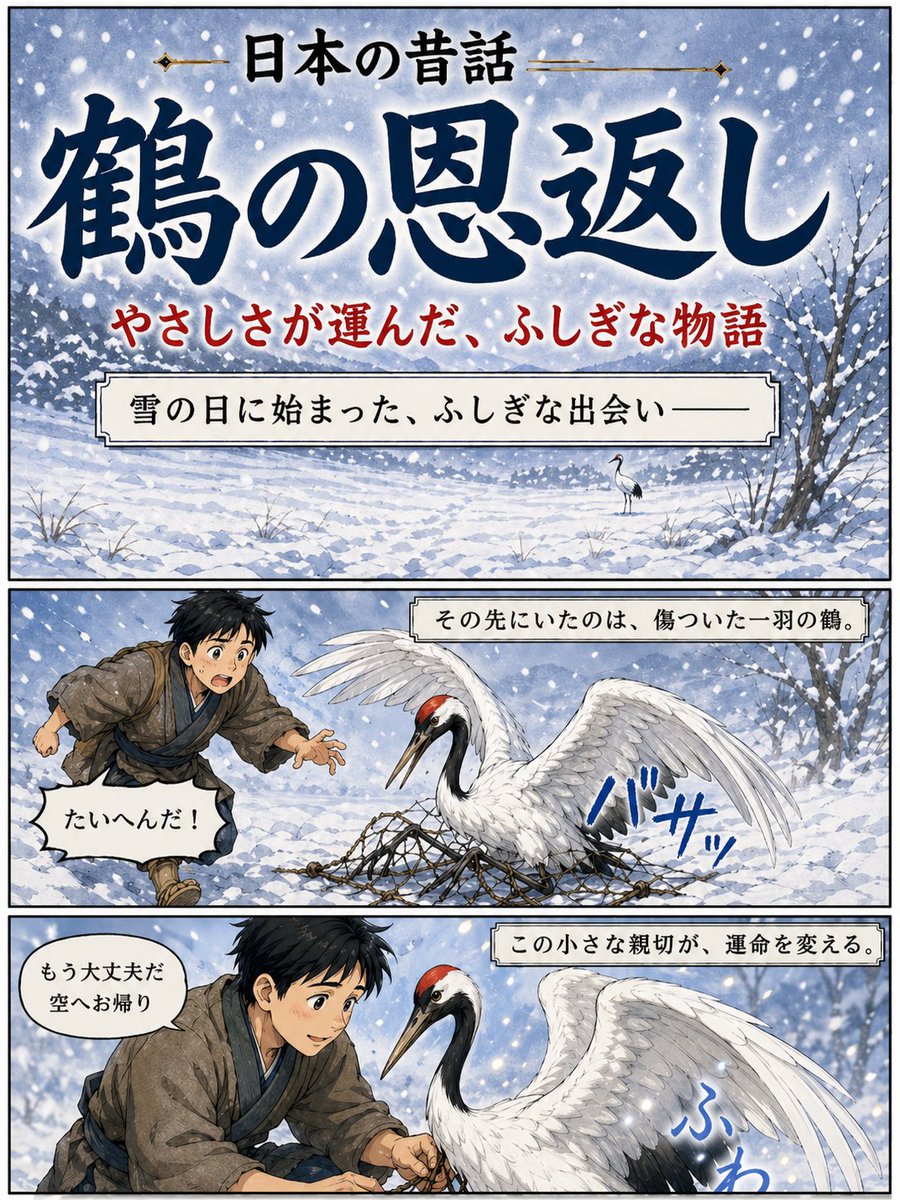
Póster del cuento popular japonés de la grulla
Un póster ilustrado de tres paneles de un cuento popular japonés que muestra a la Grulla Agradecida en un formato de libro de cuentos manga nevado, ideal para portadas narrativas o elementos visuales de historias culturales.
Este es un ejemplo GPT Image 2 para Ilustración y arte . Utilice la plantilla lista para copiar que aparece a continuación para generar imágenes similares y revise la atribución de Awesome GPT Image 2 Prompts y los derechos de uso comercial antes de reutilizarla.
Free 1K preview
Generate one preview image instantly, no sign-up required.
Prompt
Mensaje listo para copiar
{
  "type": "Japanese folktale manga-style poster",
  "style": "dramatic watercolor anime illustration with inked outlines, vintage storybook poster design, soft snowy atmosphere, vertical three-panel layout with black panel borders",
  "theme": "kindness, winter, folklore, gratitude",
  "text": {
    "topHeader": "日本の昔話",
    "mainTitle": "{argument name=\"title text\" default=\"鶴の恩返し\"}",
    "subtitle": "やさしさが運んだ、ふしぎな物語"
  },
  "layout": {
    "orientation": "portrait",
    "sections": [
      {
        "title": "cover panel",
        "position": "top",
        "count": 1,
        "labels": [
          "title area",
          "subtitle line",
          "narration box"
        ]
      },
      {
        "title": "story panel 1",
        "position": "middle",
        "count": 1,
        "labels": [
          "boy running in snow",
          "injured crane in net",
          "sound effect",
          "speech bubble",
          "caption box"
        ]
      },
      {
        "title": "story panel 2",
        "position": "bottom",
        "count": 1,
        "labels": [
          "boy helping crane",
          "crane close-up",
          "sound effect",
          "speech bubble",
          "caption box"
        ]
      }
    ],
    "panelCount": 3
  },
  "scene": {
    "season": "winter",
    "weather": "heavy falling snow with large visible flakes",
    "background": "snow-covered field with distant tree line, pale blue-gray sky, bare winter trees at the right edge, uneven snowdrifts and sparse grasses poking through snow"
  },
  "topPanel": {
    "composition": "large title-dominant cover image over a snowy landscape",
    "narrationBox": "雪の日に始まった、ふしぎな出会い——",
    "backgroundDetail": "a single small crane standing in the snowy distance near the center-right"
  },
  "middlePanel": {
    "caption": "その先にいたのは、傷ついた一羽の鶴。",
    "characters": [
      {
        "role": "boy",
        "count": 1,
        "appearance": "young Japanese boy in rustic old-fashioned village clothing, messy short black hair, brown kimono-style outer robe, blue inner layer and sash, running urgently from the left with one hand reaching forward"
      },
      {
        "role": "crane",
        "count": 1,
        "appearance": "red-crowned crane with white body, black neck and tail accents, one wing raised, trapped in a rope net spread across the snow"
      }
    ],
    "speechBubble": "たいへんだ!",
    "soundEffect": "バサッ"
  },
  "bottomPanel": {
    "caption": "この小さな親切が、運命を変える。",
    "characters": [
      {
        "role": "boy",
        "count": 1,
        "appearance": "the same boy kneeling and carefully loosening the net with both hands, leaning close to the bird"
      },
      {
        "role": "crane",
        "count": 1,
        "appearance": "large red-crowned crane facing left, calmer now, wings partially lifted, feathers detailed and luminous against the snow"
      }
    ],
    "speechBubble": "もう大丈夫だ 空へお帰り",
    "soundEffect": "ふわ"
  },
  "colorPalette": {
    "primary": [
      "indigo blue",
      "snow white",
      "soft gray",
      "muted brown"
    ],
    "accents": [
      "crane crown red",
      "subtitle red",
      "sound effect blue"
    ]
  },
  "rendering": "highly polished illustration, elegant Japanese calligraphy for the main title, readable printed Japanese text in captions and speech balloons, cinematic contrast between white snow and deep blue lettering"
}
Variables de solicitud
Marcadores de posición de argumentos editables que se encuentran en la solicitud, con sus valores predeterminados.
Best for
- - Ilustración y arte visual exploration
- - Image generation and reference-image edits
- - Reusable briefs that keep source attribution visible
Change these parts
- - Subject, product, character, or scene
- - Aspect ratio, camera, lighting, and background
- - Brand, text, color, and output constraints
Recommended model and settings
- - Model: gpt-image-2
- - Input mode: Texto a imagen
- - Aspect ratio: source
- - Commercial status: review original source
How to use this prompt
- 1. Copy the prompt and preserve its structure for the first test.
- 2. Replace the subject, context, and publishing channel.
- 3. Change one camera, lighting, or style variable per iteration.
- 4. Inspect the output, source, text, and rights before reuse.
Limitations, source, and reuse cautions
- - Generated output is an editable draft, not factual, legal, or rights evidence.
- - Review the linked source, people, brands, logos, text, and third-party media before commercial use.
Más casos en esta categoría
Priorizados por categoría, compatibilidad con el modo de entrada, calidad y menor riesgo.






Notas sobre la reutilización y la fuente
Utilice esta opción de forma segura después de previsualizar el caso.
- 1.Copia la solicitud o ábrela directamente en Dovoo con el botón de generación.
- 2.Ajusta las variables, la relación de aspecto y las imágenes de referencia según tus necesidades.
- 3.Antes de publicar o utilizar el servicio de forma remunerada, verifique los derechos de autor, los requisitos de atribución y los riesgos relacionados con la marca o la imagen de la persona.