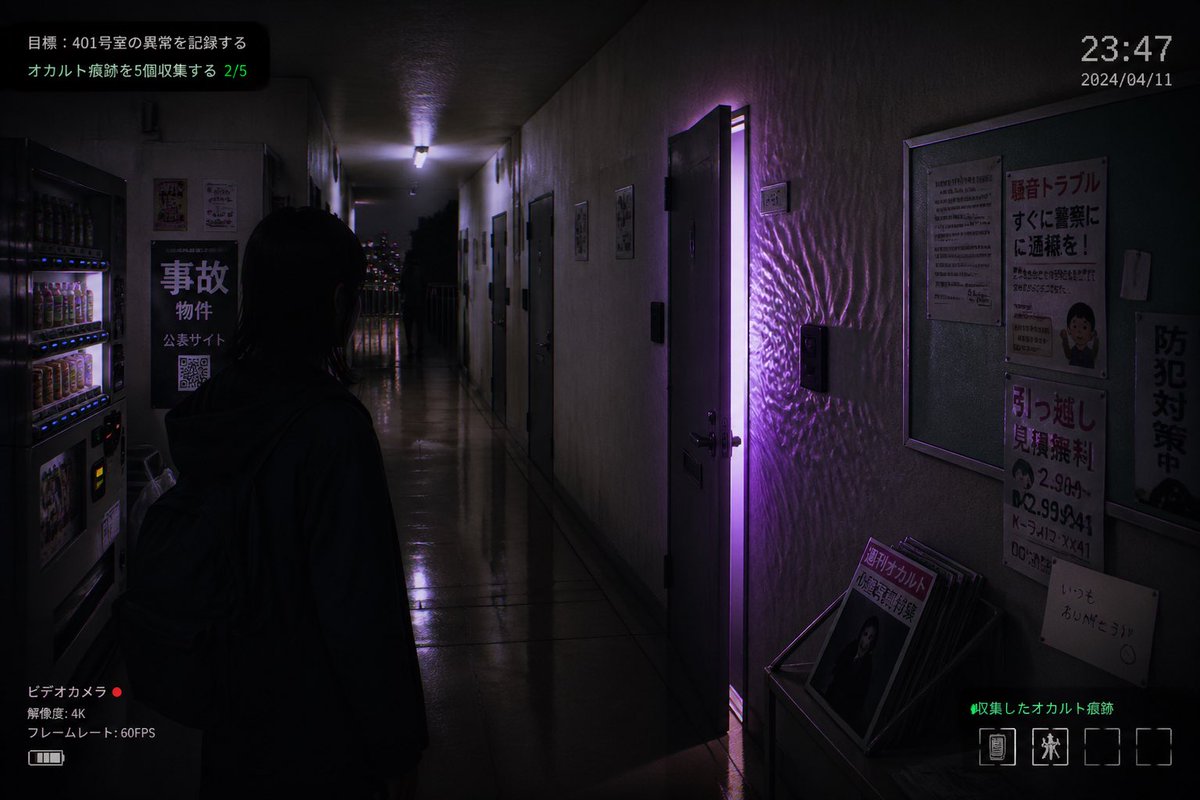
Captura de pantalla de un juego de terror japonés ambientado en un apartamento.
Esta función genera una captura de pantalla fotorrealista, al estilo de los videojuegos de terror independientes, de un pasillo embrujado en un apartamento japonés, con una puerta iluminada en color púrpura y una superposición completa de la interfaz de usuario, ideal para imágenes de juegos ficticios o material promocional espeluznante.
Este es un ejemplo GPT Image 2 para Anime y juegos . Utilice la plantilla lista para copiar que aparece a continuación para generar imágenes similares y revise la atribución de Awesome GPT Image 2 Prompts y los derechos de uso comercial antes de reutilizarla.
Free 1K preview
Generate one preview image instantly, no sign-up required.
Prompt
Mensaje listo para copiar
A realistic first-person horror game screenshot set in a narrow, dimly lit Japanese apartment corridor at night, viewed from slightly behind a lone human figure standing in the hallway. The figure is a young woman with straight dark shoulder-length hair, seen mostly in silhouette from the back, wearing a dark hoodie and a backpack, facing forward toward the end of the corridor. The setting is an older concrete apartment building interior with glossy reflective floor tiles, stained off-white walls, multiple apartment doors on both sides, and a cold fluorescent ceiling light receding into the distance. One apartment door on the right side is slightly open, emitting a vivid supernatural purple glow that spills into the hallway and creates rippling light patterns across the wall and floor. On the left foreground, include 2 beverage vending machines with illuminated rows of drinks. Also on the left wall, place a black sign with large Japanese text reading "事故物件", smaller text beneath, and a visible QR code. On the right wall, include a bulletin board and 4 posted notices: a warning-style poster with large red Japanese text, a dense text notice, a moving-service flyer with bold red text and phone numbers, and a vertical anti-crime sign. At the lower right, place a small magazine rack or stand holding several pamphlets, with the front magazine showing Japanese text including "月刊オカルト". Through the far end of the corridor, show a balcony railing and distant city lights. Add an in-game HUD overlay to make it look like a captured indie horror game screen: top left mission text in Japanese with 2 lines, including a green progress counter "2/5"; top right a digital time display "23:47" and date "2024/04/11"; bottom left a camcorder interface with Japanese text, a red recording dot, "4K", and "60FPS"; bottom right green Japanese collection text and a row of 4 inventory slots with only 2 occupied icons. Cinematic composition, moody shadows, photorealistic textures, subtle film grain, surveillance-camera and found-footage atmosphere, ominous supernatural tension, purple and blue-black color palette, realistic Japanese typography, ultra-detailed indie survival horror aesthetic.
Best for
- - Anime y juegos visual exploration
- - Image generation and reference-image edits
- - Reusable briefs that keep source attribution visible
Change these parts
- - Subject, product, character, or scene
- - Aspect ratio, camera, lighting, and background
- - Brand, text, color, and output constraints
Recommended model and settings
- - Model: gpt-image-2
- - Input mode: Texto a imagen
- - Aspect ratio: source
- - Commercial status: review original source
How to use this prompt
- 1. Copy the prompt and preserve its structure for the first test.
- 2. Replace the subject, context, and publishing channel.
- 3. Change one camera, lighting, or style variable per iteration.
- 4. Inspect the output, source, text, and rights before reuse.
Limitations, source, and reuse cautions
- - Generated output is an editable draft, not factual, legal, or rights evidence.
- - Review the linked source, people, brands, logos, text, and third-party media before commercial use.
Más casos en esta categoría
Priorizados por categoría, compatibilidad con el modo de entrada, calidad y menor riesgo.






Notas sobre la reutilización y la fuente
Utilice esta opción de forma segura después de previsualizar el caso.
- 1.Copia la solicitud o ábrela directamente en Dovoo con el botón de generación.
- 2.Ajusta las variables, la relación de aspecto y las imágenes de referencia según tus necesidades.
- 3.Antes de publicar o utilizar el servicio de forma remunerada, verifique los derechos de autor, los requisitos de atribución y los riesgos relacionados con la marca o la imagen de la persona.