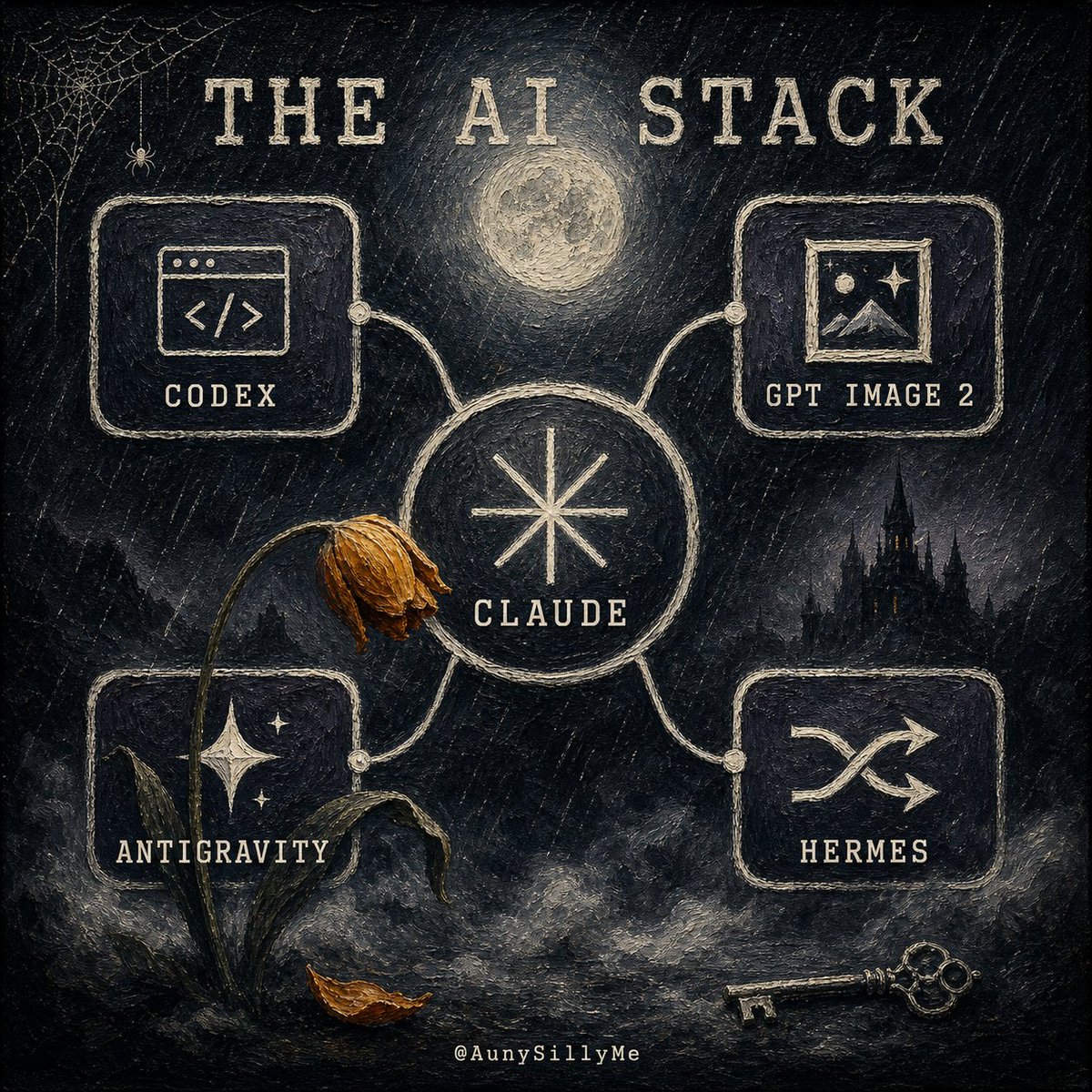
Gothic AI Stack Diagram
Creates a dark gothic illustrated AI-tool stack diagram for social posts, tech commentary, or personal workflow branding.
Este es un ejemplo GPT Image 2 para Diseño gráfico y carteles . Utilice la plantilla lista para copiar que aparece a continuación para generar imágenes similares y revise la atribución de Awesome GPT Image 2 Prompts y los derechos de uso comercial antes de reutilizarla.
¿Necesitas el conjunto completo de indicaciones? Usa el Diseño gráfico y carteles centro de temas para ver más ejemplos relacionados, o abra el GPT Image 2 catálogo de avisos Para ver el índice completo de ejemplos, las estructuras reutilizables y la atribución de fuentes.
Free 1K preview
Generate one preview image instantly, no sign-up required.
2332/4000
Prompt
Mensaje listo para copiar
Goal: Create a dark gothic hand-painted infographic poster titled {argument name="headline text" default="THE AI STACK"}, showing an interconnected personal AI-tool stack as a mysterious occult network.

Canvas: Square 1:1 composition, black and charcoal textured canvas with visible rough brush strokes, scratched chalk marks, muted cream ink, and subtle sepia highlights. The mood is eerie, nocturnal, vintage, and slightly haunted.

Layout: Place a large central circular node labeled {argument name="main tool" default="CLAUDE"} with a simple eight-point starburst symbol inside it. Four rounded rectangular tool cards connect to the central node with pale hand-drawn cables and small circular connector dots. Use exactly 4 outer cards: top-left card labeled {argument name="tool 1" default="CODEX"} with a browser-window code icon, top-right card labeled {argument name="tool 2" default="GPT IMAGE 2"} with a framed landscape/image icon, bottom-left card labeled {argument name="tool 3" default="ANTIGRAVITY"} with a starry mountain or sparkling night icon, and bottom-right card labeled {argument name="tool 4" default="HERMES"} with a crossed-arrows or janitor-like routing symbol. Keep all text in uppercase, widely spaced, distressed serif/typewriter lettering.

Scene details: Add a glowing full moon centered above the main node, a small spiderweb and tiny spider in the upper-left corner, a dark gothic castle silhouette in the right background, fog and smoky clouds along the bottom, a wilted flower with a bent stem leaning across the left side of the central node, one fallen brown leaf near the base of the flower, and an antique skeleton key lying at the bottom right. Include a tiny creator handle centered at the bottom: @AunySillyMe.

Visual style: Painterly gothic chalkboard illustration, rough impasto texture, off-white linework on black, muted gold-brown accents on the dead flower and leaf, softly glowing moon, handmade imperfect borders, no clean vector polish.

Constraints: Use exactly 1 central circle, exactly 4 connected outer cards, exactly 4 outer tool labels, exactly 1 moon, exactly 1 spiderweb, exactly 1 spider, exactly 1 wilted flower, exactly 1 fallen leaf, exactly 1 castle silhouette, and exactly 1 key. Do not add extra cards, extra tools, bright colors, modern UI gloss, or photorealism.
Variables de solicitud
Marcadores de posición de argumentos editables que se encuentran en la solicitud, con sus valores predeterminados.
Variable
headline text
Por defecto
THE AI STACK
Variable
main tool
Por defecto
CLAUDE
Variable
tool 1
Por defecto
CODEX
Variable
tool 2
Por defecto
GPT IMAGE 2
Variable
tool 3
Por defecto
ANTIGRAVITY
Variable
tool 4
Por defecto
HERMES
Best for
- - Diseño gráfico y carteles visual exploration
- - Image generation and reference-image edits
- - Reusable briefs that keep source attribution visible
Change these parts
- - Subject, product, character, or scene
- - Aspect ratio, camera, lighting, and background
- - Brand, text, color, and output constraints
Recommended model and settings
- - Model: gpt-image-2
- - Input mode: Texto a imagen
- - Aspect ratio: source
- - Commercial status: review original source
How to use this prompt
- 1. Copy the prompt and preserve its structure for the first test.
- 2. Replace the subject, context, and publishing channel.
- 3. Change one camera, lighting, or style variable per iteration.
- 4. Inspect the output, source, text, and rights before reuse.
Limitations, source, and reuse cautions
- - Generated output is an editable draft, not factual, legal, or rights evidence.
- - Review the linked source, people, brands, logos, text, and third-party media before commercial use.
Importado de Awesome GPT Image 2 Prompts . Se requiere atribución. El estado de uso comercial es allowed ; revise los derechos de la fuente antes de su uso comercial.
Más casos en esta categoría
Priorizados por categoría, compatibilidad con el modo de entrada, calidad y menor riesgo.






Notas sobre la reutilización y la fuente
Utilice esta opción de forma segura después de previsualizar el caso.
- 1.Copia la solicitud o ábrela directamente en Dovoo con el botón de generación.
- 2.Ajusta las variables, la relación de aspecto y las imágenes de referencia según tus necesidades.
- 3.Antes de publicar o utilizar el servicio de forma remunerada, verifique los derechos de autor, los requisitos de atribución y los riesgos relacionados con la marca o la imagen de la persona.