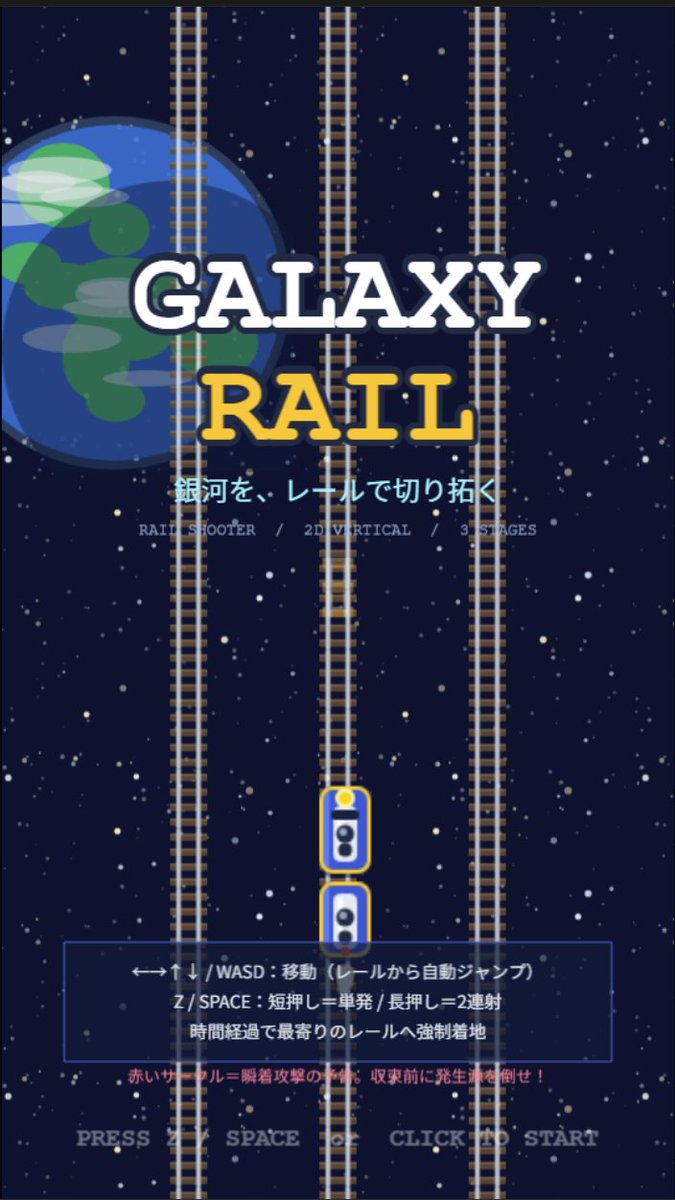
Galaxy Rail Title Screen
Creates a portrait retro arcade rail-shooter title screen with space rails, Japanese instructions, and a mobile game splash layout.
Este es un ejemplo GPT Image 2 para Anime y juegos . Utilice la plantilla lista para copiar que aparece a continuación para generar imágenes similares y revise la atribución de Awesome GPT Image 2 Prompts y los derechos de uso comercial antes de reutilizarla.
¿Necesitas el conjunto completo de indicaciones? Usa el Anime y juegos centro de temas para ver más ejemplos relacionados, o abra el GPT Image 2 catálogo de avisos Para ver el índice completo de ejemplos, las estructuras reutilizables y la atribución de fuentes.
Free 1K preview
Generate one preview image instantly, no sign-up required.
2353/4000
Prompt
Mensaje listo para copiar
Goal: Create a retro 2D vertical arcade game title screen for a rail shooter called {argument name="game title" default="GALAXY RAIL"}, with a space-and-railroad theme and Japanese UI text.

Canvas: Portrait mobile game splash screen, 9:16 aspect ratio, pixel-art inspired but clean vector-like illustration, dark navy outer-space background filled with many small white and pale yellow stars.

Layout: Center the title in the upper-middle. Place a large partially cropped Earth-like blue planet on the left behind the title, occupying about one third of the image height, with simple green landmasses and translucent cloud streaks. Add exactly 3 vertical railroad tracks running from top to bottom: one left track partly over the planet, one center track, and one right track; each track has gray rails and many brown sleepers. Put exactly 2 small train/player cars on the lower center track, stacked vertically with rounded white bodies, blue windows, yellow outlines, and a yellow headlight on the top car.

Text content: Main title text is two lines: “GALAXY” in large white slab-serif letters with a dark navy outline, and “RAIL” below in large golden yellow slab-serif letters with a dark navy outline. Under the title, show the Japanese tagline {argument name="tagline" default="銀河を、レールで切り拓く"} in bright cyan. Beneath it, add small gray feature text: “RAIL SHOOTER / 2D VERTICAL / 3 STAGES”. In the lower third, add a translucent dark blue rectangular instruction panel with a thin blue border. Inside the panel, show three Japanese instruction lines: “←→↑↓ / WASD:移動(レールから自動ジャンプ)”, “Z / SPACE:短押し=単発 / 長押し=2連射”, and “時間経過で最寄りのレールへ強制着地”. Below the panel, add a small red warning line: “赤いサークル=瞬着攻撃の予兆。収束前に発生源を倒せ!” At the very bottom, centered, show pale gray prompt text: {argument name="start prompt" default="PRESS Z SPACE OR CLICK TO START"}.

Visual style: Retro arcade title screen, simple 2D game mockup, crisp shapes, slightly pixelated typography, high contrast, deep-space palette of navy, white, cyan, yellow, gray, and red. The composition should feel like a vertical rail shooter prototype splash screen.

Constraints: Use exactly 3 full-height vertical tracks, exactly 2 train cars, one planet on the left, one instruction panel, and no characters or extra UI windows. Keep all text legible and centered, with no logos or watermarks.
Variables de solicitud
Marcadores de posición de argumentos editables que se encuentran en la solicitud, con sus valores predeterminados.
Variable
game title
Por defecto
GALAXY RAIL
Variable
tagline
Por defecto
銀河を、レールで切り拓く
Variable
start prompt
Por defecto
PRESS Z SPACE OR CLICK TO START
Best for
- - Anime y juegos visual exploration
- - Image generation and reference-image edits
- - Reusable briefs that keep source attribution visible
Change these parts
- - Subject, product, character, or scene
- - Aspect ratio, camera, lighting, and background
- - Brand, text, color, and output constraints
Recommended model and settings
- - Model: gpt-image-2
- - Input mode: Texto a imagen
- - Aspect ratio: source
- - Commercial status: review original source
How to use this prompt
- 1. Copy the prompt and preserve its structure for the first test.
- 2. Replace the subject, context, and publishing channel.
- 3. Change one camera, lighting, or style variable per iteration.
- 4. Inspect the output, source, text, and rights before reuse.
Limitations, source, and reuse cautions
- - Generated output is an editable draft, not factual, legal, or rights evidence.
- - Review the linked source, people, brands, logos, text, and third-party media before commercial use.
Importado de Awesome GPT Image 2 Prompts . Se requiere atribución. El estado de uso comercial es allowed ; revise los derechos de la fuente antes de su uso comercial.
Más casos en esta categoría
Priorizados por categoría, compatibilidad con el modo de entrada, calidad y menor riesgo.






Notas sobre la reutilización y la fuente
Utilice esta opción de forma segura después de previsualizar el caso.
- 1.Copia la solicitud o ábrela directamente en Dovoo con el botón de generación.
- 2.Ajusta las variables, la relación de aspecto y las imágenes de referencia según tus necesidades.
- 3.Antes de publicar o utilizar el servicio de forma remunerada, verifique los derechos de autor, los requisitos de atribución y los riesgos relacionados con la marca o la imagen de la persona.