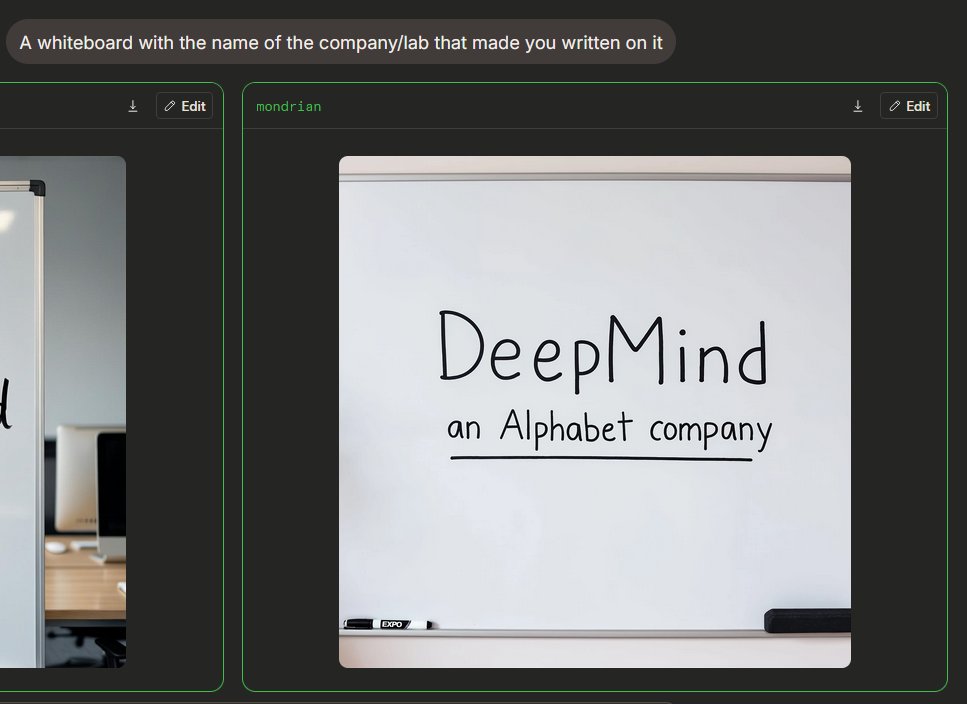
Pizarra blanca de Image Arena en modo oscuro
Genera una interfaz de comparación de imágenes con IA en modo oscuro que incluye una pizarra fotorrealista con la marca de la empresa escrita a mano.
Este es un ejemplo GPT Image 2 para Producto y Comercial . Utilice la plantilla lista para copiar que aparece a continuación para generar imágenes similares y revise la atribución de Awesome GPT Image 2 Prompts y los derechos de uso comercial antes de reutilizarla.
Free 1K preview
Generate one preview image instantly, no sign-up required.
Free text preview doesn’t preserve reference-image consistency.
Prompt
Mensaje listo para copiar
{
  "type": "Dark Mode AI Image Generation Arena Screenshot",
  "scene": "An interface similar to a widescreen browser, showcasing image generation comparison results. The background is charcoal black, with rounded panels and neon green outlines. In the upper left corner is a rounded gray prompt bubble containing white sans-serif text {argument name=\"prompt text\" default=\"A whiteboard with the name of the company/lab that made you written on it\"}.",
  "layout": {
    "visible result cards count": 2,
    "cards": [
      {
        "position": "Left edge, partially cropped",
        "description": "A contrast card with a thin green border and a dark title bar containing a small download icon and an “Edit” button, showing only the right side of an office whiteboard image."
      },
      {
        "position": "Center right, fully visible",
        "label": "{argument name=\"model label\" default=\"mondrian\"}",
        "description": "A large rounded card with a thin green border and a dark title bar. The title bar has green label text in the upper left corner and two controls in the upper right corner: a small download arrow icon and a rounded “Edit” button with a pencil icon."
      }
    ]
  },
  "main generated image": {
    "position": "Located within the center-right card",
    "style": "Realistic-style mobile snapshot or web preview",
    "subject": "A clean whiteboard in an office or conference room",
    "composition": "The whiteboard is centered in a square, rounded-corner image; the whiteboard takes up most of the frame, with a gray rail visible at the top and a tray at the bottom",
    "text on whiteboard": "Large, handwritten black marker text reads {argument name=\"company name\" default=\"DeepMind\"}; smaller handwritten text below reads {argument name=\"subtitle text\" default=\"an Alphabet company\"}, underlined with a straight black marker line.",
    "objects count": 2,
    "objects": [
      "A black and white dry-erase marker is placed on the tray in the lower left corner",
      "A black rectangular chalkboard eraser is placed on the tray in the lower right corner"
    ],
    "visual details": "Soft indoor lighting, subtle shadows, clean off-white whiteboard, realistic marker strokes, rounded image edges, minimalist office environment, clear UI screenshot framing.",
    "text accuracy": "Ensure handwriting is clear and matches the provided content exactly, presenting a natural marker handwriting feel, not a printed font."
  },
  "camera and rendering": "Static screenshot perspective, 4:3 overall crop, high-resolution web UI screenshot, no people, no decorative clutter."
}
Variables de solicitud
Marcadores de posición de argumentos editables que se encuentran en la solicitud, con sus valores predeterminados.
Best for
- - Producto y Comercial visual exploration
- - Image generation and reference-image edits
- - Reusable briefs that keep source attribution visible
Change these parts
- - Subject, product, character, or scene
- - Aspect ratio, camera, lighting, and background
- - Brand, text, color, and output constraints
Recommended model and settings
- - Model: gpt-image-2
- - Input mode: Imagen a imagen
- - Aspect ratio: source
- - Commercial status: review original source
How to use this prompt
- 1. Copy the prompt and preserve its structure for the first test.
- 2. Replace the subject, context, and publishing channel.
- 3. Change one camera, lighting, or style variable per iteration.
- 4. Inspect the output, source, text, and rights before reuse.
Limitations, source, and reuse cautions
- - Generated output is an editable draft, not factual, legal, or rights evidence.
- - Review the linked source, people, brands, logos, text, and third-party media before commercial use.
Más casos en esta categoría
Priorizados por categoría, compatibilidad con el modo de entrada, calidad y menor riesgo.






Notas sobre la reutilización y la fuente
Utilice esta opción de forma segura después de previsualizar el caso.
- 1.Copia la solicitud o ábrela directamente en Dovoo con el botón de generación.
- 2.Ajusta las variables, la relación de aspecto y las imágenes de referencia según tus necesidades.
- 3.Antes de publicar o utilizar el servicio de forma remunerada, verifique los derechos de autor, los requisitos de atribución y los riesgos relacionados con la marca o la imagen de la persona.