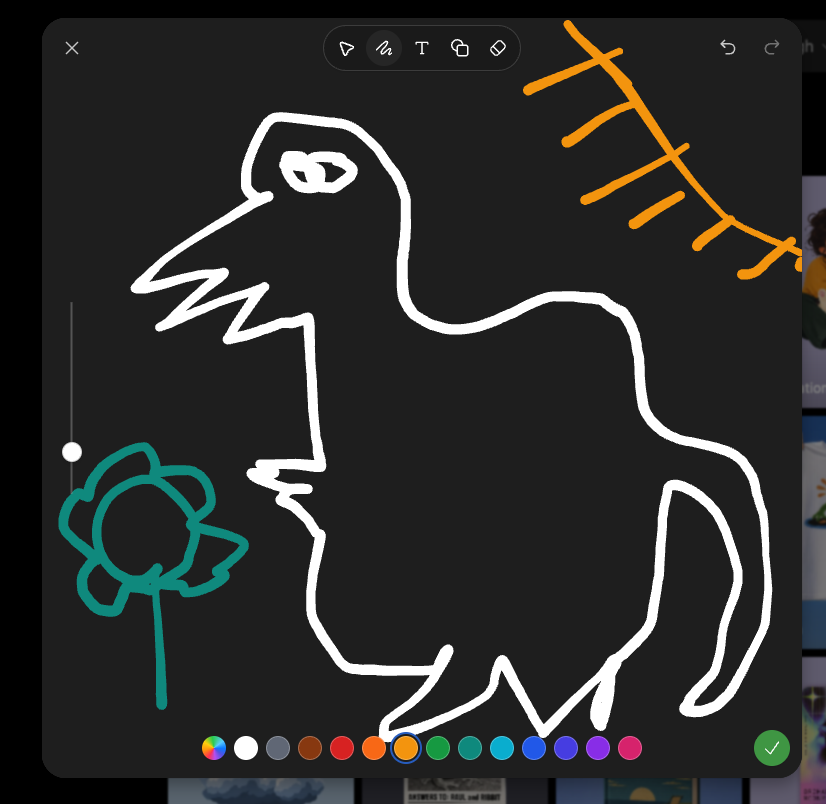
Dark Sketch Mode Monster Doodle
Generates a screenshot-style dark drawing interface with a crude monster doodle, color palette, toolbar, and sketch-mode controls.
Este es un ejemplo GPT Image 2 para Otra inspiración . Utilice la plantilla lista para copiar que aparece a continuación para generar imágenes similares y revise la atribución de Awesome GPT Image 2 Prompts y los derechos de uso comercial antes de reutilizarla.
¿Necesitas el conjunto completo de indicaciones? Usa el Otra inspiración centro de temas para ver más ejemplos relacionados, o abra el GPT Image 2 catálogo de avisos Para ver el índice completo de ejemplos, las estructuras reutilizables y la atribución de fuentes.
Free 1K preview
Generate one preview image instantly, no sign-up required.
2318/4000
Prompt
Mensaje listo para copiar
Goal: Create a screenshot-like image of a dark sketch/drawing mode interface showing a deliberately crude digital doodle being edited, as if in an image-generation app's sketch tool.

Canvas: Square-ish 4:3 screenshot, dark charcoal drawing panel centered with rounded corners over a dimmed gallery/app background barely visible at the right and bottom edges.

Layout: The main drawing area fills most of the frame. A top toolbar floats near the upper center, with a close X at top left and undo/redo icons at top right. A vertical brush-size slider sits on the left side with one white circular handle. A horizontal color palette runs along the bottom. A green circular checkmark confirmation button sits at the bottom right.

Main sketch: Draw a rough white line-art monster resembling a hunched fantasy boss creature, made with thick uneven brush strokes. It has one long pointed beak or snout facing left, a jagged open mouth, one scribbled oval eye near the top, a high arched back, a bulky torso, bent legs, and a long curved tail on the right. Add a small teal flower-like doodle on a stem at the lower left, facing the monster. Add an orange sketch of a sun or diagonal branch-like rays in the upper right corner.

Interface details: Include exactly 6 visible top toolbar icons: pointer/selection arrow, squiggle brush icon, letter T text tool, overlapping shapes/copy icon, eraser/diamond icon, and the surrounding rounded toolbar container. Include exactly 2 top-right history icons: undo and redo. Include exactly 1 close X icon at top left. Include exactly 1 vertical slider with 1 white knob. Include exactly 16 bottom color swatches, from left to right: multicolor rainbow circle, white, gray, brown, red, orange, yellow-orange selected with a blue ring, green, teal-green, cyan, blue, indigo, violet, purple, pink, plus exactly 1 green confirmation check button at the far right.

Visual style: Rough hand-drawn sketch mode, thick uneven strokes, dark UI, playful messy drawing, casual screenshot aesthetic. Use {argument name="creature outline color" default="white"}, {argument name="flower color" default="teal"}, {argument name="sun sketch color" default="orange"}, and {argument name="background panel color" default="dark charcoal"}. No polished rendering; keep it intentionally sloppy and simple.
Variables de solicitud
Marcadores de posición de argumentos editables que se encuentran en la solicitud, con sus valores predeterminados.
Variable
creature outline color
Por defecto
white
Variable
flower color
Por defecto
teal
Variable
sun sketch color
Por defecto
orange
Variable
background panel color
Por defecto
dark charcoal
Best for
- - Otra inspiración visual exploration
- - Image generation and reference-image edits
- - Reusable briefs that keep source attribution visible
Change these parts
- - Subject, product, character, or scene
- - Aspect ratio, camera, lighting, and background
- - Brand, text, color, and output constraints
Recommended model and settings
- - Model: gpt-image-2
- - Input mode: Texto a imagen
- - Aspect ratio: source
- - Commercial status: review original source
How to use this prompt
- 1. Copy the prompt and preserve its structure for the first test.
- 2. Replace the subject, context, and publishing channel.
- 3. Change one camera, lighting, or style variable per iteration.
- 4. Inspect the output, source, text, and rights before reuse.
Limitations, source, and reuse cautions
- - Generated output is an editable draft, not factual, legal, or rights evidence.
- - Review the linked source, people, brands, logos, text, and third-party media before commercial use.
Importado de Awesome GPT Image 2 Prompts . Se requiere atribución. El estado de uso comercial es allowed ; revise los derechos de la fuente antes de su uso comercial.
Más casos en esta categoría
Priorizados por categoría, compatibilidad con el modo de entrada, calidad y menor riesgo.






Notas sobre la reutilización y la fuente
Utilice esta opción de forma segura después de previsualizar el caso.
- 1.Copia la solicitud o ábrela directamente en Dovoo con el botón de generación.
- 2.Ajusta las variables, la relación de aspecto y las imágenes de referencia según tus necesidades.
- 3.Antes de publicar o utilizar el servicio de forma remunerada, verifique los derechos de autor, los requisitos de atribución y los riesgos relacionados con la marca o la imagen de la persona.