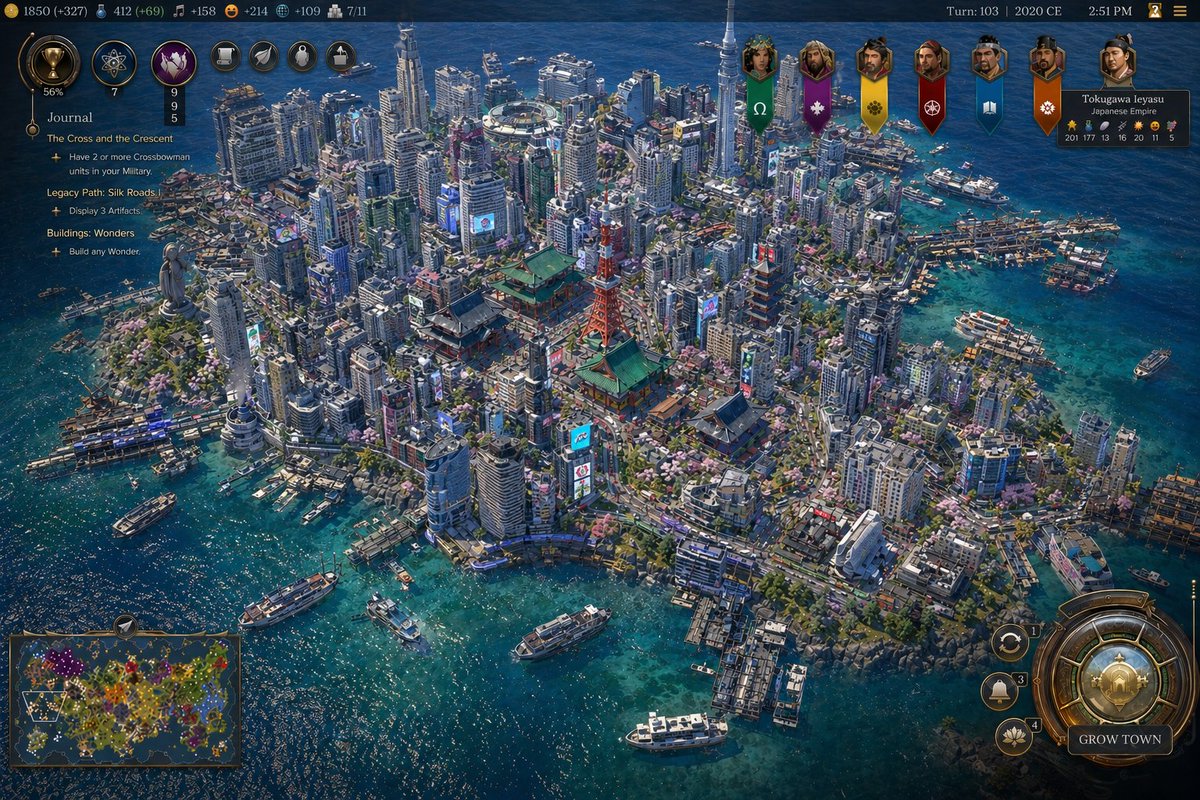
Captura de pantalla de la megaciudad insular de Tokio al estilo Civilization
Esta función genera una captura de pantalla muy detallada de un juego de estrategia al estilo Civilization, que muestra una densa ciudad costera japonesa moderna con interfaz completa, ideal para simulaciones visuales del juego y para la creación especulativa de mundos urbanos.
Este es un ejemplo GPT Image 2 para Anime y juegos . Utilice la plantilla lista para copiar que aparece a continuación para generar imágenes similares y revise la atribución de Awesome GPT Image 2 Prompts y los derechos de uso comercial antes de reutilizarla.
Free 1K preview
Generate one preview image instantly, no sign-up required.
Prompt
Mensaje listo para copiar
A highly detailed isometric grand-strategy video game screenshot in the style of a modern Civilization VII city view, showing a dense futuristic coastal island metropolis inspired by {argument name="location" default="Tokyo"} in {argument name="year" default="2020 CE"}. The camera looks down from a high oblique angle over a compact urban island surrounded by vivid turquoise-blue ocean with sun-glitter reflections. The city is extremely dense, packed wall-to-wall with hundreds of modern high-rise towers, apartment blocks, office buildings, neon billboards, multilane roads, rail lines, bridges, and waterfront piers. In the center are 3 standout landmark structures: a red lattice communications tower resembling Tokyo Tower, a large traditional Japanese temple complex with green roofs, and a 5-tier pagoda. Near the left shoreline stands 1 monumental statue on a rocky promontory resembling a giant seated or standing Buddha. Near the upper center sits 1 circular stadium or domed arena embedded among skyscrapers. The harbor contains exactly 10 visible boats and ships of mixed sizes, including ferries, yachts, and small passenger vessels, plus crowded marina docks along the right and lower shorelines. Blend traditional Japanese architecture with hyper-dense contemporary urbanism, cherry blossom trees scattered through streets and parks, intricate road loops, tiny vehicles, and layered waterfront infrastructure. The island shoreline should feel irregular, rocky, and heavily developed, with the sea transitioning from deep sapphire to clear tropical cyan near the coast.

Render it as a polished strategy-game UI screenshot rather than a pure illustration. Add a full game HUD overlay with ornate bronze-and-navy fantasy-tech interface styling. Along the top bar, show multiple resource counters and turn information; include the text {argument name="turn text" default="Turn: 103 | 2020 CE"} and a time display. On the upper right, show 7 hanging civilization banners with leader portraits or emblems. On the left side, show a quest/journal panel titled {argument name="left panel title" default="Journal"} containing 3 task sections: "The Cross and the Crescent", "Legacy Path: Silk Roads", and "Buildings: Wonders", each with short objective lines beneath. In the lower left, include 1 minimap framed in ornate UI. In the lower right, include 1 large circular city-management dial and a prominent button labeled {argument name="button text" default="GROW TOWN"}, plus 3 smaller circular action buttons nearby. The overall image should feel like an authentic in-game screenshot: razor-sharp, information-rich, colorful, immersive, and believable, with realistic urban density, accurate transportation details, and a luxurious next-generation 4X strategy aesthetic.
Variables de solicitud
Marcadores de posición de argumentos editables que se encuentran en la solicitud, con sus valores predeterminados.
Best for
- - Anime y juegos visual exploration
- - Image generation and reference-image edits
- - Reusable briefs that keep source attribution visible
Change these parts
- - Subject, product, character, or scene
- - Aspect ratio, camera, lighting, and background
- - Brand, text, color, and output constraints
Recommended model and settings
- - Model: gpt-image-2
- - Input mode: Texto a imagen
- - Aspect ratio: source
- - Commercial status: review original source
How to use this prompt
- 1. Copy the prompt and preserve its structure for the first test.
- 2. Replace the subject, context, and publishing channel.
- 3. Change one camera, lighting, or style variable per iteration.
- 4. Inspect the output, source, text, and rights before reuse.
Limitations, source, and reuse cautions
- - Generated output is an editable draft, not factual, legal, or rights evidence.
- - Review the linked source, people, brands, logos, text, and third-party media before commercial use.
Más casos en esta categoría
Priorizados por categoría, compatibilidad con el modo de entrada, calidad y menor riesgo.






Notas sobre la reutilización y la fuente
Utilice esta opción de forma segura después de previsualizar el caso.
- 1.Copia la solicitud o ábrela directamente en Dovoo con el botón de generación.
- 2.Ajusta las variables, la relación de aspecto y las imágenes de referencia según tus necesidades.
- 3.Antes de publicar o utilizar el servicio de forma remunerada, verifique los derechos de autor, los requisitos de atribución y los riesgos relacionados con la marca o la imagen de la persona.