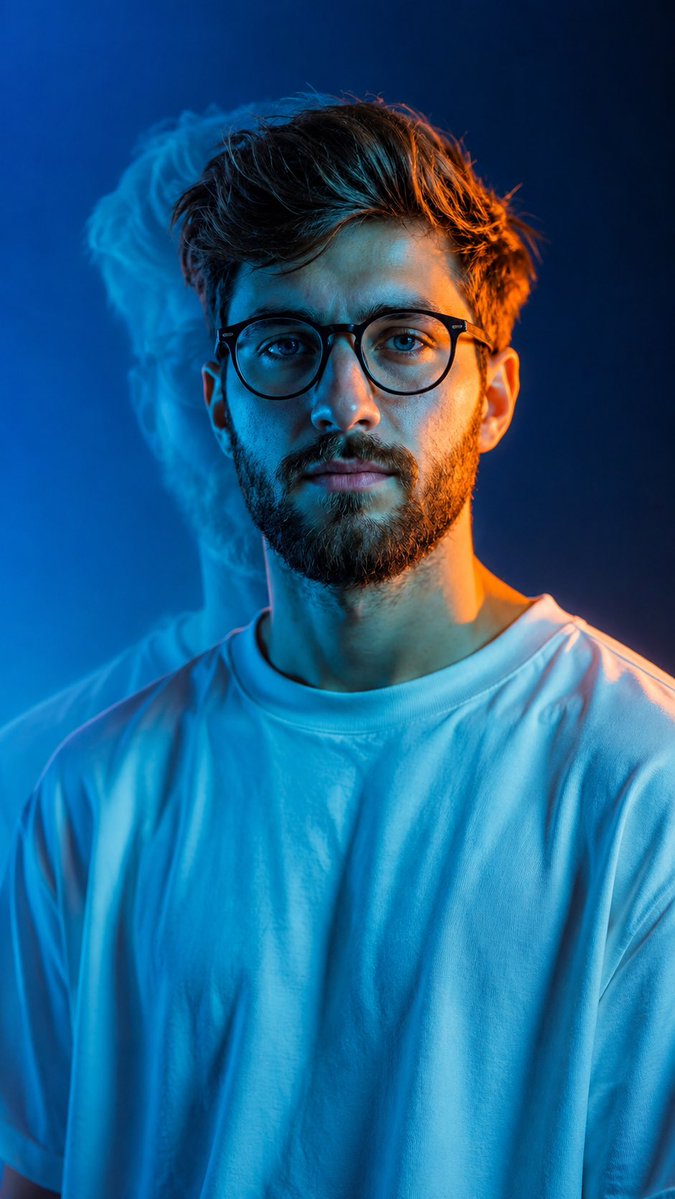
Cinematic Split Lighting Portrait
Generates a professional studio portrait with a dramatic blue and orange split-lighting effect, including a stylized ghost-like shadow.
Este es un ejemplo GPT Image 2 para Retrato y personaje . Utilice la plantilla lista para copiar que aparece a continuación para generar imágenes similares y revise la atribución de Awesome GPT Image 2 Prompts y los derechos de uso comercial antes de reutilizarla.
Free 1K preview
Generate one preview image instantly, no sign-up required.
Free text preview doesn’t preserve reference-image consistency.
Prompt
Mensaje listo para copiar
Create an ultra-photorealistic cinematic studio portrait based on the reference image. {argument name="subject" default="Young South Asian man"}, centered in a 9:16 vertical frame, wearing an {argument name="outfit" default="oversized plain white T-shirt"}, natural masculine face, realistic skin texture, detailed hair, calm confident expression. Use {argument name="lighting style" default="dramatic blue/cyan and warm orange split lighting"}: cool cyan light across the face and shirt, warm orange rim light along the opposite side of the face, hair, ear, and shoulder. Add a soft offset blue ghost-like shadow silhouette behind him. Clean electric-blue gradient background, subtle atmospheric glow, realistic fabric folds, natural skin pores, shallow depth of field, cinematic teal-orange color grading, soft bloom, subtle film grain, HDR, professional fashion photography, 8K ultra-realistic detail. Negative: cartoon, anime, CGI, plastic skin, beauty filter, distorted face, extra limbs/fingers, excessive glow, oversaturation, text, watermark.Variables de solicitud
Marcadores de posición de argumentos editables que se encuentran en la solicitud, con sus valores predeterminados.
Best for
- - Retrato y personaje visual exploration
- - Image generation and reference-image edits
- - Reusable briefs that keep source attribution visible
Change these parts
- - Subject, product, character, or scene
- - Aspect ratio, camera, lighting, and background
- - Brand, text, color, and output constraints
Recommended model and settings
- - Model: gpt-image-2
- - Input mode: Imagen a imagen
- - Aspect ratio: source
- - Commercial status: review original source
How to use this prompt
- 1. Copy the prompt and preserve its structure for the first test.
- 2. Replace the subject, context, and publishing channel.
- 3. Change one camera, lighting, or style variable per iteration.
- 4. Inspect the output, source, text, and rights before reuse.
Limitations, source, and reuse cautions
- - Generated output is an editable draft, not factual, legal, or rights evidence.
- - Review the linked source, people, brands, logos, text, and third-party media before commercial use.
Más casos en esta categoría
Priorizados por categoría, compatibilidad con el modo de entrada, calidad y menor riesgo.






Notas sobre la reutilización y la fuente
Utilice esta opción de forma segura después de previsualizar el caso.
- 1.Copia la solicitud o ábrela directamente en Dovoo con el botón de generación.
- 2.Ajusta las variables, la relación de aspecto y las imágenes de referencia según tus necesidades.
- 3.Antes de publicar o utilizar el servicio de forma remunerada, verifique los derechos de autor, los requisitos de atribución y los riesgos relacionados con la marca o la imagen de la persona.