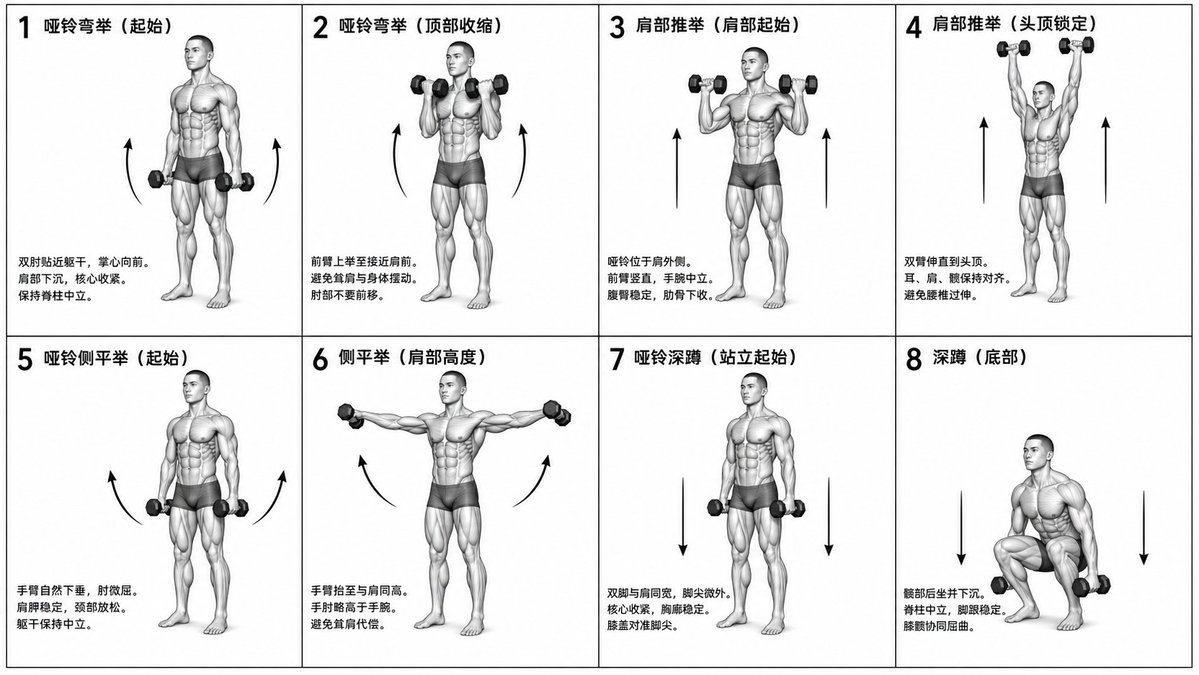
Tabla instructiva de aptitud biomecánica
Un encargo complejo para crear una tabla de ejercicios en formato monocromo, científicamente precisa, con una cuadrícula de 2x4, que muestre ejercicios específicos con etiquetas y figuras anatómicas.
Este es un ejemplo GPT Image 2 para Diseño gráfico y carteles . Utilice la plantilla lista para copiar que aparece a continuación para generar imágenes similares y revise la atribución de Awesome GPT Image 2 Prompts y los derechos de uso comercial antes de reutilizarla.
Free 1K preview
Generate one preview image instantly, no sign-up required.
Free text preview doesn’t preserve reference-image consistency.
Prompt
Mensaje listo para copiar
Generate a monochrome grayscale technical illustration, a biomechanically accurate fitness instruction sheet, clean 3D anatomical figures, scientific diagram aesthetics, minimalist style, no artistic exaggeration.

2x4 grid layout (total of 8 panels), perfectly aligned cells, equal spacing, thin black border, numbered 1 to 8.

Neutral athletic human body (gender-neutral), proportional anatomy, consistent figure across all panels.

{argument name="training sequence" default="Dumbbell training"} sequence (key positions only):
1. Dumbbell Curl (starting position)
2. Dumbbell Curl (top contraction)
3. Shoulder Press (start at shoulder height)
4. Shoulder Press (overhead lockout)
5. Lateral Raise (arms down)
6. Lateral Raise (arms to shoulder height)
7. Dumbbell Squat (standing start)
8. Squat (bottom position).

Top left corner: bold number + movement name (Chinese).
Center: full-body pose (clear joint positioning).
Bottom left corner: brief technical description (2–3 lines, correct posture cues).
Overlay: directional arrows showing the path of motion (up/down/arc).

Correct joint alignment, neutral spine, proper elbow and knee positioning, realistic weight distribution, no exaggerated movements.

Highly detailed grayscale shading, soft studio lighting, subtle shadows, clean lines, medical/sports science diagram quality.

Solid white background.

No color, no background environment, no extra elements, no stylization, no blur.
Variables de solicitud
Marcadores de posición de argumentos editables que se encuentran en la solicitud, con sus valores predeterminados.
Best for
- - Diseño gráfico y carteles visual exploration
- - Image generation and reference-image edits
- - Reusable briefs that keep source attribution visible
Change these parts
- - Subject, product, character, or scene
- - Aspect ratio, camera, lighting, and background
- - Brand, text, color, and output constraints
Recommended model and settings
- - Model: gpt-image-2
- - Input mode: Imagen a imagen
- - Aspect ratio: source
- - Commercial status: review original source
How to use this prompt
- 1. Copy the prompt and preserve its structure for the first test.
- 2. Replace the subject, context, and publishing channel.
- 3. Change one camera, lighting, or style variable per iteration.
- 4. Inspect the output, source, text, and rights before reuse.
Limitations, source, and reuse cautions
- - Generated output is an editable draft, not factual, legal, or rights evidence.
- - Review the linked source, people, brands, logos, text, and third-party media before commercial use.
Más casos en esta categoría
Priorizados por categoría, compatibilidad con el modo de entrada, calidad y menor riesgo.






Notas sobre la reutilización y la fuente
Utilice esta opción de forma segura después de previsualizar el caso.
- 1.Copia la solicitud o ábrela directamente en Dovoo con el botón de generación.
- 2.Ajusta las variables, la relación de aspecto y las imágenes de referencia según tus necesidades.
- 3.Antes de publicar o utilizar el servicio de forma remunerada, verifique los derechos de autor, los requisitos de atribución y los riesgos relacionados con la marca o la imagen de la persona.