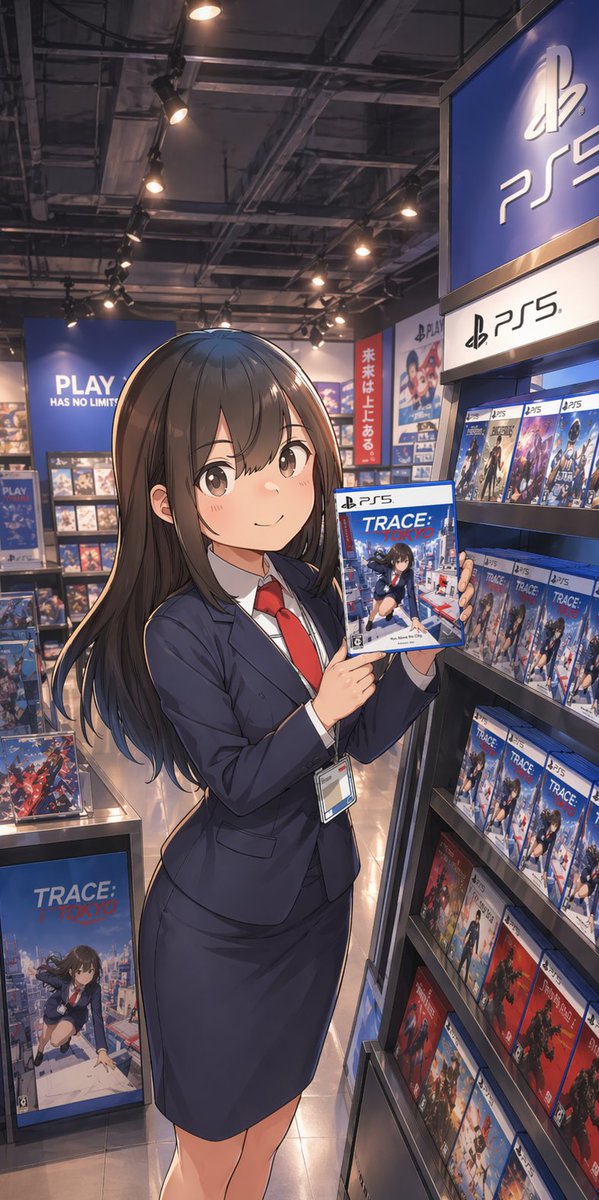
Dependiente de anime en la tienda de juegos de PS5
Esta función genera una ilustración promocional vertical de estilo anime de una joven vestida de traje presentando un juego de PS5 dentro de una tienda de la marca PlayStation, ideal para publicaciones en redes sociales, carteles o anuncios publicitarios ficticios.
Este es un ejemplo GPT Image 2 para Anime y juegos . Utilice la plantilla lista para copiar que aparece a continuación para generar imágenes similares y revise la atribución de Awesome GPT Image 2 Prompts y los derechos de uso comercial antes de reutilizarla.
Free 1K preview
Generate one preview image instantly, no sign-up required.
Prompt
Mensaje listo para copiar
A polished anime-style illustration of a young Japanese woman standing in a modern video game store aisle, posed like a store clerk or promotional staff member. She has long, straight {argument name="hair color" default="dark brown"} hair with soft shine and gentle layered ends, and she wears a fitted navy business suit with exactly 4 visible clothing/accessory pieces: a navy blazer, a matching pencil skirt, a white dress shirt, and a bright red necktie, plus a staff ID badge hanging from her waist. Show every face clearly with natural, detailed facial features. She stands in a relaxed three-quarter pose, slightly turned toward the viewer, holding up a PS5 game case with both hands at chest height to present it. The game cover title should read {argument name="game title" default="TRACE: TOKYO"}, showing an anime schoolgirl over a Tokyo city background. Set the scene inside a PlayStation-branded retail section with 2 dominant PS5 signs visible on the right side, multiple blue PlayStation displays, and shelves densely stocked with PS5 game boxes. Include 1 large floor display box for the same featured game near the lower left, and many repeated PS5 cases on the right shelf, with a few red-spined game cases on the lower shelves for color contrast. In the back left, add a large blue wall sign reading {argument name="store slogan" default="PLAY HAS NO LIMITS"}. In the mid-background, add 1 vertical red banner with Japanese text reading {argument name="banner text" default="未来は上にある。"}. Use warm overhead spotlights, a realistic game shop interior with exposed industrial ceiling fixtures, glossy tile floor reflections, and cinematic depth. Composition is vertical smartphone aspect ratio, full-body framing, slightly low eye-level perspective, with the woman centered-left and the PS5 shelf dominating the right side. Render in high-detail contemporary anime key art style, clean linework, soft shading, realistic store lighting, rich blue tones, and a premium promotional illustration feel.Variables de solicitud
Marcadores de posición de argumentos editables que se encuentran en la solicitud, con sus valores predeterminados.
Best for
- - Anime y juegos visual exploration
- - Image generation and reference-image edits
- - Reusable briefs that keep source attribution visible
Change these parts
- - Subject, product, character, or scene
- - Aspect ratio, camera, lighting, and background
- - Brand, text, color, and output constraints
Recommended model and settings
- - Model: gpt-image-2
- - Input mode: Texto a imagen
- - Aspect ratio: source
- - Commercial status: review original source
How to use this prompt
- 1. Copy the prompt and preserve its structure for the first test.
- 2. Replace the subject, context, and publishing channel.
- 3. Change one camera, lighting, or style variable per iteration.
- 4. Inspect the output, source, text, and rights before reuse.
Limitations, source, and reuse cautions
- - Generated output is an editable draft, not factual, legal, or rights evidence.
- - Review the linked source, people, brands, logos, text, and third-party media before commercial use.
Más casos en esta categoría
Priorizados por categoría, compatibilidad con el modo de entrada, calidad y menor riesgo.






Notas sobre la reutilización y la fuente
Utilice esta opción de forma segura después de previsualizar el caso.
- 1.Copia la solicitud o ábrela directamente en Dovoo con el botón de generación.
- 2.Ajusta las variables, la relación de aspecto y las imágenes de referencia según tus necesidades.
- 3.Antes de publicar o utilizar el servicio de forma remunerada, verifique los derechos de autor, los requisitos de atribución y los riesgos relacionados con la marca o la imagen de la persona.