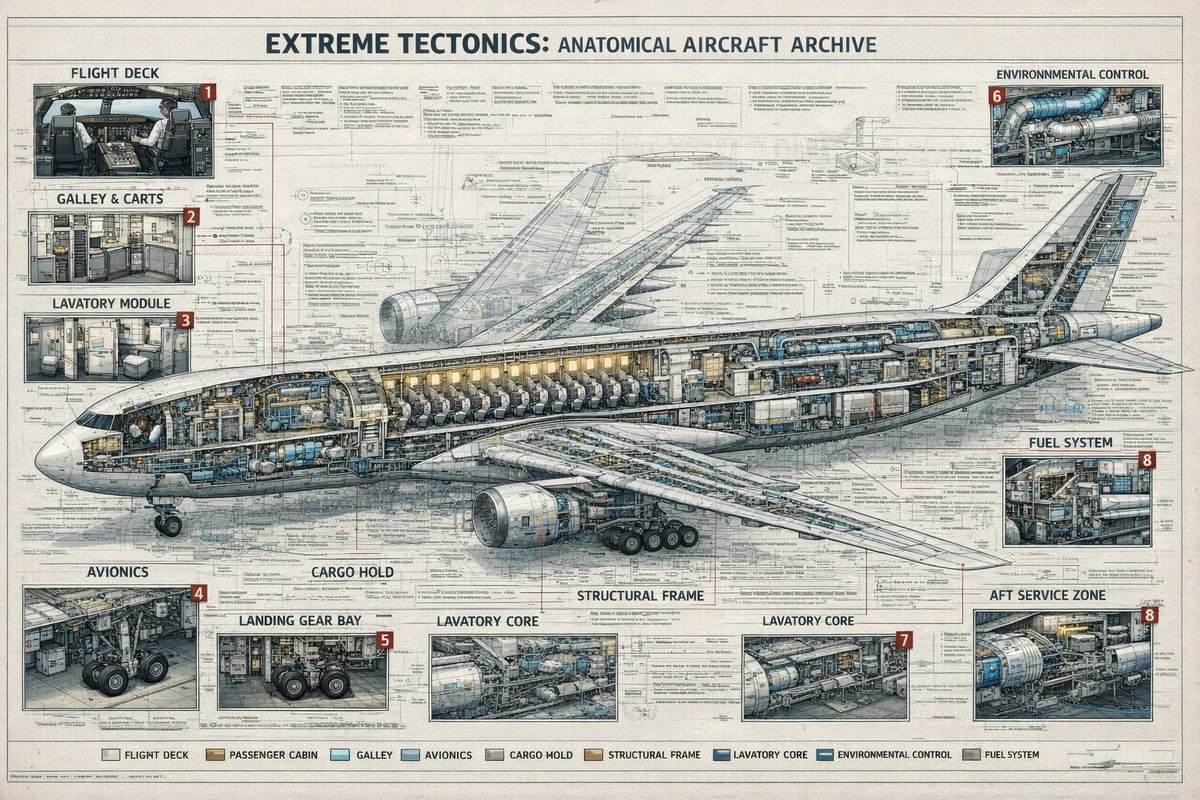
Póster de archivo con vista en sección de aeronave
Un póster de estilo ingenieril con gran nivel de detalle que muestra un avión comercial en sección transversal con nueve categorías de sistemas etiquetadas y múltiples paneles técnicos insertados, ideal para generar infografías de alta calidad.
Este es un ejemplo GPT Image 2 para Diseño gráfico y carteles . Utilice la plantilla lista para copiar que aparece a continuación para generar imágenes similares y revise la atribución de Awesome GPT Image 2 Prompts y los derechos de uso comercial antes de reutilizarla.
Free 1K preview
Generate one preview image instantly, no sign-up required.
Prompt
Mensaje listo para copiar
{
  "type": "technical aircraft cutaway infographic poster",
  "subject": {
    "title": "{argument name=\"headline text\" default=\"EXTREME TECTONICS: ANATOMICAL AIRCRAFT ARCHIVE\"}",
    "aircraft": "wide-body commercial passenger jet in side cutaway view, nose facing left, tail to the right, landing gear deployed, one large underwing engine visible, internal cabin and systems exposed",
    "style": "ultra-detailed aerospace engineering blueprint mixed with architectural archive plate, precise cross-section drawing, dense annotation lines, clean readable microtext, muted ink-and-wash rendering, off-white aged paper texture, blue-gray graphite linework, subtle tan and steel accents"
  },
  "layout": {
    "format": "single large landscape poster",
    "background": "full-page engineering schematic with layered orthographic outlines, measurement marks, callout leaders, technical notes, and faint drafting grids",
    "centerpiece": "one enormous airplane cross-section spanning nearly the full width of the page, showing cockpit, passenger seating rows, service compartments, internal ducts, cargo spaces, structural frame, and tail systems",
    "sections": [
      {
        "title": "FLIGHT DECK",
        "position": "top-left",
        "count": 1,
        "labels": [
          "1"
        ],
        "description": "cockpit interior inset with pilots' seats, instrument panels, windows, and surrounding avionics"
      },
      {
        "title": "GALLEY & CARTS",
        "position": "upper left below flight deck",
        "count": 1,
        "labels": [
          "2"
        ],
        "description": "service galley inset with storage racks, ovens, trolleys, cabinets, and narrow aisle"
      },
      {
        "title": "LAVATORY MODULE",
        "position": "left middle below galley",
        "count": 1,
        "labels": [
          "3"
        ],
        "description": "small restroom inset with toilet, sink, wall panels, and door"
      },
      {
        "title": "ENVIRONMENTAL CONTROL",
        "position": "top-right",
        "count": 1,
        "labels": [
          "6"
        ],
        "description": "mechanical systems inset with ducts, pipes, turbines, and cylindrical equipment"
      },
      {
        "title": "FUEL SYSTEM",
        "position": "middle-right",
        "count": 1,
        "labels": [
          "8"
        ],
        "description": "compact machinery inset showing tanks, pumps, and pipework"
      },
      {
        "title": "AVIONICS",
        "position": "bottom-left",
        "count": 1,
        "labels": [
          "4"
        ],
        "description": "electronics bay inset with wiring, cabinets, equipment racks, and landing gear nearby"
      },
      {
        "title": "LANDING GEAR BAY",
        "position": "lower left-center",
        "count": 1,
        "labels": [
          "5"
        ],
        "description": "gear compartment inset focused on wheel assemblies, struts, and surrounding structure"
      },
      {
        "title": "LAVATORY CORE",
        "position": "bottom center",
        "count": 2,
        "labels": [
          "LAVATORY CORE",
          "LAVATORY CORE"
        ],
        "description": "2 separate service-core insets with exposed cylindrical tanks, ducting, and interior support systems; the right inset carries label number 7"
      },
      {
        "title": "AFT SERVICE ZONE",
        "position": "bottom-right",
        "count": 1,
        "labels": [
          "8"
        ],
        "description": "rear technical compartment inset with large blue cylindrical unit, pipes, service access, and structural framing"
      }
    ],
    "additional_labels": [
      {
        "text": "CARGO HOLD",
        "position": "lower center-left"
      },
      {
        "text": "STRUCTURAL FRAME",
        "position": "lower center"
      }
    ],
    "legend": {
      "position": "bottom center",
      "count": 9,
      "labels": [
        "FLIGHT DECK",
        "PASSENGER CABIN",
        "GALLEY",
        "AVIONICS",
        "CARGO HOLD",
        "STRUCTURAL FRAME",
        "LAVATORY CORE",
        "ENVIRONMENTAL CONTROL",
        "FUEL SYSTEM"
      ]
    }
  },
  "composition": {
    "camera": "orthographic side elevation",
    "poster_margins": "thin border around the entire sheet",
    "text_density": "very high, with many tiny notes, arrows, and part labels distributed across the page",
    "lighting": "flat archival illustration lighting, not photographic, optimized for legibility",
    "finish": "crisp 4K infographic print quality, no gibberish text, authentic typography, meticulous line precision"
  }
}
Variables de solicitud
Marcadores de posición de argumentos editables que se encuentran en la solicitud, con sus valores predeterminados.
Best for
- - Diseño gráfico y carteles visual exploration
- - Image generation and reference-image edits
- - Reusable briefs that keep source attribution visible
Change these parts
- - Subject, product, character, or scene
- - Aspect ratio, camera, lighting, and background
- - Brand, text, color, and output constraints
Recommended model and settings
- - Model: gpt-image-2
- - Input mode: Texto a imagen
- - Aspect ratio: source
- - Commercial status: review original source
How to use this prompt
- 1. Copy the prompt and preserve its structure for the first test.
- 2. Replace the subject, context, and publishing channel.
- 3. Change one camera, lighting, or style variable per iteration.
- 4. Inspect the output, source, text, and rights before reuse.
Limitations, source, and reuse cautions
- - Generated output is an editable draft, not factual, legal, or rights evidence.
- - Review the linked source, people, brands, logos, text, and third-party media before commercial use.
Más casos en esta categoría
Priorizados por categoría, compatibilidad con el modo de entrada, calidad y menor riesgo.






Notas sobre la reutilización y la fuente
Utilice esta opción de forma segura después de previsualizar el caso.
- 1.Copia la solicitud o ábrela directamente en Dovoo con el botón de generación.
- 2.Ajusta las variables, la relación de aspecto y las imágenes de referencia según tus necesidades.
- 3.Antes de publicar o utilizar el servicio de forma remunerada, verifique los derechos de autor, los requisitos de atribución y los riesgos relacionados con la marca o la imagen de la persona.